STARTECH
STARTECH CDP2HDMM1MB USB-C to HDMI Cable 1m 4K 30Hz
- USB to HDMI Adapters
- Black
33,99 $39,74 $−14%
0.00041724BTC
KrājumāMēs pieņemam kriptovalūtu — lai tā, kas Jums pieder, varētu nopirkt īstu aparatūru.Maksājiet kriptovalūtā, iztērējiet to īstai aparatūrai. Bezmaksas apdrošināta piegāde visā pasaulē virs 399 $. Vienkāršas, nemarķētas kastes, sūtītas no Vācijas.Bezmaksas apdrošināta piegāde virs 399 $. Jūsu kurss tiek fiksēts uz 30 minūtēm, tiklīdz atveras kase.Kurss fiksēts uz 30 minūtēm. Katra prece ir aizzīmogota, tās sērijas numurs ir pārbaudīts, un uz to attiecas 24 mēnešu garantija.Aizzīmogots, 24 mēnešu garantija.


STARTECH
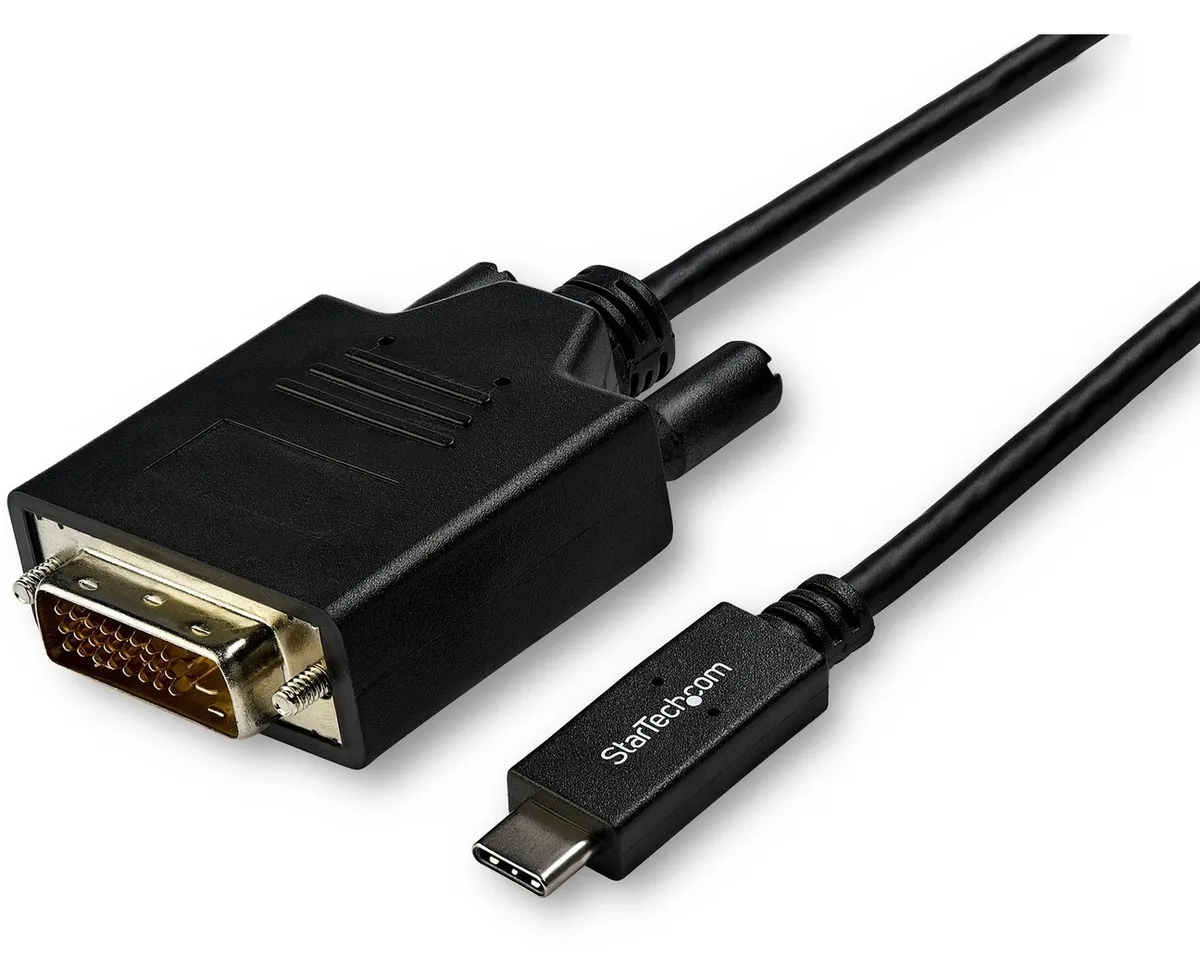
Connects a USB-C computer directly to a DVI display with a compact two-metre cable supporting up to 2560 x 1600 resolution
Model 6 ft. DVI
Pārsvītrotās versijas pastāv, taču šeit nav pieejamas.
This 2 m adapter cable links a USB-C computer directly to a DVI-D display without extra adapters. The reversible USB-C plug simplifies insertion. It supports video resolutions up to 2560 x 1600 for a clear picture. Plug-and-play operation means no driver installation is required.
Users with a USB-C laptop or desktop who need to connect one DVI monitor will find this cable convenient. It suits offices and home workstations where a tidy, direct link is preferred. Builders requiring multiple display outputs or higher refresh rates should consider a dock or multi-port hub instead. The fixed cable length also limits placement flexibility for distant screens.
The integrated 2 m cable reduces clutter by replacing a separate adapter and cable pair. It draws video signal and power from the host USB-C port, freeing up other ports for peripherals. Ensure the host USB-C port supports DisplayPort Alternate Mode for video output. The DVI-D male connector mates with standard DVI-D or DVI-I monitor inputs.
| Brand | StarTech.com |
|---|---|
| Model | CDP2DVIMM2MB |
| Type | USB to DVI-D Adapters |
| Color | Black |
| Cable Length | 6 ft. |
| Specifications | Supported Resolutions: 1024 x 768 1280 x 720 (High-definition 720p) 1920 x 1080 (High-definition 1080p) 1920 x 1200 2560 x 1440 2560 x 1600 |
| Output Connector | 1 x DVI-D (25 pin) Male Output |
| Features | Reduce clutter with a compact 2 m (6 ft.) adapter cable Hassle-free connection with the reversible USB-C connector Crystal-clear picture quality with support for video resolutions up to 2560 x 1600 Plug-and-play installation No power adapter required Thunderbolt 3 port compatible |
| Weight | 0.20 lbs. |
| Package Contents | 1 x USB-C to DVI adapter cable |
| Sūtījuma svars | 0.15 kg |
| Sūtījuma izmēri | 208 × 119 × 34 mm |
Citas šī modeļa versijas
Viena saime, taču atšķirīga atmiņa, dzesētājs vai frekvence — salīdziniet, pirms izlemjat.
Yes, the USB-C port on your computer must support DisplayPort Alternate Mode to carry video signals through this CDP2DVIMM2MB cable to a DVI display.
The adapter cable supports 1920 x 1200 natively, so a legacy DVI monitor at that resolution will display correctly without forced scaling.
Open your operating system display settings and confirm the external monitor shows 2560 x 1600 as the active resolution.
Arī šajā sadaļā
Tas pats plaukts, tā pati kase — astoņas kriptovalūtas un kursa fiksēšana uz 30 minūtēm.
Kriptovalūta, kurā maksājat, un valūta, kurā redzat cenas.
Nosūtīts no Jūsu maciņa, noformējot pasūtījumu
Tikai informatīvi — katalogā cenas norādītas ASV dolāros
Neviena valūta neatbilst.
Izvēlieties valodu, kurā vietne sarunājas ar Jums.
Neviena valoda neatbilst.
Pirmo reizi šeit?
Jau ir konts?
Automātiskas atiestatīšanas nav: šis veikals nesūta e-pastus, tāpēc nav arī vienreizējas saites, ko pieprasīt. Atstājiet adresi kontā, un tā tiks apstrādāta manuāli.
Pieprasījums saņemts
Uz Jūsu e-pastu nekas neatnāks — šis veikals vispār nesūta e-pastus. Kāds šos pieprasījumus apstrādā manuāli.
Atcerējāties?