STARTECH
STARTECH CDP2HDMM1MB USB-C to HDMI Cable 1m 4K 30Hz
- USB to HDMI Adapters
- Black
33,99 USD39,74 USD−14%
0.00041724BTC
RaktáronElfogadjuk a kriptovalutát — így az Ön birtokában lévő érmékből valódi hardvert vásárolhat.Fizessen kriptóval, és költse el valódi hardverre. 399 $ felett világszerte díjmentes a biztosított szállítás. Egyszerű, jelöletlen külső kartonok, Németországból küldve.399 $ felett díjmentes a biztosított szállítás. Az Ön árfolyama a pénztár megnyitásától számított 30 percre zárolva marad.Árfolyam zárolva 30 percre. Minden termék gyárilag zárt, sorozatszáma ellenőrzött, és 24 hónapos garancia fedezi.Zárt csomagolás, 24 hónap garancia.


STARTECH
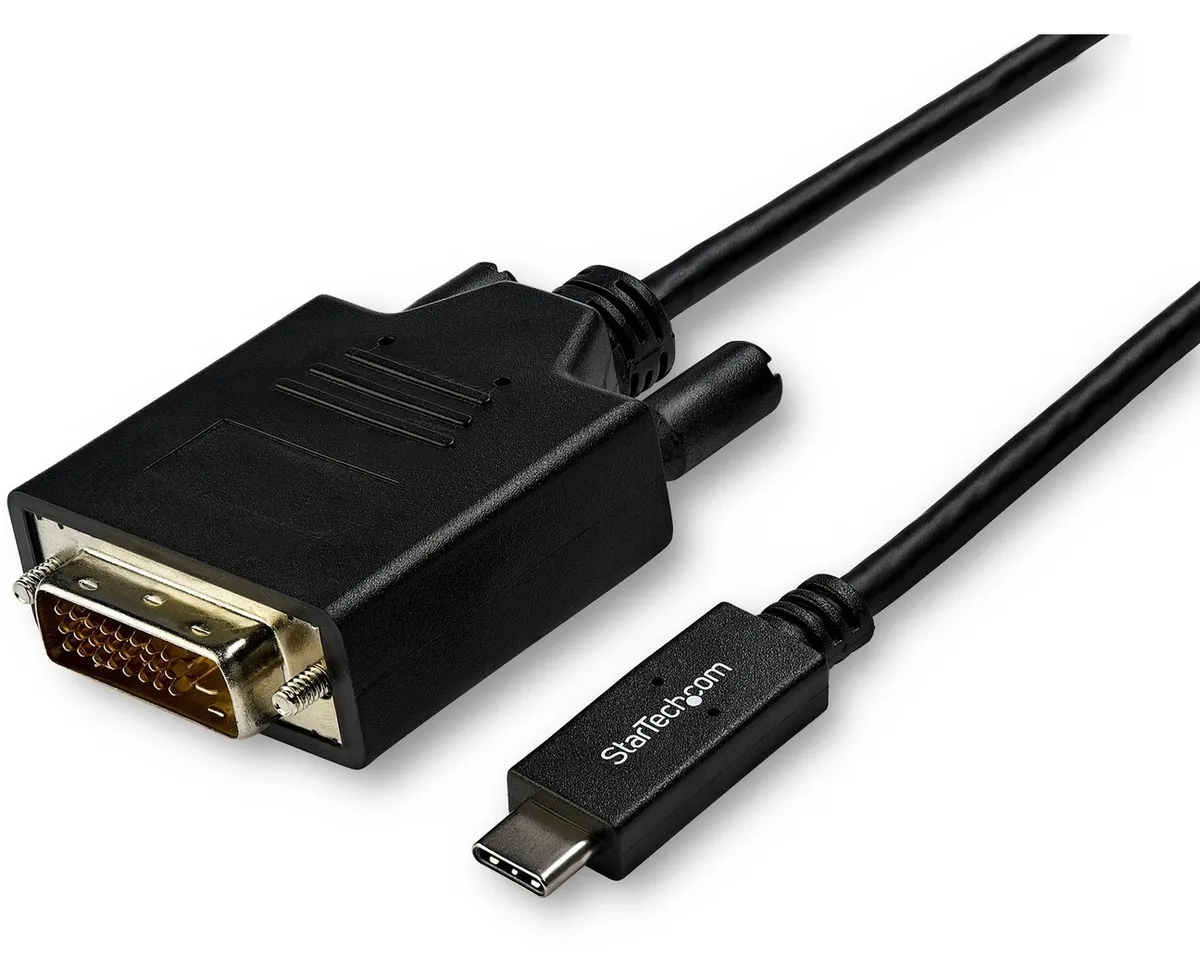
Connects a USB-C computer directly to a DVI display with a compact two-metre cable supporting up to 2560 x 1600 resolution
Model 6 ft. DVI
Az áthúzott konfigurációk léteznek, de nem érhetők el itt.
This 2 m adapter cable links a USB-C computer directly to a DVI-D display without extra adapters. The reversible USB-C plug simplifies insertion. It supports video resolutions up to 2560 x 1600 for a clear picture. Plug-and-play operation means no driver installation is required.
Users with a USB-C laptop or desktop who need to connect one DVI monitor will find this cable convenient. It suits offices and home workstations where a tidy, direct link is preferred. Builders requiring multiple display outputs or higher refresh rates should consider a dock or multi-port hub instead. The fixed cable length also limits placement flexibility for distant screens.
The integrated 2 m cable reduces clutter by replacing a separate adapter and cable pair. It draws video signal and power from the host USB-C port, freeing up other ports for peripherals. Ensure the host USB-C port supports DisplayPort Alternate Mode for video output. The DVI-D male connector mates with standard DVI-D or DVI-I monitor inputs.
| Brand | StarTech.com |
|---|---|
| Model | CDP2DVIMM2MB |
| Type | USB to DVI-D Adapters |
| Color | Black |
| Cable Length | 6 ft. |
| Specifications | Supported Resolutions: 1024 x 768 1280 x 720 (High-definition 720p) 1920 x 1080 (High-definition 1080p) 1920 x 1200 2560 x 1440 2560 x 1600 |
| Output Connector | 1 x DVI-D (25 pin) Male Output |
| Features | Reduce clutter with a compact 2 m (6 ft.) adapter cable Hassle-free connection with the reversible USB-C connector Crystal-clear picture quality with support for video resolutions up to 2560 x 1600 Plug-and-play installation No power adapter required Thunderbolt 3 port compatible |
| Weight | 0.20 lbs. |
| Package Contents | 1 x USB-C to DVI adapter cable |
| Szállítási súly | 0.15 kg |
| Csomagméret | 208 × 119 × 34 mm |
A modell további verziói
Ugyanaz a termékcsalád, eltérő memória, hűtés vagy órajel — hasonlítsa össze, mielőtt dönt.
Yes, the USB-C port on your computer must support DisplayPort Alternate Mode to carry video signals through this CDP2DVIMM2MB cable to a DVI display.
The adapter cable supports 1920 x 1200 natively, so a legacy DVI monitor at that resolution will display correctly without forced scaling.
Open your operating system display settings and confirm the external monitor shows 2560 x 1600 as the active resolution.
Szintén ezen a polcon
Ugyanaz a polc, ugyanaz a pénztár — nyolc pénznem és 30 perces árfolyamzár.
Amivel fizet, és amiben az árakat olvassa.
A pénztárnál küldi el a tárcájából
Csak tájékoztató jellegű — a katalógus dollárban van árazva
Nincs ilyen pénznem.
Válassza ki, milyen nyelven szóljon Önhöz az oldal.
Nincs egyező nyelv.
Először jár itt?
Már van fiókja?
Nincs automatikus visszaállítás: ez a bolt nem küld e-mailt, tehát nincs kérhető egyszer használatos link. Hagyja meg a fiókhoz tartozó címet, azt valaki kézzel átnézi.
Kérés rögzítve
Semmi nem érkezik a postafiókjába — ez a bolt egyáltalán nem küld e-mailt. Ezeket valaki kézzel intézi.
Eszébe jutott?