STARTECH
STARTECH CDP2HDMM1MB USB-C to HDMI Cable 1m 4K 30Hz
- USB to HDMI Adapters
- Black
US$33.99US$39.74−14%
0.00041724BTC
มีสินค้าเรารับชำระด้วยคริปโต — เหรียญที่คุณถืออยู่จึงนำมาซื้อฮาร์ดแวร์ของจริงได้จ่ายด้วยคริปโต แล้วนำไปซื้อฮาร์ดแวร์ของจริง จัดส่งฟรีพร้อมประกันภัยทั่วโลก เมื่อสั่งซื้อเกิน US$399 กล่องพัสดุเรียบไม่มีตราสินค้า จัดส่งจากประเทศเยอรมนีจัดส่งฟรีพร้อมประกันภัย เมื่อสั่งซื้อเกิน US$399 อัตราแลกเปลี่ยนของคุณจะถูกล็อกไว้ 30 นาที ทันทีที่เปิดหน้าชำระเงินล็อกอัตราแลกเปลี่ยน 30 นาที สินค้าทุกชิ้นปิดผนึกจากโรงงาน ตรวจสอบหมายเลขซีเรียล และรับประกัน 24 เดือนปิดผนึกจากโรงงาน รับประกัน 24 เดือน


STARTECH
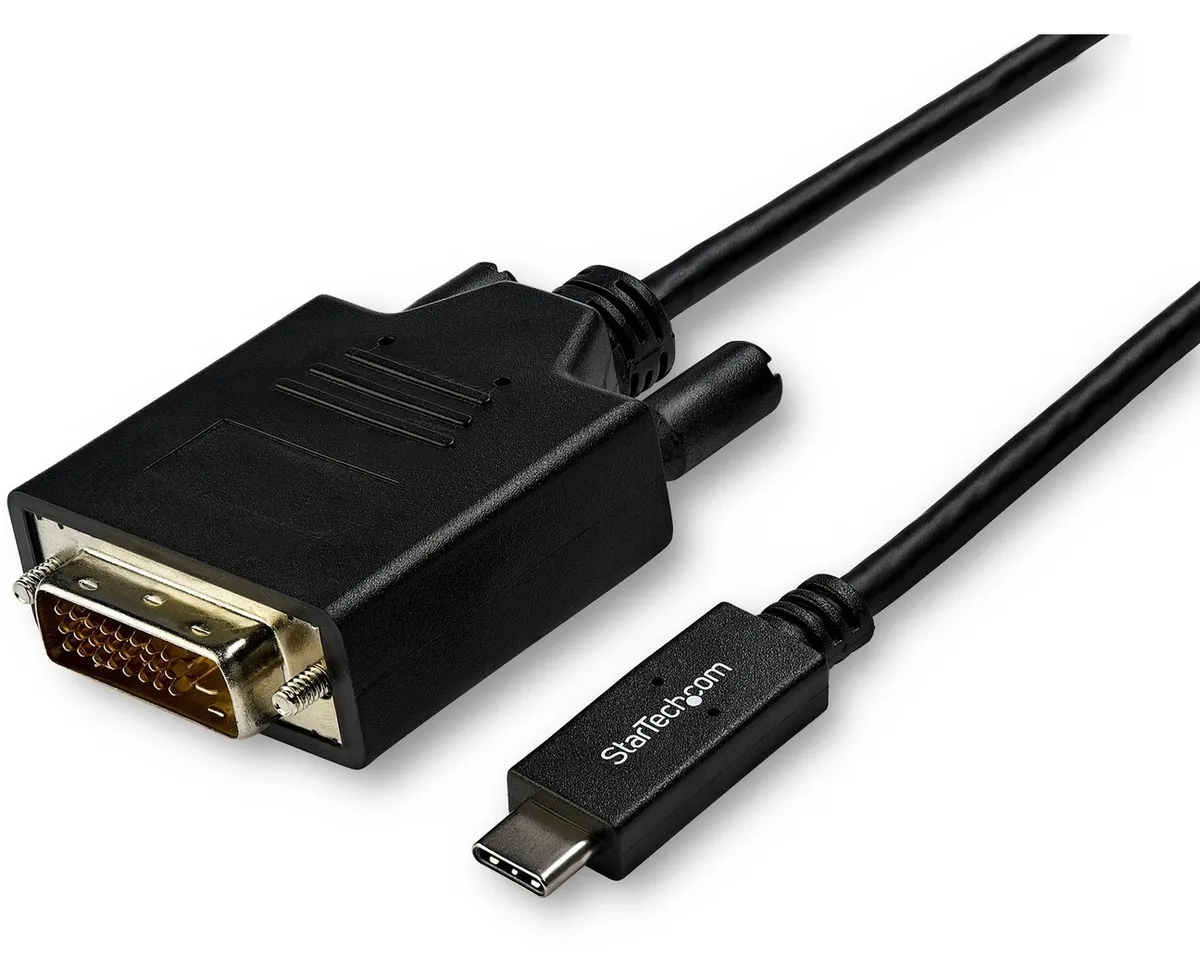
Connects a USB-C computer directly to a DVI display with a compact two-metre cable supporting up to 2560 x 1600 resolution
Model 6 ft. DVI
ตัวเลือกที่ขีดฆ่าไว้มีอยู่จริง แต่ไม่มีจำหน่ายที่นี่
This 2 m adapter cable links a USB-C computer directly to a DVI-D display without extra adapters. The reversible USB-C plug simplifies insertion. It supports video resolutions up to 2560 x 1600 for a clear picture. Plug-and-play operation means no driver installation is required.
Users with a USB-C laptop or desktop who need to connect one DVI monitor will find this cable convenient. It suits offices and home workstations where a tidy, direct link is preferred. Builders requiring multiple display outputs or higher refresh rates should consider a dock or multi-port hub instead. The fixed cable length also limits placement flexibility for distant screens.
The integrated 2 m cable reduces clutter by replacing a separate adapter and cable pair. It draws video signal and power from the host USB-C port, freeing up other ports for peripherals. Ensure the host USB-C port supports DisplayPort Alternate Mode for video output. The DVI-D male connector mates with standard DVI-D or DVI-I monitor inputs.
| Brand | StarTech.com |
|---|---|
| Model | CDP2DVIMM2MB |
| Type | USB to DVI-D Adapters |
| Color | Black |
| Cable Length | 6 ft. |
| Specifications | Supported Resolutions: 1024 x 768 1280 x 720 (High-definition 720p) 1920 x 1080 (High-definition 1080p) 1920 x 1200 2560 x 1440 2560 x 1600 |
| Output Connector | 1 x DVI-D (25 pin) Male Output |
| Features | Reduce clutter with a compact 2 m (6 ft.) adapter cable Hassle-free connection with the reversible USB-C connector Crystal-clear picture quality with support for video resolutions up to 2560 x 1600 Plug-and-play installation No power adapter required Thunderbolt 3 port compatible |
| Weight | 0.20 lbs. |
| Package Contents | 1 x USB-C to DVI adapter cable |
| น้ำหนักในการจัดส่ง | 0.15 kg |
| ขนาดบรรจุภัณฑ์ | 208 × 119 × 34 mm |
รุ่นอื่นในตระกูลเดียวกัน
ตระกูลเดียวกัน แต่หน่วยความจำ คูลเลอร์ หรือสัญญาณนาฬิกาต่างกัน — เปรียบเทียบก่อนตัดสินใจ
Yes, the USB-C port on your computer must support DisplayPort Alternate Mode to carry video signals through this CDP2DVIMM2MB cable to a DVI display.
The adapter cable supports 1920 x 1200 natively, so a legacy DVI monitor at that resolution will display correctly without forced scaling.
Open your operating system display settings and confirm the external monitor shows 2560 x 1600 as the active resolution.
อื่น ๆ ในหมวดนี้
หมวดเดียวกัน การชำระเงินแบบเดียวกัน — แปดสกุลเงินคริปโตและอัตราแลกเปลี่ยนที่ล็อกไว้ 30 นาที
สิ่งที่คุณใช้ชำระ และสิ่งที่คุณใช้อ่านราคา
ส่งจากกระเป๋าเงินของคุณเมื่อชำระเงิน
แสดงผลเท่านั้น — แคตตาล็อกสินค้าตั้งราคาเป็นดอลลาร์สหรัฐ
ไม่พบสกุลเงินที่ตรงกัน
เลือกภาษาที่ต้องการให้เว็บไซต์แสดงผล
ไม่พบภาษาที่ตรงกัน
ยังไม่เคยใช้งานใช่ไหม
มีบัญชีอยู่แล้วใช่ไหม
ไม่มีการรีเซ็ตแบบอัตโนมัติ ร้านนี้ไม่ส่งอีเมลใด ๆ จึงไม่มีลิงก์ใช้ครั้งเดียวให้ขอ ปล่อยที่อยู่อีเมลนี้ไว้ในบัญชี แล้วเจ้าหน้าที่จะดำเนินการให้ด้วยตนเอง
รับคำขอแล้ว
ไม่มีอะไรถูกส่งไปยังกล่องจดหมายของคุณ — ร้านนี้ไม่ส่งอีเมลใด ๆ เลย มีคนดำเนินการเรื่องนี้ให้ด้วยมือ
นึกออกแล้วใช่ไหม