

AJMRTC
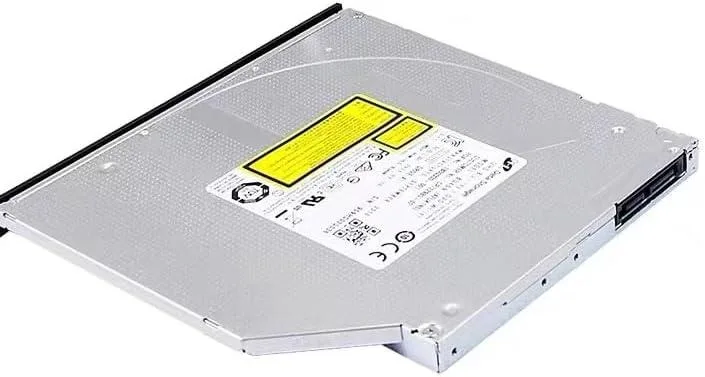
AJMRTC BU20N 9.5mm SATA internal blu-ray burner
9.5mm slimline SATA Blu-ray writer reads and writes BDXL up to 128GB, M-DISC media, DVD and CD formats at 6X, 8X and 24X speeds
- Panel ColorBlack / Matte Black
- Windows VistaYes / Compatible
- Form Factor9.5mm Ultra Slim Internal SATA Optical Drive, Slimline Lapto
- InterfaceSATA II (1.5Gbps) Slim SATA
- Load TypeTray Loading
- Cache4MB Buffer Cache
Options BU20N
- BU40N
- BU50N
- BU20N
Les versions barrées existent, mais ne sont pas disponibles ici.
- Slim 9.5 mm profile fits laptop bays perfectly
- BDXL support stores 100 GB on triple-layer discs
- M-DISC media protects data for archival longevity
- 6X BD read and write handles high-capacity burns
- Tray-loading mechanism eases disc swaps in tight spaces
Ultra-slim laptop Blu-ray burner
The AJMRTC BU20N is a 9.5mm thick internal optical drive built for laptops and notebooks that still use a standard SATA tray-load bay. It reads and writes Blu-ray, DVD and CD media, including triple-layer BDXL discs up to 100 GB and quad-layer discs up to 128 GB. The SATA II connection tops out at 150 MB/s with a 4 MB buffer to keep burns stable. It fits any machine that accepts a 9.5mm SATA tray drive.
Tray-load mechanism and bezel
A front-loading tray ejects with a button on the matte black bezel, so discs load the same way they did on the original drive. No caddy or adapter is required when the laptop already has a 9.5mm SATA slot. The drive draws power and data from the single slim SATA connector, leaving no extra cables inside the chassis. It is not compatible with slot-load bays, tablets, TVs, projectors or automotive players.
Replaces a failed or missing ODD
This unit restores disc reading and writing on a laptop whose original drive has died or been removed. It adds BDXL and M-DISC support that many older drives lack, so you can archive up to 128 GB per disc with media rated for decades. The jump is worth it when you need to read triple-layer Blu-ray discs or create long-term M-DISC backups on a machine that still has a 9.5mm SATA bay. Software for 4K UHD playback must be sourced separately.
Points forts
- Slim 9.5 mm profile fits laptop bays perfectly
- BDXL support stores 100 GB on triple-layer discs
- M-DISC media protects data for archival longevity
- 6X BD read and write handles high-capacity burns
- Tray-loading mechanism eases disc swaps in tight spaces
Caractéristiques
| Panel Color | Black / Matte Black |
|---|---|
| Windows Vista | Yes / Compatible |
| Form Factor | 9.5mm Ultra Slim Internal SATA Optical Drive, Slimline Laptop ODD |
| Interface | SATA II (1.5Gbps) Slim SATA |
| Load Type | Tray Loading |
| Model | BU20N |
| Cache | 4MB Buffer Cache |
| BD-ROM Access Time | 180ms (Typical) |
| Data Transfer Rate | Max 150MB/s (SATA 1.5Gbps) |
| BD-R | 6X |
| BD-RE | 2X |
| DVD+R | 8X |
| DVD+RW | 8X |
| DVD-R | 8X |
| DVD-RW | 6X |
| CD-R | 24X |
| CD-RW | 16X |
| BD-ROM | 6X |
| DVD-ROM | 8X |
| CD-ROM | 24X |
| Operating Systems Supported | Windows Vista / Windows 7 / Windows 8 / Windows 10 / Windows 11, Mac OS X 10.8 and above |
| Software Contents | Blu-ray playback & media burning software (Media Suite) |
Autres versions de ce modèle
1 de plus dans cette gamme
Même famille, mémoire, ventirad ou fréquence différents — comparez avant de vous décider.


Questions sur cet article
What does the SATA 1.5Gbps interface cap the maximum data transfer rate at?
The drive's SATA 1.5Gbps interface limits the maximum data transfer rate to 150MB/s.
What physical dimensions and mounting style does this drive require?
It needs a 9.5mm ultra-slim internal bay with a tray-loading mechanism and standard SATA connectors.
How is the BU20N installed in a laptop, and what step is often missed?
Slide the drive into the 9.5mm optical bay, secure it with the chassis screw, and connect both the SATA data and power cables — the power connector is often forgotten.
Également dans ce rayon
Les clients ont aussi comparé
Même rayon, même caisse — huit monnaies et un taux bloqué 30 minutes.