
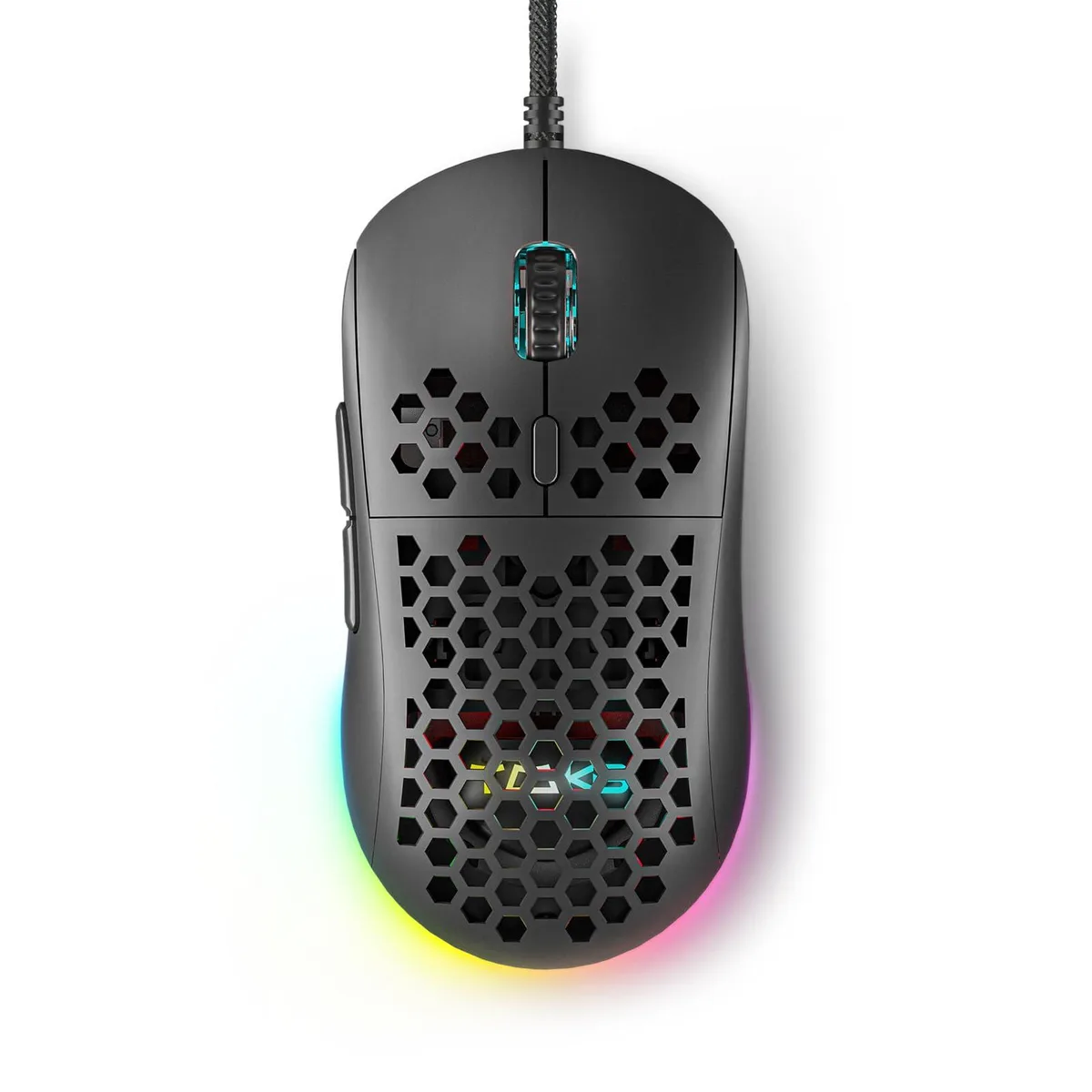


ASUS DIERYA M1SE Gaming Mouse 75g 12800DPI 6 Buttons Black
Wired gaming mouse with honeycomb shell, 75 g weight, 12800 DPI optical sensor, six programmable buttons, 16.8 million colour RGB lighting and driver software for macro recording
- NameDIERYA
- Type2.4GHz / Wired
- ColorBlack
- InterfaceBluetooth
- Mouse Grip StyleAdjustable
- Tracking MethodOptical
- Optical sensor adjusts 200–12800 DPI for precise aiming
- 75 g honeycomb shell cuts fatigue during long sessions
- 13 RGB effects sync to audio across 16.8 million colours
- 6 programmable buttons support macros and rapid-fire commands
- 180 cm braided cable delivers drag-free wired feel
Product Identity
The ASUS DIERYA M1SE is a wired gaming mouse with a honeycomb shell that weighs 75 grams. It uses an optical sensor adjustable from 200 to 12800 DPI and offers six programmable buttons. The device connects via USB and includes RGB lighting with 16.8 million colours. It is built for right-handed players who want a lightweight, customisable pointer for competitive titles.
Installation and Common Issues
Plug the 180 cm braided cable into a USB port and the mouse works immediately on Windows 7, 8, 10, XP, Vista or Linux. For button remapping, macro recording and RGB profile editing you must download the TMKB driver from the supplied link. The software is the only way to access the 23 adjustable DPI levels and four memory profiles. Some users report that the driver must be run as administrator for settings to persist after reboot.
Deciding Specification
The sensor tops out at 12800 DPI with a polling rate up to 1000 Hz. If your play style demands higher sensitivity or faster report rates, this model will not meet that need. Buyers who require a wireless connection or a left-handed shape should look elsewhere.
Points forts
- Optical sensor adjusts 200–12800 DPI for precise aiming
- 75 g honeycomb shell cuts fatigue during long sessions
- 13 RGB effects sync to audio across 16.8 million colours
- 6 programmable buttons support macros and rapid-fire commands
- 180 cm braided cable delivers drag-free wired feel
Caractéristiques
| Brand | ASUS |
|---|---|
| Name | DIERYA |
| Part Number | M1SE |
| Type | 2.4GHz / Wired |
| Color | Black |
| Interface | Bluetooth |
| Mouse Grip Style | Adjustable |
| Tracking Method | Optical |
| Sensor | Optical |
| Hand Orientation | Right Hand |
| Buttons | 16 |
| Scrolling Capability | Touch Scroll |
| Weight | 105 grams |
| System Requirement | USB port |
| Package Contents | Honeycomb Gaming Mouse *1, User Manual *1 |
Questions sur cet article
How do I verify the mouse is tracking correctly after plugging it in?
Move the mouse and confirm the cursor responds smoothly; then open the DIERYA driver software and check that the polling rate shows 1000Hz and the DPI level matches one of the 23 adjustable steps between 200 and 12800.
What comes in the box and what must I provide?
The package includes the honeycomb gaming mouse and a user manual; you must supply a free USB port for the 180cm cable and download the driver from kemove.com to unlock button remapping, macros and RGB control.
Which DPI setting should I start with for FPS games?
Begin at 800 DPI — a common mid-range value within the 200-12800 range — then use the DPI adjustment button to cycle through the 23 levels until the sensitivity feels right for your play style.
Également dans ce rayon
Les clients ont aussi comparé
Même rayon, même caisse — huit monnaies et un taux bloqué 30 minutes.



BFKK
BFKK Wireless Gaming Mouse PAW 3950Max 42000 DPI 8KHz 38g Black & Sticker
- Black
106,99 $US
0.00136516BTC
En stock
BFKK
BFKK Wireless Gaming Mouse Red 7 Silent Buttons 5 Adjustable DPI
- Red
34,99 $US
0.00044646BTC
En stock
BFKK
BFKK Wireless Gaming Mouse Blue 7 Silent Buttons 1000-4000 DPI
- Blue
30,99 $US
0.00039542BTC
En stock