


ASUS
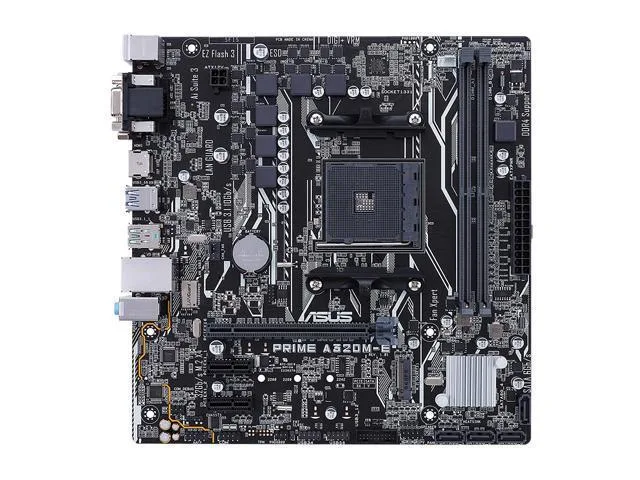
ASUS PRIME A320M-E AMD motherboard
Micro-ATX board for AM4 Ryzen CPUs with dual-channel DDR4 to 3200 MT/s, one PCIe 3.0 x16 slot, four SATA ports and one M.2 socket
- CPU Socket TypeAM4
- CPU TypeRyzen / Athlon / A-Series
- ChipsetAMD A320
- Number of Memory Slots2x288pin (DDR4)
- Memory StandardDDR4 2666
- Maximum Memory Supported32GB
- Supports AMD Ryzen and Athlon processors on AM4 socket
- Dual-channel DDR4 memory up to 3200 MT/s overclocked with 32 GB capacity
- One PCIe 3.0 x16 slot plus two PCIe x1 slots for expansion cards
- Four SATA 6 Gb/s ports and one M.2 slot for storage drives
- Realtek ALC887 8-channel audio and RTL8111H gigabit LAN built in
ASUS PRIME A320M-E AM4 foundation
The ASUS PRIME A320M-E is a micro-ATX motherboard built on the AMD A320 chipset for socket AM4 processors. It accepts Ryzen, Athlon and 7th generation A-series CPUs and provides a compact platform for everyday desktop builds.
Entry builds and upgrades from older AM4 boards
This board suits builders who need a basic AM4 foundation with dual-channel DDR4 memory up to 32 GB and a single PCI Express 3.0 x16 slot for a graphics card. It lacks the overclocking headroom and extra connectivity of B- or X-series chipsets, so enthusiasts chasing higher memory speeds or multi-GPU layouts should look elsewhere.
One PCI Express 3.0 x16 slot decides GPU options
The single PCI Express 3.0 x16 slot determines whether your graphics card fits the build plan. If the system requires only one discrete GPU, this slot covers the requirement; any design needing a second x16 lane or additional high-bandwidth add-in cards cannot use this motherboard.
Points forts
- Supports AMD Ryzen and Athlon processors on AM4 socket
- Dual-channel DDR4 memory up to 3200 MT/s overclocked with 32 GB capacity
- One PCIe 3.0 x16 slot plus two PCIe x1 slots for expansion cards
- Four SATA 6 Gb/s ports and one M.2 slot for storage drives
- Realtek ALC887 8-channel audio and RTL8111H gigabit LAN built in
Caractéristiques
| Brand | ASUS |
|---|---|
| Model | PRIME A320M-E |
| CPU Socket Type | AM4 |
| CPU Type | Ryzen / Athlon / A-Series |
| Chipset | AMD A320 |
| Number of Memory Slots | 2x288pin (DDR4) |
| Memory Standard | DDR4 2666 |
| Maximum Memory Supported | 32GB |
| Channel Supported | Dual Channel |
| PCI Express 3.0 x16 | 1 x PCI Express 3.0 x16 |
| PCI Express x1 | 2 x PCI Express x1 |
| Serial ATA (SATA) | 4 x SATA 6Gb/s |
| M.2 | 1 x M.2 |
| SATA RAID | 0/1/10 |
| Onboard Video Chipset | Supported only by CPU with integrated graphic |
| Audio Chipset | Realtek ALC887 |
| Audio Channels | 8 Channels |
| LAN Chipset | Realtek RTL8111H |
| Max LAN Speed | 1Gbps |
| Back I/O Ports | 1 x D-Sub / 1 x DVI / 1 x HDMI / 1 x LAN (RJ45) / 3 x Audio Jacks |
| Video Ports | D-Sub + DVI |
| HDMI | 1 x HDMI |
| RJ45 | 1 x RJ45 |
| USB 3.1 | 5 x USB 3.1 |
| Audio Ports | 3 Ports |
| Onboard USB | 2 x USB 3.1 + 4 x USB 2.0 |
| Other Connectors | 1 x COM port(s) connector(s)1 x CPU Fan connector(s) (1 x 4-pin)1 x Chassis Fan connector(s) (1 x 4-pin)1 x S/PDIF out header(s)1 x Front panel audio connector(s) (AAFP)1 x System panel(s)1 x Clear CMOS jumper(s)1 x Speaker connector |
| Form Factor | Micro ATX |
| Dimensions (W x L) | 8.9" x 8.7" |
| Power Pin | 24 Pin |
| Features | Special Features:ASUS 5X Protection III:- ASUS SafeSlot Core: Fortified PCIe Slot prevents damage- ASUS LANGuard: Protects against LAN surges, lightning strikes and static-electricity discharges!- ASUS Overvoltage Protection: World-class circuit-protecting power design- ASUS Stainless-Steel Back I/O: 3X corrosion-resistance for greater durability!- ASUS DIGI+ VRM: 6 Phase digital power designASUS Exclusive Features:- AI Suite 3- Ai ChargerASUS Quiet Thermal Solution:- Stylish Fanless Design Heat-sink solution- ASUS Fan XpertASUS EZ DIY:- ASUS CrashFree BIOS 3- ASUS EZ Flash 3- ASUS U |
| Package Contents | Accessories:User's manualI/O Shield2 x SATA 6Gb/s cable(s)1 x M.2 Anchor1 x Supporting DVD |
Questions sur cet article
What case size and mounting holes does the Micro ATX board need?
The Micro ATX form factor fits cases with matching standoffs and I/O shield cut-out; secure it with standard motherboard screws.
How do I install the AM4 processor and what step is often missed?
Lift the socket lever, align the triangle on the CPU with the socket marker, lower the lever, then apply thermal paste before mounting the cooler.
When will the DDR4 memory slots or SATA ports need attention later?
DDR4 modules can be added up to 32 GB across the two 288-pin slots; SATA cables may be replaced if connectors loosen or cables degrade.
Également dans ce rayon
Les clients ont aussi comparé
Même rayon, même caisse — huit monnaies et un taux bloqué 30 minutes.


PrimoChill
PrimoChill Praxis Wetbench Open-Air Test Bench 461.8mm
- Open-Air
274,89 $US
0.00354272BTC
En stock
Silverstone Technology
SilverStone Technology Strider 1200W 80 Plus Platinum Modular Power Supply
- ATX Mid Tower
- 1200W
324,03 $US
0.00417602BTC
En stock