


ASUS
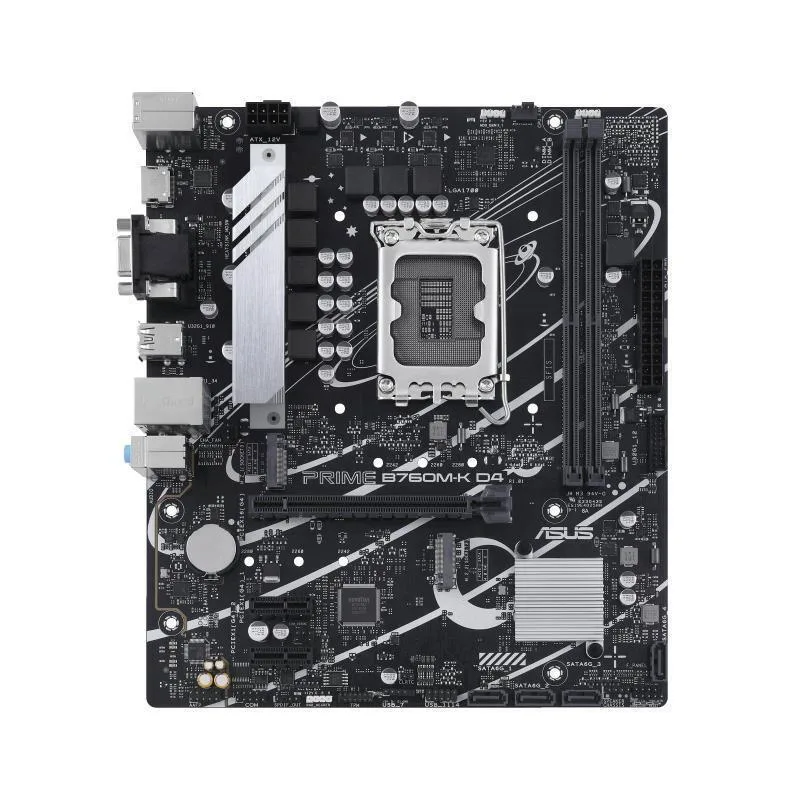
ASUS Prime B760M-K D4 mATX Intel motherboard with two PCIe 4.0 M.2 slots
Micro-ATX board for Intel LGA 1700 CPUs with dual PCIe 4.0 M.2 slots, 2.5 Gb Ethernet and DDR4 memory up to 64 GB
- CPU TypeIntel Core 13th Gen (LGA 1700)
- Supports 13th Gen Intel Core processors via LGA 1700 socket
- Two PCIe 4.0 M.2 slots for fast storage expansion
- Realtek 2.5Gb Ethernet delivers high-speed wired networking
- DDR4 memory up to 5333 MHz OC with 64 GB capacity
- Comprehensive cooling with VRM heatsink, PCH heatsink and Fan Xpert
Intel LGA 1700 micro-ATX board for 12th
This ASUS Prime B760M-K D4 motherboard fits micro-ATX cases and accepts Intel Core 12th and 13th generation processors through the LGA 1700 socket. It provides two DDR4 DIMM slots supporting up to 64 GB of memory. The layout suits builders who want a compact foundation for a mainstream desktop system.
Thermals, noise and power draw
A dedicated VRM heatsink and PCH heatsink manage heat from the power delivery and chipset during typical workloads. Hybrid fan headers connect to Fan Xpert software for automatic speed curves that keep noise low when the system is idle. Power consumption follows the chosen CPU and attached components rather than adding significant overhead of its own.
Two PCIe 4.0 M.2 slots for primary storage
The board includes two M.2 sockets wired for PCIe 4.0 x4, each accepting 2242, 2260 or 2280 modules. This capacity decides whether the platform can hold both an OS drive and a large secondary drive without using SATA ports. Builders who need more than two high-speed M.2 devices must choose a different board.
Points forts
- Supports 13th Gen Intel Core processors via LGA 1700 socket
- Two PCIe 4.0 M.2 slots for fast storage expansion
- Realtek 2.5Gb Ethernet delivers high-speed wired networking
- DDR4 memory up to 5333 MHz OC with 64 GB capacity
- Comprehensive cooling with VRM heatsink, PCH heatsink and Fan Xpert
Caractéristiques
| CPU Type | Intel Core 13th Gen (LGA 1700) |
|---|
Questions sur cet article
How do I install a CPU into the LGA 1700 socket and what step do people often miss?
Align the notches on the processor with the socket keys, lower it gently, then close the retention lever; the step many miss is removing the protective cover from the load plate before seating the CPU.
What maintenance will the two PCIe 4.0 M.2 slots need later?
The slots themselves require no maintenance; if you add M.2 drives in 2242, 2260 or 2280 sizes, just ensure the motherboard standoffs are fitted so the drives sit flat and the screws are snug.
What limit appears first when the VRM heatsink is under sustained load?
The VRM heatsink and hybrid fan headers managed by Fan Xpert set the thermal ceiling; if case airflow is restricted, VRM temperatures will throttle the 13th or 12th Gen Intel Core processor before other components.
Également dans ce rayon
Les clients ont aussi comparé
Même rayon, même caisse — huit monnaies et un taux bloqué 30 minutes.


PrimoChill
PrimoChill Praxis Wetbench Open-Air Test Bench 461.8mm
- Open-Air
274,89 $US
0.00355155BTC
En stock
Silverstone Technology
SilverStone Technology Strider 1200W 80 Plus Platinum Modular Power Supply
- ATX Mid Tower
- 1200W
324,03 $US
0.00418643BTC
En stock