


ASUS
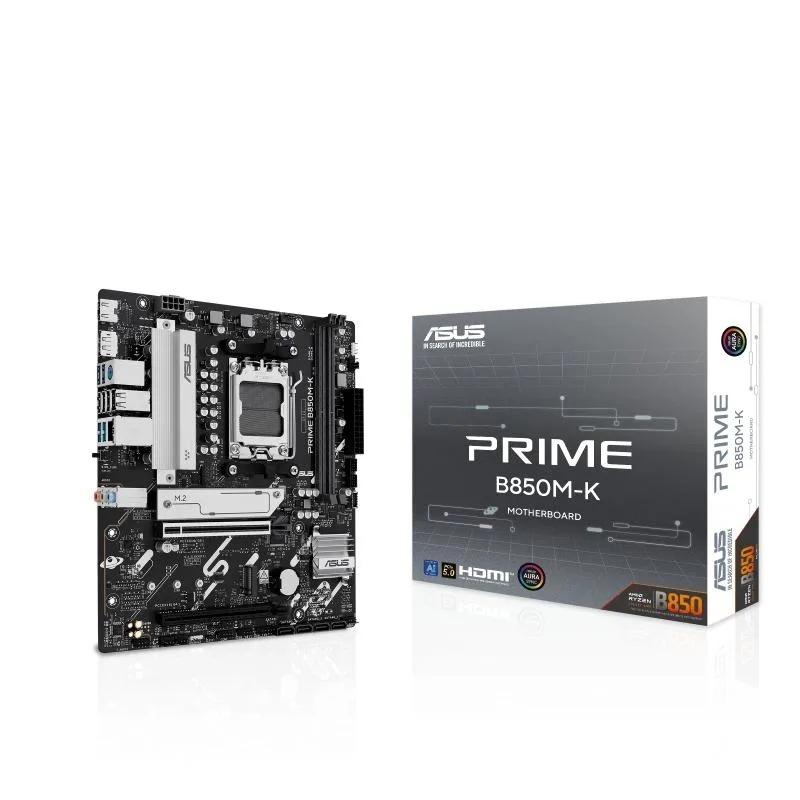
ASUS PRIME B850M-K AMD motherboard
Micro-ATX AM5 board with 8+2+1 power phases, PCIe 5.0 slot, three M.2 sockets, Realtek 2.5Gb LAN, rear USB 10Gbps Type-A and front USB 5Gbps Type-C.
- Stable power delivery from 8+2+1 phases and 6-layer PCB
- DDR5 memory speeds up to 8400 MT/s with overclocking
- VRM heatsinks, M.2 heatsink and 4-pin fan headers for cooling
- PCIe 5.0 slot plus Realtek 2.5 Gb Ethernet and USB 10 Gbps Type-A
- UEFI BIOS with BIOS FlashBack, Aura Sync and addressable ARGB headers
Power design and DDR5 speed
The ASUS PRIME B850M-K is a micro-ATX motherboard built around the AMD B850 chipset for AM5 processors. It uses an 8+2+1 power module layout on a six-layer PCB with Digi+ VRM control for stable voltage delivery. Memory can reach DDR5 8400 MT/s when overclocked.
Builders who need more M.2 slots or wireless
This board suits users who want strong power delivery and high memory speed in a compact form factor. It provides three M.2 sockets and a 2.5 Gb Ethernet port. Builders who require more than three M.2 sockets or integrated Wi-Fi should look at other options.
PCIe 5.0 slot for graphics and storage
The single most decisive specification is the PCIe 5.0 slot, which enables full bandwidth for compatible graphics cards or high-speed storage. If your build does not need PCIe 5.0, a board with an older slot standard may cost less.
Points forts
- Stable power delivery from 8+2+1 phases and 6-layer PCB
- DDR5 memory speeds up to 8400 MT/s with overclocking
- VRM heatsinks, M.2 heatsink and 4-pin fan headers for cooling
- PCIe 5.0 slot plus Realtek 2.5 Gb Ethernet and USB 10 Gbps Type-A
- UEFI BIOS with BIOS FlashBack, Aura Sync and addressable ARGB headers
Caractéristiques
Aucune caractéristique publiée pour cet article pour l’instant.
Questions sur cet article
What PCIe standard does the primary expansion slot use, and what bandwidth does that cap the graphics card at?
The board provides a PCIe 5.0 slot, so a graphics card is limited to the 5.0 signalling rate available from the processor
What are the board dimensions and mounting pattern for case fitment?
The board uses the micro-ATX form factor with standard mATX mounting holes
How is a BIOS update applied without a CPU installed, and which step is commonly missed?
Press the BIOS FlashBack button after inserting the prepared USB stick into the designated rear port
Également dans ce rayon
Les clients ont aussi comparé
Même rayon, même caisse — huit monnaies et un taux bloqué 30 minutes.


PrimoChill
PrimoChill Praxis Wetbench Open-Air Test Bench 461.8mm
- Open-Air
274,89 $US
0.00357BTC
En stock
Silverstone Technology
SilverStone Technology Strider 1200W 80 Plus Platinum Modular Power Supply
- ATX Mid Tower
- 1200W
324,03 $US
0.00420818BTC
En stock