


ASUS
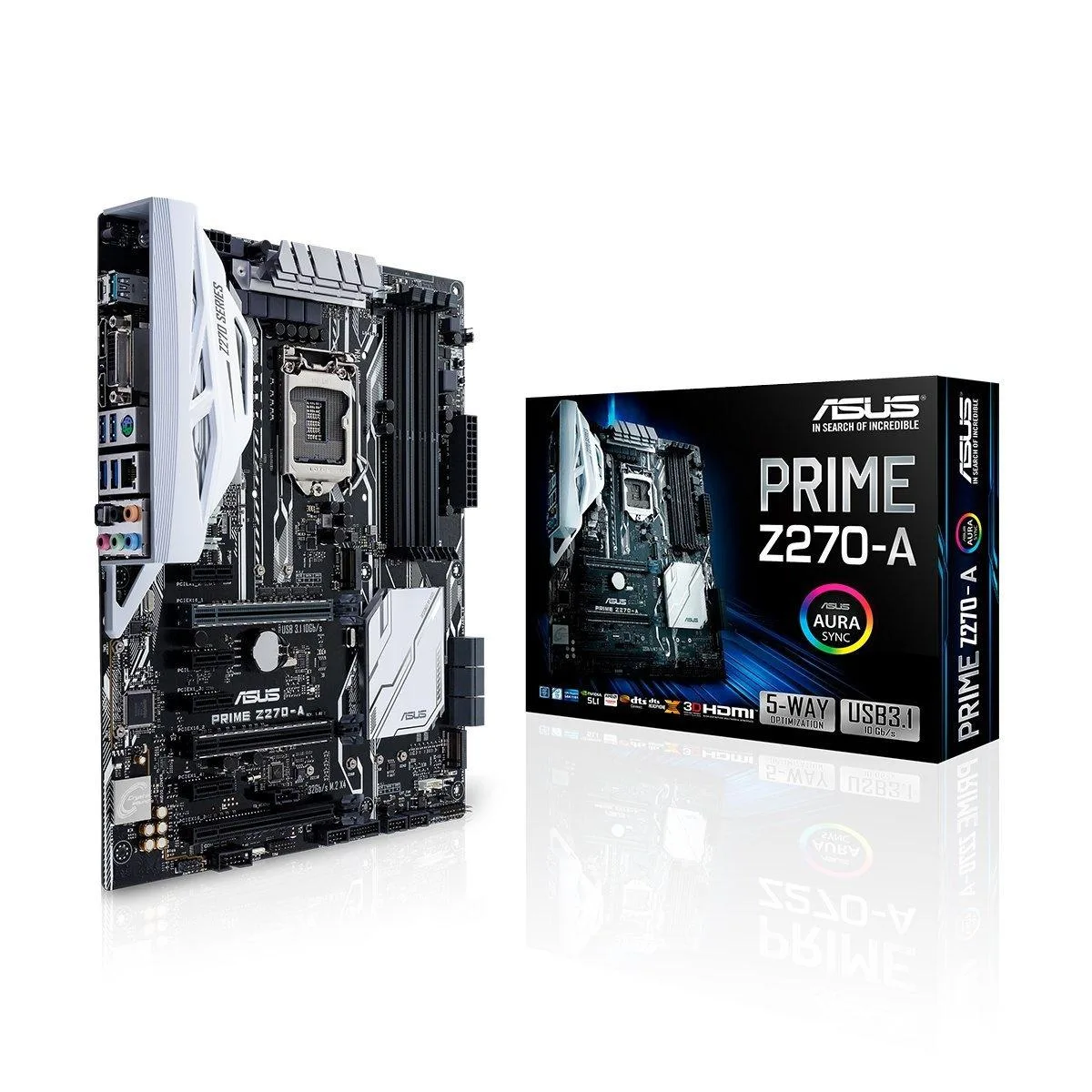
ASUS PRIME Z270-A Intel motherboard
LGA 1151 ATX board with Intel Z270 chipset, four DDR4 slots up to 64 GB, dual PCIe 3.0 x16, two M.2 sockets, six SATA 6.0 Gb/s ports, Realtek S1220A 8-channel audio and Intel I219-V gigabit LAN
- CPU Socket TypeLGA 1151
- CPU TypeCore i7 / i5 / i3 / Pentium / Celeron (LGA1151)
- Supported CPU TechnologiesTurbo Boost Technology 2.0 * Not Compatible with Intel 8th G
- ChipsetIntel Z270
- Number of Memory Slots4x288pin (DDR4)
- Memory StandardDDR4 3866(O.C.)/ 3733(O.C.)/ 3600(O.C.)/ 3466(O.C.)/ 3400(O.
- Supports DDR4 memory up to 3866 MHz overclocked for responsive multitasking
- Intel Z270 chipset on LGA 1151 socket fits Core i7 i5 i3 Pentium Celeron CPUs
- Dual PCIe 3.0 x16 slots run at x16 or dual x8 for flexible GPU configurations
- Two M.2 sockets accept 2242 2260 2280 22110 drives in SATA and PCIe modes
- Realtek S1220A 8-channel audio with Intel I219-V gigabit LAN for clear sound and wired networking
LGA 1151 Z270 ATX board
The ASUS PRIME Z270-A is an ATX motherboard built around the Intel Z270 chipset for 6th and 7th generation Core i7, i5, i3, Pentium and Celeron processors in the LGA 1151 socket. It provides four DDR4 memory slots supporting up to 64 GB in dual-channel mode with overclocked speeds listed up to 3866 MT/s. Onboard video outputs include DisplayPort 1.2, HDMI 1.4b and DVI-D for integrated graphics use.
Ideal for 6th and 7th Gen Intel builders
This board suits builders assembling a new system with a 6th or 7th generation Intel Core processor who need multiple expansion slots and dual M.2 sockets. It is not compatible with Intel 8th generation CPUs, so anyone planning to use an 8th generation chip should select a 300-series chipset motherboard instead.
Two full PCIe 3.0 x16 slots
The deciding specification is the PCI Express layout: two slots wired for PCIe 3.0 x16 that can run at x16 or dual x8, plus a third x16 slot limited to x4 mode. This arrangement determines whether the board can support a dual-graphics configuration at full bandwidth or only at reduced speeds.
Points forts
- Supports DDR4 memory up to 3866 MHz overclocked for responsive multitasking
- Intel Z270 chipset on LGA 1151 socket fits Core i7 i5 i3 Pentium Celeron CPUs
- Dual PCIe 3.0 x16 slots run at x16 or dual x8 for flexible GPU configurations
- Two M.2 sockets accept 2242 2260 2280 22110 drives in SATA and PCIe modes
- Realtek S1220A 8-channel audio with Intel I219-V gigabit LAN for clear sound and wired networking
Caractéristiques
| Brand | ASUS |
|---|---|
| Model | PRIME Z270-A |
| CPU Socket Type | LGA 1151 |
| CPU Type | Core i7 / i5 / i3 / Pentium / Celeron (LGA1151) |
| Supported CPU Technologies | Turbo Boost Technology 2.0 * Not Compatible with Intel 8th Gen CPUs |
| Chipset | Intel Z270 |
| Number of Memory Slots | 4x288pin (DDR4) |
| Memory Standard | DDR4 3866(O.C.)/ 3733(O.C.)/ 3600(O.C.)/ 3466(O.C.)/ 3400(O.C.)/ 3333(O.C.)/ 3300(O.C.)/ 3200(O.C.)/ 3000(O.C.)/ 2800(O.C.)/ 2666(O.C.)/ 2400(O.C.)/ 2133 |
| Maximum Memory Supported | 64GB |
| Channel Supported | Dual Channel |
| PCI Express 3.0 x16 | 2 x PCIe 3.0/2.0 x16 (x16 or dual x8)1 x PCIe 3.0/2.0 x16 (max at x4 mode) |
| PCI Express x1 | 4 x PCI Express 3.0/2.0 x1 slots |
| Serial ATA (SATA) | 6 x SATA 6.0Gb/s ports (gray) |
| M.2 | 1 x M.2 Socket 3 with M Key, type 2242/2260/2280/22110 storage devices support (both SATA & PCIE mode)**1 x M.2 Socket 3 with M Key, type 2242/2260/2280 storage devices support (PCIE mode only)***** The M.2_1 socket shares SATA_1 port when use M.2 SATA mode device. Adjust BIOS settings to use a SATA device.*** The M.2_2 socket shares SATA_56 ports when use M.2 PCIE mode device in X4 mode. Adjust BIOS settings to use M.2 PCIE devices in X4 mode. |
| SATA RAID | 0/1/5/10 |
| Audio Chipset | Realtek S1220A |
| Audio Channels | 8 Channels |
| LAN Chipset | Intel I219-V |
| Max LAN Speed | 1Gbps |
| PS/2 | 1 x PS/2 keyboard/mouse port |
| Video Ports | 1 x DVI-D |
| HDMI | 1 x HDMI |
| RJ45 | 1 x RJ45 |
| DisplayPort | 1 x DisplayPort |
| USB 3.1 | 1 x USB 3.1 Type-A1 x USB 3.1 USB Type-C4 x USB 3.1 Gen 1 |
| S/PDIF Out | 1 x Optical |
| Audio Ports | 5 Ports |
| Onboard USB | 2 x USB 3.1 + 6 x USB 2.0 |
| Other Connectors | 1 x Aura RGB Strip Header1 x CPU Fan connector(s) (1 x 4-pin)1 x CPU OPT Fan connector(s) (1 x 4-pin)2 x Chassis Fan connector(s) (2 x 4-pin)1 x Thunderbolt header(s)1 x EZ XMP switch1 x Front panel audio connector(s) (AAFP)1 x System panel(s) (Q-Connector) (Chassis intrusion header is inbuilt)1 x 5-pin EXT_FAN (Extension Fan) connector1 x MemOK! button(s)1 x CPU OV1 x Power-on button(s)1 x Clear CMOS jumper(s)1 x 14-1 pin TPM connector1 x COM port header1 x High AMP Fan header (4-pin)1 x T_Sensor Connector1 x AIO PUMP Header2 x 3D Mount screw port(s) |
| Form Factor | ATX |
| LED Lighting | RGB |
| Dimensions (W x L) | 12.0" x 9.6" |
| Power Pin | 1 x 24-pin EATX Power connector(s)1 x 8-pin ATX 12V Power connector(s) |
| Features | Multi-GPU Support:Supports NVIDIA 2-Way SLI TechnologySupports AMD 3-Way CrossFireX Technology Special Features:OC Design - ASUS PRO Clock Technology- Full BCLK range for extreme overclocking performance5-Way Optimization by Dual Intelligent Processors 5- Whole system optimization with a single click! 5-Way Optimization tuning key perfectly consolidates TPU, EPU, DIGI+ Power Control, Fan Xpert 4, and Turbo App together, providing better CPU performance, efficient power saving, precise digital power control, whole system cooling and even tailor your own app usages.ASUS 5X Protection I |
| Package Contents | Accessories:User's manualASUS Q-Shield3 x SATA 6Gb/s cable(s)1 x M.2 Screw Package1 x CPU installation tool1 x Supporting DVD1 x SLI HB BRIDGE (2-WAY-M)1 x Q-connector(s) (1 in 1) |
Questions sur cet article
What case and power connectors does the ATX board require to fit and mount?
The board uses the standard ATX form factor with a 24-pin main power connector and an 8-pin CPU power connector, and it mounts via nine ATX screw holes in any compatible chassis.
How do I install DDR4 memory in the four 288-pin slots, and what step do builders often miss?
Align the notch on each module with the slot key, press down firmly until both side clips click, and then enable the XMP or DOCP profile in BIOS so the memory runs at its rated speed instead of the default 2133 MT/s.
Which M.2 SSD lengths does the board accept, and when will a drive need replacement?
The M.2_1 socket supports 2242, 2260, 2280 and 22110 lengths in both SATA and PCIe modes, while M.2_2 supports 2242, 2260 and 2280 in PCIe mode only; replace a drive when its health monitoring tools report worn-out NAND or when you need more capacity.
Également dans ce rayon
Les clients ont aussi comparé
Même rayon, même caisse — huit monnaies et un taux bloqué 30 minutes.


PrimoChill
PrimoChill Praxis Wetbench Open-Air Test Bench 461.8mm
- Open-Air
274,89 $US
0.0035499BTC
En stock
Silverstone Technology
SilverStone Technology Strider 1200W 80 Plus Platinum Modular Power Supply
- ATX Mid Tower
- 1200W
324,03 $US
0.00418449BTC
En stock