


ASUS
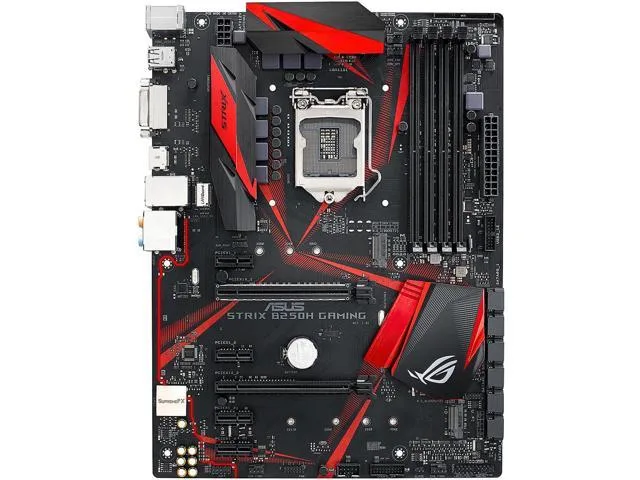
ASUS ROG STRIX B250H GAMING Intel motherboard
ATX board for 6th and 7th Gen Intel CPUs with dual M.2 slots, USB 3.1 and 8-channel audio
- CPU Socket TypeLGA 1151
- CPU TypeCore i7 / i5 / i3 / Pentium / Celeron (LGA1151)
- Supported CPU TechnologiesTurbo Boost Technology 2.0 * Not Compatible with Intel 8th G
- ChipsetIntel B250
- Onboard Video ChipsetIntegrated Graphics Processor - Intel HD Graphics supportMul
- Number of Memory Slots4x288pin (DDR4)
- Supports 7th Gen Intel Core processors via LGA 1151 socket
- Dual-channel DDR4 memory up to 2400 MHz with four 288-pin slots
- Dual M.2 sockets for 2242, 2260, 2280 and 22110 storage devices
- SupremeFX S1220A codec delivers 8-channel high-definition audio
- Intel I219-V LAN provides 1 Gbps wired networking
LGA 1151 ATX board for 6th and 7th Gen Intel Core
The ROG STRIX B250H GAMING fits the LGA 1151 socket and the Intel B250 chipset. It accepts Core i7, i5, i3, Pentium and Celeron processors from the 6th and 7th generations. The ATX layout provides standard mounting points for most mid-tower and full-tower chassis.
Reinforced PCIe slot and dual M.2 with four DDR4
SafeSlot reinforces the primary PCIe 3.0 x16 slot to protect heavy graphics cards from flex. Two M.2 Socket 3 slots accept 2242, 2260, 2280 and 22110 drives in both SATA and PCIe 3.0 x4 modes. Four 288-pin DDR4 slots support up to 64 GB in dual-channel configuration.
DDR4 2400 MHz limited to 7th Gen CPUs
Memory runs at 2400 MHz only when a 7th Generation processor is installed; with a 6th Generation CPU the maximum is 2133 MHz. Any faster modules will downclock to the supported ceiling. This single constraint decides whether the board matches your chosen CPU and memory kit.
Points forts
- Supports 7th Gen Intel Core processors via LGA 1151 socket
- Dual-channel DDR4 memory up to 2400 MHz with four 288-pin slots
- Dual M.2 sockets for 2242, 2260, 2280 and 22110 storage devices
- SupremeFX S1220A codec delivers 8-channel high-definition audio
- Intel I219-V LAN provides 1 Gbps wired networking
Caractéristiques
| Brand | ASUS |
|---|---|
| Series | ROG |
| Model | STRIX B250H GAMING |
| CPU Socket Type | LGA 1151 |
| CPU Type | Core i7 / i5 / i3 / Pentium / Celeron (LGA1151) |
| Supported CPU Technologies | Turbo Boost Technology 2.0 * Not Compatible with Intel 8th Gen CPUs |
| Chipset | Intel B250 |
| Onboard Video Chipset | Integrated Graphics Processor - Intel HD Graphics supportMulti-VGA output support: HDMI/DVI-D ports- Supports HDMI with max. resolution 4096 x 2160 @ 24 Hz- Supports DVI-D with max. resolution 1920 x 1200 @ 60 HzMaximum shared memory of 1024MBSupports Intel InTru 3D, Quick Sync Video, Clear Video HD Technology, Insider |
| Number of Memory Slots | 4x288pin (DDR4) |
| Memory Standard | DDR4 2400/ 2133* Due to Intel chipset limitation, DDR4 2400 MHz memory frequency is only supported by 7th Gen Intel processors. Higher memory modules will run at the maximum transfer rate of DDR4 2400 MHz.** Due to Intel chipset limitation, DDR4 2133 MHz and higher memory modules on 6th Gen Intel processors will run at the maximum transfer rate of DDR4 2133 MHz. |
| Maximum Memory Supported | 64GB |
| Channel Supported | Dual Channel |
| PCI Express 3.0 x16 | 1 x PCIe 3.0/2.0 x16 (x16 mode)1 x PCIe 3.0/2.0 x16 (max at x4 mode) *1*1 PCIe x16_2 slot shares bandwidth with PCIe x1_3 and PCIe x1_4 slots. When PCIe x1_3 and PCIe x1_4 slots are occupied, PCIe x16_2 slot runs at x2 mode. |
| PCI Express x1 | 4 x PCIe 3.0/2.0 x1 |
| Serial ATA (SATA) | 6 x SATA 6Gb/s |
| M.2 | 1 x M.2 Socket 3, with M key, type 2242/2260/2280 storage devices support (both SATA & PCIE mode) *21 x M.2 Socket 3, with M key, type 2242/2260/2280/22110 storage devices support (PCIE 3.0 x4 mode) *3*2 The M.2_1 socket shares SATA_1 port when using M.2 SATA mode device. Adjust BIOS settings to use a SATA device. M.2_1 slot shares bandwidth with PCIe x1_1 and PCIe x1_2 slots. When PCIe x1_1 and PCIe x1_2 slots are occupied, M.2_1 slot runs at x2 mode.*3 The M.2_2 socket supports Intel Optane Technology. Intel Optane Technology only supported when using 7th Generation Intel Processor |
| Audio Chipset | ROG SupremeFX High Definition Audio CODEC S1220A |
| Audio Channels | 8 Channels |
| LAN Chipset | Intel I219-V |
| Max LAN Speed | 1Gbps |
| PS/2 | 1 x PS/2 keyboard/mouse port |
| Video Ports | 1 x DVI-D |
| HDMI | 1 x HDMI |
| RJ45 | 1 x RJ45 |
| USB 3.1 | 2 x USB 3.1 Gen 1 (blue) |
| USB 1.1/2.0 | 4 x USB 2.0 |
| S/PDIF Out | 1 x Optical |
| Audio Ports | 5 Ports |
| Onboard USB | 2 x USB 3.1 Gen 1 connector(s) support(s) additional 4 USB 3.1 Gen 1 port(s)1 x USB 2.0 connector(s) support(s) additional 2 USB 2.0 port(s) |
| Other Connectors | 1 x AAFP connector1 x CPU Fan connector(s)1 x CPU OPT Fan connector(s)2 x Chassis Fan connector(s)1 x AIO_PUMP connector1 x System panel(s) (Chassis intrusion header is inbuilt)1 x Clear CMOS jumper(s)1 x 14-1-pin TPM connector |
| Form Factor | ATX |
| Dimensions (W x L) | 12.0" x 9.2" |
| Power Pin | 1 x 24-pin EATX Power connector(s)1 x 8-pin ATX 12V Power connector(s) |
| Features | Multi-GPU Support:Supports AMD 2-Way CrossFireX Technology ROG Exclusive Features:ROG RAMCache IIROG CPU-ZROG CloneDriveOverwolfGameFirst IVSpecial Features:Gamer's Guardian:- DRAM Overcurrent Protection- Stainless Steel Back I/O- Highly Durable Components- DIGI+ VRM- SafeSlotASUS Exclusive Features:- AI Suite 3- Ai Charger- ESD GuardsASUS EZ DIY:- ASUS CrashFree BIOS 3- ASUS EZ Flash 3- ASUS UEFI BIOS EZ ModeASUS Q-Design:- ASUS Q-Shield- ASUS Q-Slot- ASUS Q-DIMMPerformance Optimization:- GPU BoostFan Xpert 3M.2 Onboard (The latest transfer technologies with up to 32Gb/s data transf |
| Package Contents | Accessories:User's manualASUS Q-Shield4 x SATA 6Gb/s cable(s)2 x M.2 Screw Package1 x Supporting DVD1 x ROG Strix stickers1 x Cable ties pack(s)1 x 10 in 1 ROG Cable Label(s) |
Questions sur cet article
What maximum memory speed does the B250 chipset actually allow on this board?
DDR4 2400 MHz is the ceiling when paired with a 7th Gen processor; with a 6th Gen CPU the limit drops to DDR4 2133 MHz.
Which M.2 lengths and keying does the STRIX B250H GAMING accept?
Both M.2 slots use M-key and support 2242, 2260, 2280 drives; the second slot also takes 22110 modules.
How do I seat the graphics card in the reinforced SafeSlot without damaging the latch?
Open the PCIe slot latch fully, press the card straight down until it clicks, then close the latch to lock it in place.
Également dans ce rayon
Les clients ont aussi comparé
Même rayon, même caisse — huit monnaies et un taux bloqué 30 minutes.


PrimoChill
PrimoChill Praxis Wetbench Open-Air Test Bench 461.8mm
- Open-Air
274,89 $US
0.00354624BTC
En stock
Silverstone Technology
SilverStone Technology Strider 1200W 80 Plus Platinum Modular Power Supply
- ATX Mid Tower
- 1200W
324,03 $US
0.00418017BTC
En stock