


ASUS
ASUS ROG Strix B760-I Gaming WiFi B760 MicroATX Desktop Motherboard A
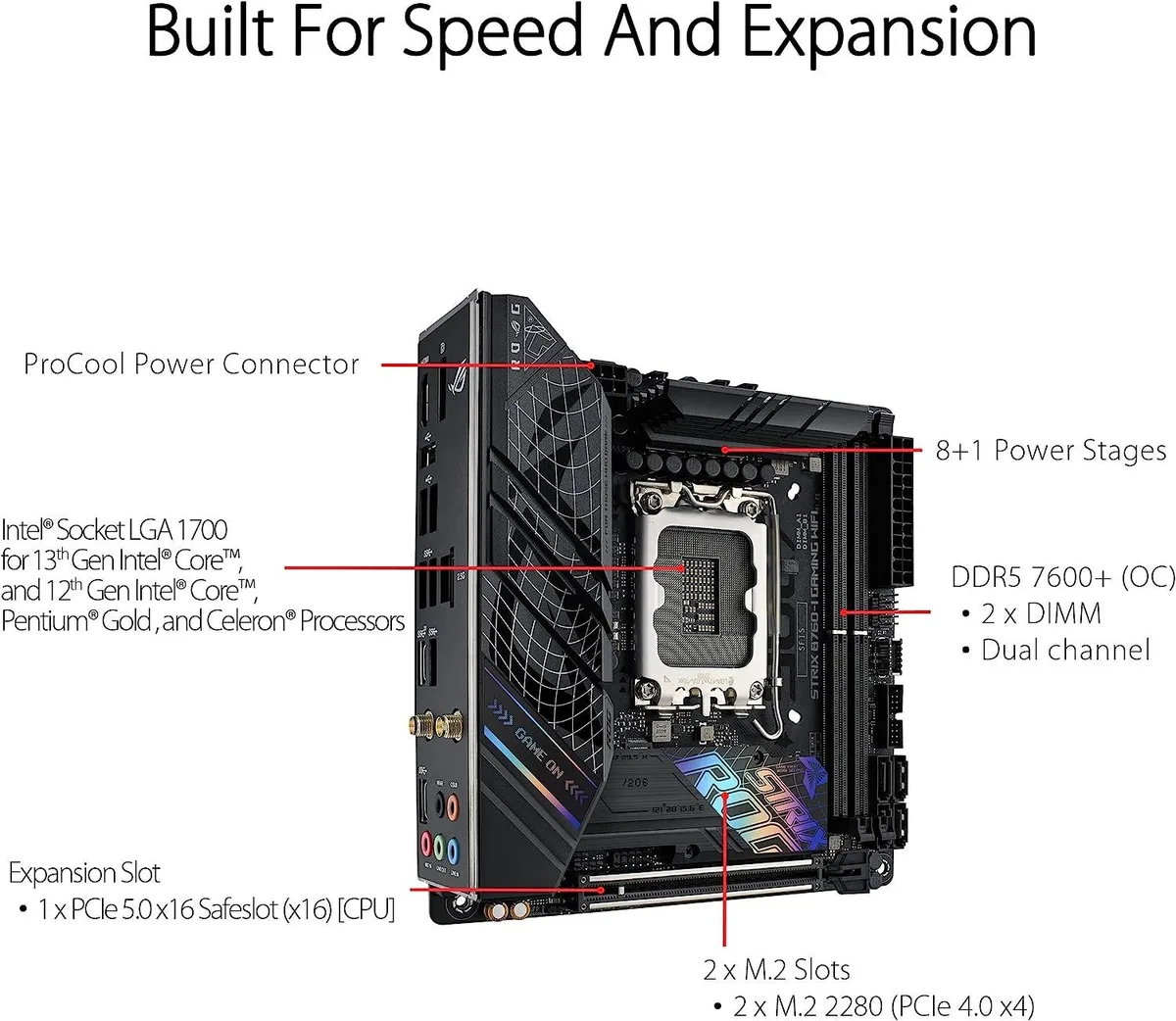
LGA 1700 MicroATX board with DDR5 memory support, PCIe 5.0 x16 slot and two M.2 slots
- CPU Socket TypeLGA 1700
- CPU TypeLGA 1700
- Memory StandardDDR5
- Form FactorMicroATX
- Supports DDR5 memory for modern bandwidth
- PCI Express 5.0 x16 slot enables high-speed graphics
- Two M.2 slots provide fast storage expansion
- MicroATX form factor fits compact builds
- LGA 1700 socket matches compatible Intel CPUs
Compact DDR5 Motherboard
The ASUS ROG Strix B760-I Gaming WiFi is a MicroATX board built for Intel LGA 1700 processors and DDR5 memory. It includes a PCI Express 5.0 x16 slot and two M.2 slots alongside the I/O shield. This configuration suits compact desktop builds that require modern memory and high-speed expansion.
Small Form Factor Builder
This board fits builders who want a MicroATX layout with DDR5 support and a single top-tier graphics slot. It is not for users who need more than two M.2 slots or additional full-length PCIe slots beyond the primary x16 connection.
LGA 1700 Socket
The CPU socket is LGA 1700, which determines processor compatibility. Verify your chosen processor against the manufacturer's CPU compatibility list before purchase to confirm support and any BIOS update requirements.
Points forts
- Supports DDR5 memory for modern bandwidth
- PCI Express 5.0 x16 slot enables high-speed graphics
- Two M.2 slots provide fast storage expansion
- MicroATX form factor fits compact builds
- LGA 1700 socket matches compatible Intel CPUs
Caractéristiques
| Brand | ASUS |
|---|---|
| CPU Socket Type | LGA 1700 |
| CPU Type | LGA 1700 |
| Memory Standard | DDR5 |
| Form Factor | MicroATX |
Questions sur cet article
What case dimensions and mounting points does the MicroATX B760-I board require?
The board uses the MicroATX form factor with standard mounting holes, so any case that supports MicroATX will fit it.
How is the I/O shield installed, and what step do builders often miss?
The I/O shield snaps into the case rear cut-out before the motherboard is lowered in; the common mistake is mounting the board first and then realising the shield is still on the bench.
What replacement parts or maintenance will the M.2 slots and DDR5 memory need over time?
The two M.2 slots each use a small standoff and screw that can be lost during drive swaps; DDR5 modules have no moving parts and only need occasional dust removal.
Également dans ce rayon
Les clients ont aussi comparé
Même rayon, même caisse — huit monnaies et un taux bloqué 30 minutes.


PrimoChill
PrimoChill Praxis Wetbench Open-Air Test Bench 461.8mm
- Open-Air
274,89 $US
0.00357046BTC
En stock
Silverstone Technology
SilverStone Technology Strider 1200W 80 Plus Platinum Modular Power Supply
- ATX Mid Tower
- 1200W
324,03 $US
0.00420873BTC
En stock