


ASUS
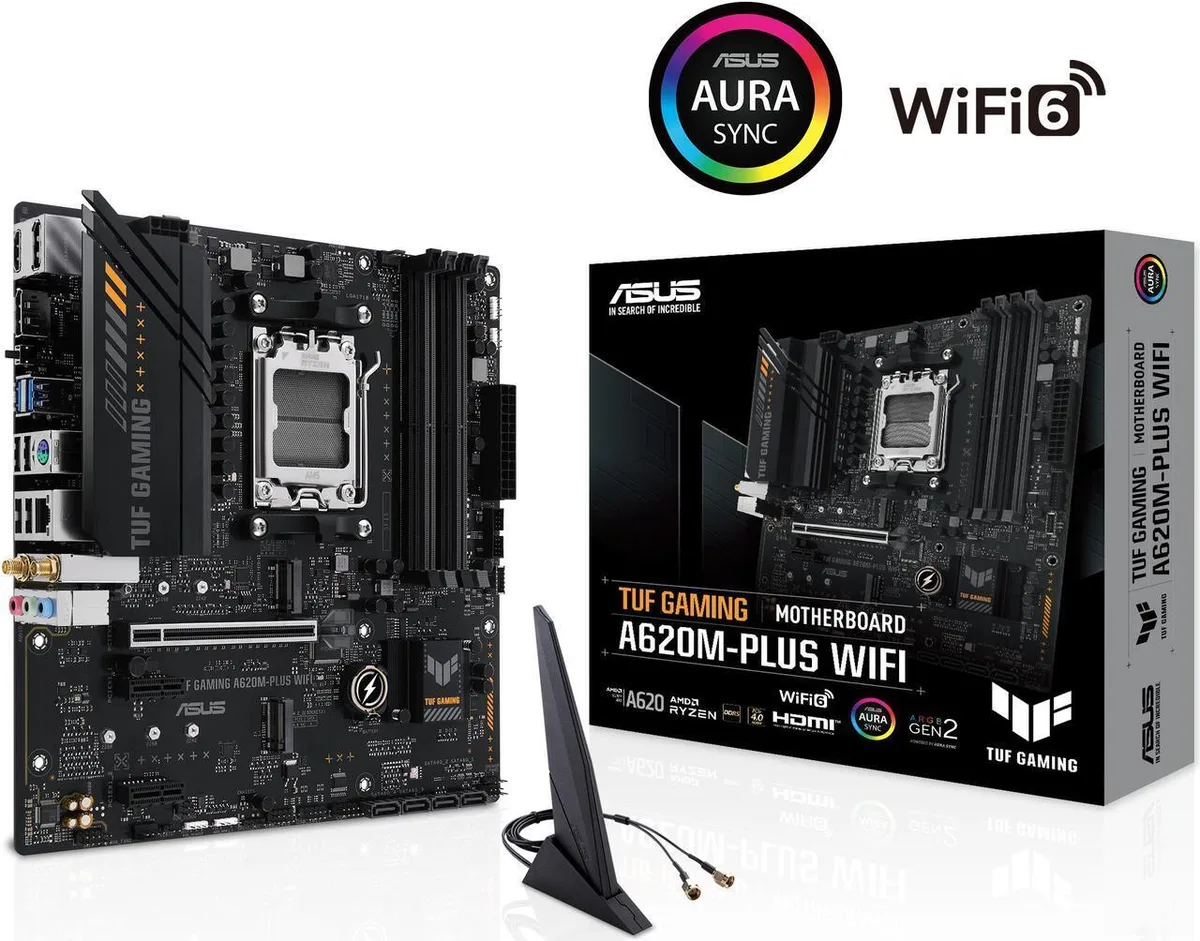
ASUS TUF GAMING A620M-PLUS WiFi AMD motherboard
Micro-ATX AM5 board with DDR5 up to 6400 OC, dual PCIe 4.0 M.2, 2.5Gb Ethernet and Wi-Fi 6
- ChipsetAMD A620
- Number of Memory Slots4x288pin (DDR5)
- Memory StandardDDR5 6400+(OC)/6200(OC)/6000(OC)/5800(OC)/5600(OC)/5400(OC)/
- Maximum Memory Supported256GB
- Channel SupportedDual Channel
- Memory FeatureDual Channel Memory Architecture Supports AMD Extended Profi
- Ready for AMD Ryzen 7000 Series processors with AM5 socket
- DDR5 memory support up to 6400 MT/s overclocked across four slots
- Dual M.2 slots with PCIe 4.0 x4 for fast storage expansion
- Wi-Fi 6 and 2.5Gb Ethernet with TUF LANGuard for stable online gaming
- Enhanced power delivery using six-layer PCB, alloy chokes and DIGI+ VRM
AM5 microATX for Ryzen 7000 builds
The ASUS TUF GAMING A620M-PLUS WiFi is a microATX motherboard built on the AMD A620 chipset for AMD Ryzen 7000 series processors. It targets gamers and builders who want a compact platform with modern connectivity and durable components.
Upgrade from older AM4 or entry boards
Moving from an AM4 system or a basic A520 board brings DDR5 memory support, PCIe 4.0 lanes for graphics and storage, and integrated Wi-Fi 6 plus 2.5Gb Ethernet. The jump is worthwhile when you need faster memory speeds, newer CPU architecture, and current networking standards in a smaller chassis.
256GB DDR5 headroom with dual M.2 slots
Four DDR5 slots support up to 256GB across a wide OC range from 4800 to 6400, giving ample capacity for heavy multitasking and content work. Dual M.2 slots accept 2242, 2260, and 2280 drives at PCIe 4.0 x4, while four SATA 6Gb/s ports handle additional storage. The board runs out of expansion with only one PCIe 4.0 x16 slot and two PCIe 3.0 x1 slots.
Points forts
- Ready for AMD Ryzen 7000 Series processors with AM5 socket
- DDR5 memory support up to 6400 MT/s overclocked across four slots
- Dual M.2 slots with PCIe 4.0 x4 for fast storage expansion
- Wi-Fi 6 and 2.5Gb Ethernet with TUF LANGuard for stable online gaming
- Enhanced power delivery using six-layer PCB, alloy chokes and DIGI+ VRM
Caractéristiques
| Brand | ASUS |
|---|---|
| Model | TUF GAMING A620M-PLUS WIFI |
| Part Number | 90MB1F00-M0AAY0 |
| Chipset | AMD A620 |
| Number of Memory Slots | 4x288pin (DDR5) |
| Memory Standard | DDR5 6400+(OC)/6200(OC)/6000(OC)/5800(OC)/5600(OC)/5400(OC)/5200/5000/4800, ECC and Non-ECC, Un-buffered Memory* * Supported memory types, data rate (speed), and number of DRAM modules vary depending on the CPU and memory configuration, for more information please refer to CPU/Memory Support list under the Support tab of product information site or visit https://www.asus.com/support/. * Non-ECC, un-buffered DDR5 memory supports On-Die ECC function. |
| Maximum Memory Supported | 256GB |
| Channel Supported | Dual Channel |
| Memory Feature | Dual Channel Memory Architecture Supports AMD Extended Profiles for Overclocking (EXPO) OptiMem II |
| PCI Express 4.0 x16 | AMD Ryzen 7000 Series Desktop Processors* 1 x PCIe 4.0 x16 slot * Please check the PCIe bifurcation table on the support site (https://www.asus.com/support/FAQ/1037507/). - To ensure compatibility of the device installed, please refer to https://www.asus.com/support/ for the list of supported peripherals. |
| PCI Express x1 | AMD A620 Chipset 2 x PCIe 3.0 x1 slots |
| Serial ATA (SATA) | 4 x SATA 6Gb/s |
| M.2 | AMD Ryzen 7000 Series Desktop Processors M.2_1 slot (Key M), type 2242/2260/2280 (supports PCIe 4.0 x4 mode) M.2_2 slot (Key M), type 2242/2260/2280 (supports PCIe 4.0 x4 mode) |
| SATA RAID | AMD RAIDXpert2 Technology supports both PCIe RAID 0/1/10 and SATA RAID 0/1/10. |
| Audio Chipset | Realtek 7.1 Surround Sound High Definition Audio CODEC* - Supports: Jack-detection, Multi-streaming, Front Panel Jack-retasking - Supports up to 24-Bit/192 kHz playback Audio Features - Audio Shielding - Premium audio capacitors - Dedicated audio PCB layers * A chassis with an HD audio module in the front panel is required to support 7.1 Surround Sound audio output. |
| Audio Channels | 7.1 Channels |
| LAN Chipset | 1 x Realtek 2.5Gb Ethernet TUF LANGuard |
| Max LAN Speed | 2.5Gbps |
| Wireless LAN | Wi-Fi 6 1x1 Wi-Fi 6 (802.11 a/b/g/n/ac/ax) Supports 2.4/5GHz frequency band |
| Bluetooth | Bluetooth v5.3 |
| Back I/O Ports | 2 x USB 3.2 Gen 1 (5G) ports (2 x Type-A) 4 x USB 2.0 ports (4 x Type-A) 2 x DisplayPort 1 x HDMI port 1 x Wi-Fi Module 1 x Realtek 2.5Gb Ethernet port 3 x Audio jacks 1 x BIOS FlashBack button 1 x PS/2 Keyboard/Mouse combo port |
| Onboard USB | 1 x USB 3.2 Gen 1 (5G) connector (supports USB Type-C ) 1 x USB 3.2 Gen 1 (5G) header supports 2 additional USB 3.2 Gen 1 ports 2 x USB 2.0 headers support 4 additional USB 2.0 ports |
| Other Connectors | Fan and Cooling related 1 x 4-pin CPU Fan header 2 x 4-pin Chassis Fan headers Storage related 2 x M.2 slots (Key M) 4 x SATA 6Gb/s ports Miscellaneous 3 x Addressable Gen 2 headers 1 x Aura RGB header 1 x Clear CMOS header 1 x COM Port header 1 x Front Panel Audio header (AAFP) 1 x S/PDIF Out header 1 x Speaker header 1 x 10⁻¹ pin System Panel header |
| Form Factor | Micro ATX |
| Dimensions (W x L) | 9.6" x 9.6" |
| Power Pin | 1 x 24-pin Main Power connector 1 x 8-pin +12V Power connector |
| Windows 11 | Supported |
| Features | ASUS TUF PROTECTION - DIGI+ VRM - ESD Guards - TUF LANGuard - Overvoltage Protection - SafeSlot Core+ - Stainless-Steel Back I/O ASUS Q-Design - M.2 Q-Latch - Q-DIMM - Q-LED Core - Q-Slot ASUS Thermal Solution - VRM heatsink design ASUS EZ DIY - BIOS FlashBack button - BIOS FlashBack LED Aura Sync - Aura RGB header - Addressable Gen 2 headers |
| Package Contents | Cables 2 x SATA 6Gb/s cables Miscellaneous 1 x ASUS Wi-Fi moving antennas 1 x I/O Shield 1 x TUF Gaming sticker 1 x Screw package for M.2 SSD Documentation 1 x TUF Certification card 1 x User guide |
Questions sur cet article
What case size and mounting holes does the microATX board use?
The board follows the microATX form factor with standard mounting holes that align with any microATX or ATX chassis.
How do I seat the CPU in the AM5 socket without bending pins?
Lift the retention arm, align the gold triangle on the processor with the socket corner, place the chip gently without pressure, then lower and lock the arm.
Which components may need replacement after several years of use?
The button-cell CMOS battery on the board will eventually lose charge and should be swapped to keep BIOS settings.
Également dans ce rayon
Les clients ont aussi comparé
Même rayon, même caisse — huit monnaies et un taux bloqué 30 minutes.


PrimoChill
PrimoChill Praxis Wetbench Open-Air Test Bench 461.8mm
- Open-Air
274,89 $US
0.00355155BTC
En stock
Silverstone Technology
SilverStone Technology Strider 1200W 80 Plus Platinum Modular Power Supply
- ATX Mid Tower
- 1200W
324,03 $US
0.00418643BTC
En stock