


ASUS
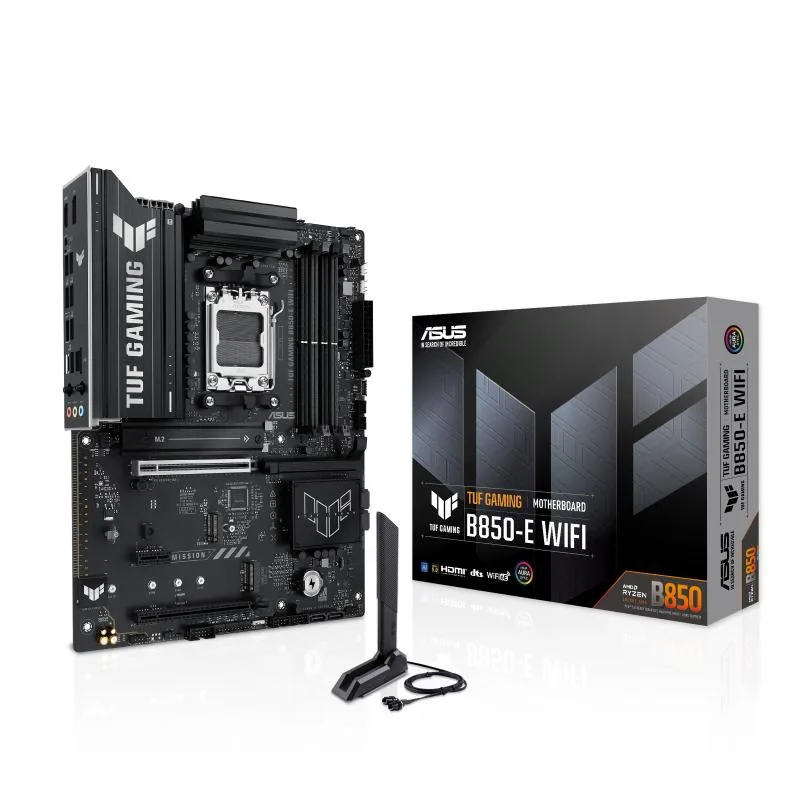
ASUS TUF GAMING B850-E WIFI AMD AM5 B850 ATX motherboard DDR5 PCIe 5.0 M.2 slots x3 Wi-Fi 6E 2.5Gb Ethernet
AM5 ATX board for Ryzen 7000, 8000 and 9000 CPUs with DDR5, one PCIe 5.0 M.2 slot, two PCIe 4.0 M.2 slots, Wi-Fi 6E, 2.5Gb Ethernet and front USB 20Gbps Type-C
- CPU Socket TypeAM5
- Supports AMD Ryzen 7000, 8000 and 9000 series processors with AM5 socket
- One PCIe 5.0 M.2 slot plus two PCIe 4.0 M.2 slots for fast storage
- Wi-Fi 6E and Realtek 2.5Gb Ethernet for low-latency networking
- Front USB 20Gbps Type-C and rear USB 10Gbps Type-C for quick data transfers
- Enlarged VRM heatsink, M.2 heatsink, PCH heatsink and Fan Xpert 4 for thermal control
ASUS TUF B850-E AM5 ATX motherboard
This ATX motherboard uses the AMD B850 chipset and AM5 socket for Ryzen 7000, 8000 and 9000 series processors. It supports DDR5 memory and provides one PCIe 5.0 M.2 slot plus two PCIe 4.0 M.2 slots. Connectivity includes Wi-Fi 6E, 2.5Gb Ethernet, a front USB 20Gbps Type-C header and a rear USB 10Gbps Type-C port.
Suits AMD Ryzen builders who need three M.2 slots
The board suits builders who want three M.2 slots, PCIe 5.0 x16 graphics bandwidth and strong VRM cooling with an 8+2+1 80A DrMOS design. DIY features include PCIe Slot Q-Release, M.2 Q-Latch and BIOS FlashBack. Buyers needing more than three M.2 slots or a different form factor should consider other options.
One PCIe 5.0 M.2 slot plus two PCIe 4.0 M.2 slots
The single PCIe 5.0 M.2 slot and two PCIe 4.0 M.2 slots define the storage ceiling for this platform. Verify that your drive count and speed requirements match this layout before purchase.
Points forts
- Supports AMD Ryzen 7000, 8000 and 9000 series processors with AM5 socket
- One PCIe 5.0 M.2 slot plus two PCIe 4.0 M.2 slots for fast storage
- Wi-Fi 6E and Realtek 2.5Gb Ethernet for low-latency networking
- Front USB 20Gbps Type-C and rear USB 10Gbps Type-C for quick data transfers
- Enlarged VRM heatsink, M.2 heatsink, PCH heatsink and Fan Xpert 4 for thermal control
Caractéristiques
| CPU Socket Type | AM5 |
|---|
Questions sur cet article
Should I use the single PCIe 5.0 M.2 slot or one of the two PCIe 4.0 M.2 slots for my main drive?
Install the operating system on the PCIe 5.0 M.2 slot for the highest sequential throughput; the two PCIe 4.0 M.2 slots are ideal for secondary storage or games.
What does the 8+2+1 80A DrMOS power stage count mean for a Ryzen 9000 series CPU?
The 80A stages deliver clean current to the cores, SoC and I/O domains, keeping voltages stable under heavy all-core loads.
Does the Wi-Fi 6E and 2.5Gb Ethernet share bandwidth with the PCIe 5.0 x16 slot?
No, the x16 slot connects directly to the CPU while Wi-Fi 6E and 2.5Gb Ethernet run through the chipset, so graphics performance is unaffected.
Également dans ce rayon
Les clients ont aussi comparé
Même rayon, même caisse — huit monnaies et un taux bloqué 30 minutes.


PrimoChill
PrimoChill Praxis Wetbench Open-Air Test Bench 461.8mm
- Open-Air
274,89 $US
0.00355854BTC
En stock
Silverstone Technology
SilverStone Technology Strider 1200W 80 Plus Platinum Modular Power Supply
- ATX Mid Tower
- 1200W
324,03 $US
0.00419467BTC
En stock