


ASUS
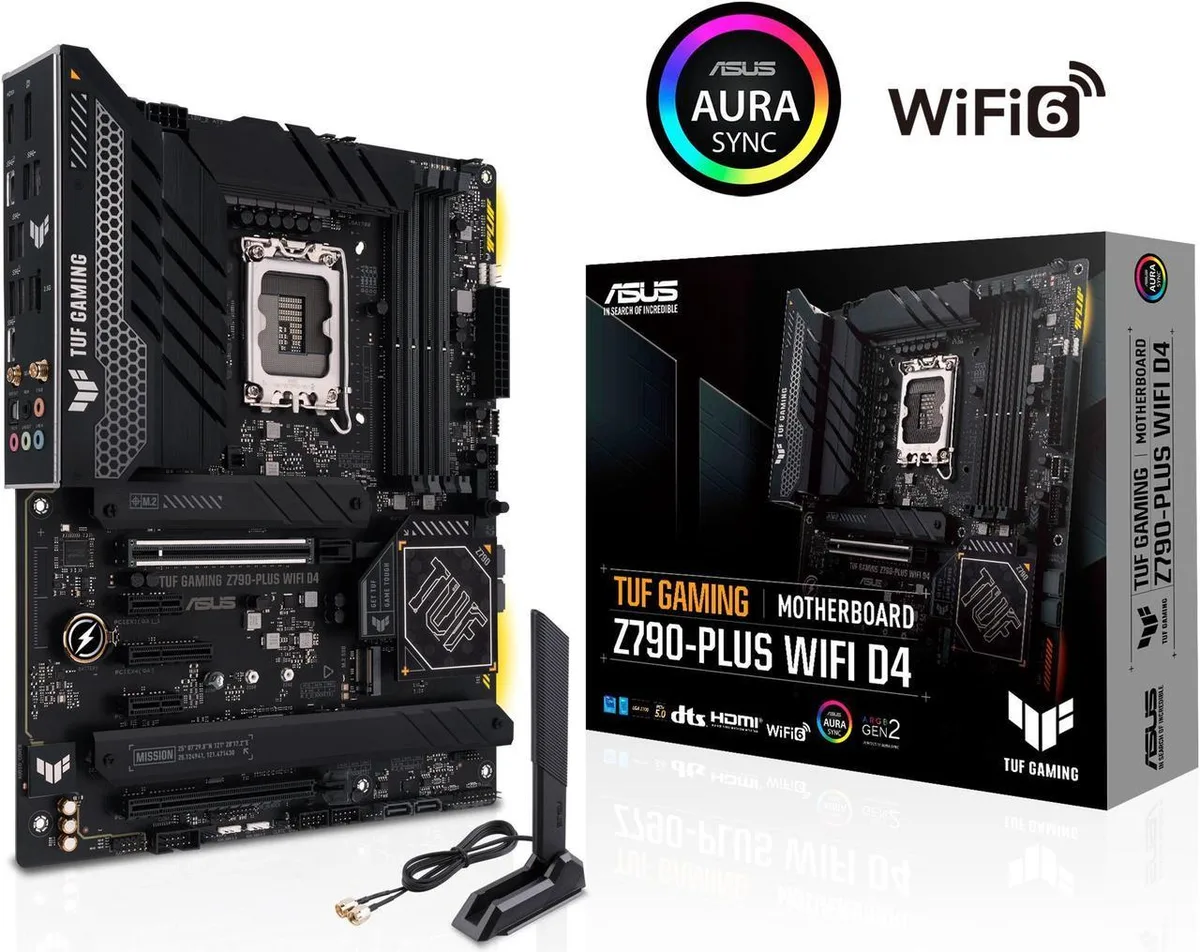
ASUS TUF Gaming Z790-Plus WiFi D4 ATX Intel motherboard
Supports 12th, 13th and 14th Gen Intel Core processors with DDR4 memory up to 128 GB, PCIe 5.0 graphics slot, four M.2 slots, WiFi 6 and 2.5 Gb LAN
- CPU TypeIntel® Socket LGA1700 for 14th & 13th & 12th Gen Intel® Core
- Supported CPU TechnologiesSupports Intel Turbo Boost Technology 2.0 and Intel Turbo Bo
- ChipsetIntel Z790
- Number of Memory Slots4x288pin (DDR4)
- Memory StandardDDR4:5333(OC)/5133(OC)/5066(OC)/5000(OC)/4800(OC)/4700(OC)/4
- Maximum Memory Supported128GB
- Supports 14th, 13th, 12th Gen Intel Core CPUs on LGA 1700 socket
- 16+1 DrMOS power stages with ProCool sockets and military-grade TUF components
- WiFi 6 AX201 and Intel 2.5Gb LAN with TUF LANGuard and TurboLAN
- Four M.2 slots plus front USB 3.2 Gen 2 Type-C and Thunderbolt 4 header
- SafeDIMM, PCIe 5.0 SafeSlot, Q-LED, M.2 Q-Latch and pre-mounted I/O shield
Platform foundation
The ASUS TUF Gaming Z790-Plus WiFi D4 is an ATX motherboard built on the Intel Z790 chipset for LGA 1700 processors. It accepts 12th, 13th and 14th generation Intel Core, Pentium Gold and Celeron CPUs with support for Intel Turbo Boost 2.0 and Max Technology 3.0.
Memory and audience
Four 288-pin slots take DDR4 memory up to 128 GB in dual-channel mode with a long list of validated overclock speeds from 2133 to 5333 MT/s. Builders who already own DDR4 modules will find this board a direct fit while those planning a new memory purchase for a different memory type should consider a Z790 model with the appropriate slots.
Deciding spec
The CPU socket and chipset combination locks the platform to Intel LGA 1700 and Z790, so the single specification that decides compatibility is whether the intended processor fits that socket and chipset pairing.
Points forts
- Supports 14th, 13th, 12th Gen Intel Core CPUs on LGA 1700 socket
- 16+1 DrMOS power stages with ProCool sockets and military-grade TUF components
- WiFi 6 AX201 and Intel 2.5Gb LAN with TUF LANGuard and TurboLAN
- Four M.2 slots plus front USB 3.2 Gen 2 Type-C and Thunderbolt 4 header
- SafeDIMM, PCIe 5.0 SafeSlot, Q-LED, M.2 Q-Latch and pre-mounted I/O shield
Caractéristiques
| Brand | ASUS |
|---|---|
| Series | TUF |
| Model | TUF GAMING Z790-PLUS WIFI D4 |
| CPU Type | Intel® Socket LGA1700 for 14th & 13th & 12th Gen Intel® Core™ Processors & 12th Gen Intel® Core™, Pentium® Gold and Celeron® Processors* Supports Intel® Turbo Boost Technology 2.0 and Intel® Turbo Boost Max Technology 3.0** * Refer to www.asus.com for CPU support list. ** Intel® Turbo Boost Max Technology 3.0 support depends on the CPU types. |
| Supported CPU Technologies | Supports Intel Turbo Boost Technology 2.0 and Intel Turbo Boost Max Technology 3.0** ** Intel Turbo Boost Max Technology 3.0 support depends on the CPU types. |
| Chipset | Intel Z790 |
| Number of Memory Slots | 4x288pin (DDR4) |
| Memory Standard | DDR4:5333(OC)/5133(OC)/5066(OC)/5000(OC)/4800(OC)/4700(OC)/4600(OC)/4500(OC)/4400(OC)/4266(OC)/4133(OC)/4000(OC)/3866(OC)/3733(OC) /3600(OC)/3466(OC)/3400(OC)/3333(OC)/3200/3000/2933/2800/2666/2400/2133 Non-ECC, Un-buffered Memory* Dual Channel Memory Architecture Supports Intel® Extreme Memory Profile (XMP) OptiMem II * Supported memory types, data rate(Speed), and number of DRAM modules vary depending on the CPU and memory configuration, for more information refer to www.asus.com for memory support list. |
| Maximum Memory Supported | 128GB |
| Channel Supported | Dual Channel |
| PCI Express 5.0 x16 | Intel® 14th & 13th & 12th Gen Processors* 1 x PCIe 5.0 x16 slot * Please check the PCIe bifurcation table at the support site (https://www.asus.com/support/FAQ/1037507/). - To ensure compatibility of the device installed, please refer to https://www.asus.com/support/ for the list of supported peripherals. |
| PCI Express 4.0 x16 | 1 x PCIe 4.0 x16 slot (supports x4 mode) |
| PCI Express x4 | 1 x PCIe 4.0 x4 slot |
| PCI Express x1 | 2 x PCIe 3.0 x1 slots * Please check the PCIe bifurcation table at the support site (https://www.asus.com/support/FAQ/1037507/). - To ensure compatibility of the device installed, please refer to https://www.asus.com/support/ for the list of supported peripherals. |
| Serial ATA (SATA) | 4 x SATA 6Gb/s |
| M.2 | Intel® 14th & 13th & 12th Gen Processors M.2_1 slot (Key M), type 2242/2260/2280/22110 - Intel® 13th & 12th Gen processors support PCIe 4.0 x4 mode Intel® Z790 Chipset M.2_2 slot (Key M), type 2242/2260/2280 (supports PCIe 4.0 x4 mode) M.2_3 slot (Key M), type 2242/2260/2280/22110 (supports PCIe 4.0 x4 mode) M.2_4 slot (Key M), type 2242/2260/2280 (supports PCIe 4.0 x4 & SATA modes) 4 x SATA 6Gb/s ports * Intel® Rapid Storage Technology supports PCIe RAID 0/1/5/10, SATA RAID 0/1/5/10. |
| SATA RAID | 0/1/5/10 |
| Audio Chipset | Realtek S1220A 7.1 Surround Sound High Definition Audio CODEC* - Impedance sense for front and rear headphone outputs - Internal audio Amplifier to enhance the highest quality sound for headphone and speakers - Supports: Jack-detection, Multi-streaming, Front Panel Jack-retasking - High quality 120 dB SNR stereo playback output and 113 dB SNR recording input (Line-in) - Supports up to 32-Bit/192 kHz playback* Audio Features - Audio Shielding - Rear optical S/PDIF out port - Premium audio capacitors - Dedicated audio PCB layers - Audio Cover * Due to limitations in HDA bandwidth, 32-B |
| Audio Channels | Realtek S1220A 7.1 Surround Sound High Definition Audio CODEC* - Impedance sense for front and rear headphone outputs - Internal audio Amplifier to enhance the highest quality sound for headphone and speakers - Supports: Jack-detection, Multi-streaming, Front Panel Jack-retasking - High quality 120 dB SNR stereo playback output and 113 dB SNR recording input (Line-in) - Supports up to 32-Bit/192 kHz playback* Audio Features - Audio Shielding - Rear optical S/PDIF out port - Premium audio capacitors - Dedicated audio PCB layers - Audio Cover * Due to limitations in HDA bandwidth, 32-B |
| LAN Chipset | 1 x Intel 2.5Gb Ethernet |
| Max LAN Speed | 2.5Gbps |
| Wireless LAN | Wi-Fi 6 2x2 Wi-Fi 6 (802.11 a/b/g/n/ac/ax) Supports 2.4/5GHz frequency band |
| Bluetooth | Bluetooth v5.2 |
| Back I/O Ports | 1 x USB 3.2 Gen 2x2 port (1 x USB Type-C) 3 x USB 3.2 Gen 2 ports (2 x Type-A + 1 x USB Type-C) 4 x USB 3.2 Gen 1 ports (4 x Type-A) 1 x DisplayPort 1 x HDMI port 1 x Wi-Fi Module 1 x Intel 2.5Gb Ethernet port 5 x Audio jacks 1 x Optical S/PDIF out port |
| Onboard USB | 1 x USB 3.2 Gen 2 connector (supports USB Type-C) 1 x USB 3.2 Gen 1 header supports 2 additional USB 3.2 Gen 1 ports 2 x USB 2.0 headers support additional 4 USB 2.0 ports |
| Other Connectors | Fan and Cooling related 1 x 4-pin CPU Fan header 1 x 4-pin CPU OPT Fan header 1 x 4-pin AIO Pump header 4 x 4-pin Chassis Fan headers Storage related 4 x M.2 slots (Key M) 4 x SATA 6Gb/s ports Miscellaneous 3 x Addressable Gen 2 headers 1 x Aura RGB header 1 x Clear CMOS header 1 x COM Port header 1 x Front Panel Audio header (AAFP) 1 x 20-3 pin System Panel header with Chassis intrude function 1 x Thunderbolt header |
| Windows 11 | Supported |
| Form Factor | ATX |
| LED Lighting | RGB |
| Dimensions (W x L) | 12.0" x 9.6" |
| Power Pin | 1 x 24-pin Main Power connector 1 x 8-pin +12V Power connector 1 x 4-pin +12V Power connector |
| Features | ASUS TUF PROTECTION - DIGI+ VRM (- Digital power design with DrMOS) - ESD Guards - TUF LANGuard - Overvoltage Protection - Safeslot - Stainless-Steel Back I/O ASUS Q-Design - M.2 Q-Latch - PCIe Slot Q-Release - Q-DIMM - Q-LED (CPU [red], DRAM [yellow], VGA [white], Boot Device [yellow green]) - Q-Slot ASUS Thermal Solution - M.2 heatsink - VRM heatsink design ASUS EZ DIY - CPU Socket lever protector - ProCool - Pre-mounted I/O shield - SafeDIMM AURA Sync - Aura RGB header - Addressable Gen 2 headers |
| Package Contents | Cables 2 x SATA 6Gb/s cables Miscellaneous 1 x ASUS Wi-Fi moving antenna 1 x TUF GAMING sticker 2 x M.2 Rubber Packages 1 x Screw package for M.2 SSD Documentation 1 x TUF Certification card 1 x User guide |
Questions sur cet article
How do I install a CPU into the LGA 1700 socket and which step is most often missed?
Lift the socket lever, align the processor notches with the socket keys, lower the CPU gently, then close and latch the lever; the step most builders miss is removing the protective plastic cover from the socket before seating the chip.
What maintenance or replacement will the TUF GAMING Z790-PLUS WIFI D4 need over time?
The only user-replaceable part is the CMOS battery on the board; dust the VRM heatsinks and M.2 shields periodically with compressed air to keep the 16+1 DrMOS power stages cool.
Which limit appears first when the board runs sustained heavy loads?
The VRM temperature of the 16+1 DrMOS phases becomes the limiting factor before the PCIe 5.0 x16 slot or the four M.2 slots throttle under continuous full-power operation.
Également dans ce rayon
Les clients ont aussi comparé
Même rayon, même caisse — huit monnaies et un taux bloqué 30 minutes.


PrimoChill
PrimoChill Praxis Wetbench Open-Air Test Bench 461.8mm
- Open-Air
274,89 $US
0.00356417BTC
En stock
Silverstone Technology
SilverStone Technology Strider 1200W 80 Plus Platinum Modular Power Supply
- ATX Mid Tower
- 1200W
324,03 $US
0.00420131BTC
En stock