


ASUS
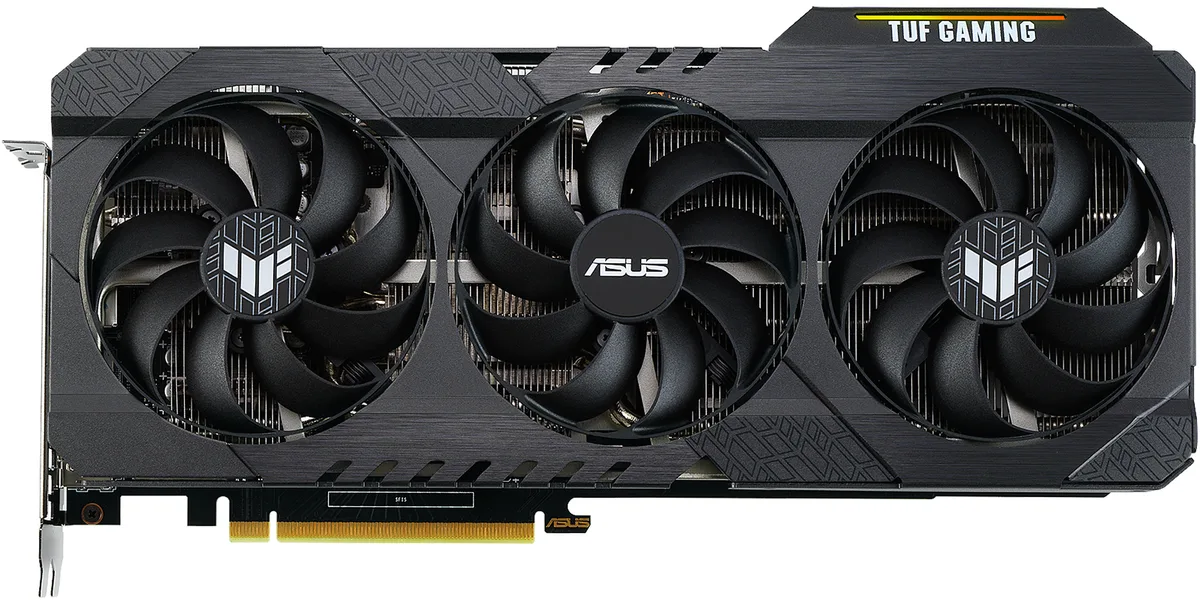
ASUS TUF-RTX3060-O12G-GAM GeForce RTX 3060 12GB graphics card
Refurbished GeForce RTX 3060 with 12 GB GDDR6, 3584 CUDA cores at 1852 MHz, PCIe 4.0, triple-fan cooling, 2 x HDMI 2.1 and 3 x DisplayPort 1.4a for four displays up to 7680 x 4320, 170 W TDP
- InterfacePCI Express 4.0
- Chipset ManufacturerNVIDIA
- GPU SeriesNVIDIA GeForce RTX 30 Series
- GPUGeForce RTX 3060
- Core Clock1852 MHz
- CUDA Cores3584
- 12 GB GDDR6 memory handles large textures at 15 Gbps
- 3584 CUDA cores accelerate rendering and compute workloads
- Core clock reaches 1852 MHz for responsive gaming
- PCIe 4.0 interface doubles bandwidth over 3.0
- Triple-fan cooler keeps the 170 W TDP in check
12GB GDDR6 Gaming GPU
The ASUS TUF Gaming GeForce RTX 3060 delivers 12GB of GDDR6 memory across a 192-bit interface for 1080p and 1440p gaming. A boost clock of 1852 MHz and 3584 CUDA cores handle modern titles with DirectX 12 Ultimate support. The PCI Express 4.0 interface connects to compatible platforms without bottlenecking the GPU. Three DisplayPort 1.4a and two HDMI 2.1 outputs drive up to four displays at 7680 x 4320 resolution.
Upgrade From 6GB Or 8GB Cards
Moving from a 6GB or 8GB graphics card removes the memory ceiling that forces texture downgrades in current games. The 12GB frame buffer keeps high-resolution assets resident for smoother 1440p gameplay. The jump is worth it when your current card hits its VRAM limit before its compute limit. A 750W power supply and single 8-pin connector satisfy the 170W board power without extra cables.
Triple-Fan Cooler Installation
The card installs into a standard PCIe slot and draws auxiliary power through one 8-pin connector. Triple axial fans exhaust heat toward the case side panel, so front-to-rear airflow clears it efficiently. The most common issue is case length clearance; measure the available space before ordering. HDCP 2.3 compliance ensures protected 4K content plays without handshake errors.
Points forts
- 12 GB GDDR6 memory handles large textures at 15 Gbps
- 3584 CUDA cores accelerate rendering and compute workloads
- Core clock reaches 1852 MHz for responsive gaming
- PCIe 4.0 interface doubles bandwidth over 3.0
- Triple-fan cooler keeps the 170 W TDP in check
Caractéristiques
| Brand | ASUS |
|---|---|
| Series | TUF Gaming |
| Model | TUF-RTX3060-O12G-GAMING |
| Interface | PCI Express 4.0 |
| Chipset Manufacturer | NVIDIA |
| GPU Series | NVIDIA GeForce RTX 30 Series |
| GPU | GeForce RTX 3060 |
| Core Clock | 1852 MHz |
| CUDA Cores | 3584 |
| Effective Memory Clock | 15 Gbps |
| Memory Size | 12GB |
| Memory Interface | 192-Bit |
| Memory Type | GDDR6 |
| DirectX | DirectX 12 Ultimate |
| OpenGL | OpenGL 4.6 |
| Multi-Monitor Support | 4 |
| HDMI | 2 x HDMI 2.1 |
| DisplayPort | 3 x DisplayPort 1.4a |
| Max Resolution | 7680 x 4320 |
| SLI Support | No |
| Virtual Reality Ready | Yes |
| Cooler | Triple Fans |
| Thermal Design Power | 170W |
| Recommended PSU Wattage | 750W |
| Power Connector | 1 x 8-pin |
| HDCP Ready | 2.3 |
| Features | NVIDIA Ampere Streaming Multiprocessors: The building blocks for the world's fastest, most efficient GPUs, the all-new Ampere SM brings 2X the FP32 throughput and improved power efficiency. 2nd Generation RT Cores: Experience 2X the throughput of 1st gen RT Cores, plus concurrent RT and shading for a whole new level of ray tracing performance. 3rd Generation Tensor Cores: Get up to 2X the throughput with structural sparsity and advanced AI algorithms such as DLSS. These cores deliver a massive boost in game performance and all-new AI capabilities. Axial-tech fan design has been newly |
| Max GPU Length | 301 mm |
| Card Dimensions (L x H) | 11.81" x 5.63" |
| Slot Width | 2.7 Slot |
| Poids d’expédition | 1.72 kg |
| Dimensions du colis | 411 × 241 × 97 mm |
Questions sur cet article
What case clearance and power supply capacity are needed for the 170W TUF Gaming RTX 3060?
The card draws up to 170W and requires a 750W power supply; it occupies two expansion slots and needs a case long enough for a triple-fan cooler.
How do you connect the single 8-pin power plug without bending the cable against the backplate?
Route the 8-pin cable from the PSU along the side of the card before seating it in the PCI Express 4.0 slot, then press the connector straight in until it clicks.
When should the thermal paste under the triple-fan heatsink be replaced on this 12GB model?
Replace the paste if GPU temperatures rise noticeably above normal after several years of heavy load; the 12GB GDDR6 memory and 3584 CUDA cores benefit from fresh compound.
Également dans ce rayon
Les clients ont aussi comparé
Même rayon, même caisse — huit monnaies et un taux bloqué 30 minutes.


PrimoChill
PrimoChill Praxis Wetbench Open-Air Test Bench 461.8mm
- Open-Air
274,89 $US
0.00357046BTC
En stock
Silverstone Technology
SilverStone Technology Strider 1200W 80 Plus Platinum Modular Power Supply
- ATX Mid Tower
- 1200W
324,03 $US
0.00420873BTC
En stock