


ASUS
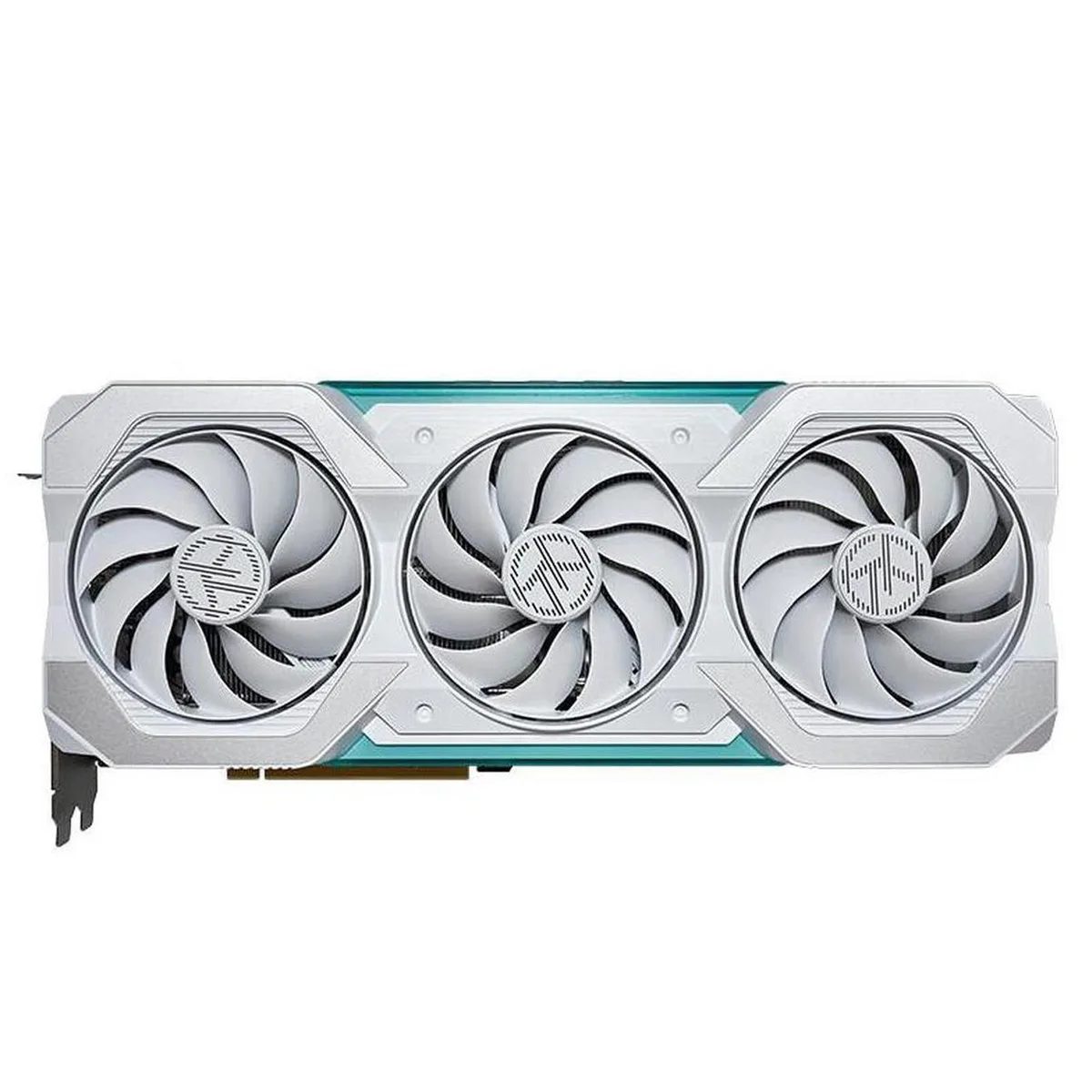
ASUS TX Gaming GeForce RTX 4060 Ti OC graphics card
Overclocked RTX 4060 Ti with 8 GB GDDR6, DLSS 3, HDMI 2.1 and DisplayPort 1.4, axial fans and a ventilated backplate for cooler, quieter operation
- Chipset ManufacturerNVIDIA
- DLSS 3 boosts frame rates using 4th Gen Tensor Cores
- Ray tracing runs faster on 3rd Gen RT Cores
- Factory overclock reaches 2610 MHz in OC mode
- Axial fans with smaller hub move more air over the heatsink
- Ventilated backplate and dual ball-bearing fans keep temperatures low and noise down
TX Gaming RTX 4060 Ti OC identity
The ASUS TX Gaming GeForce RTX 4060 Ti OC is a graphics card built on the Ada Lovelace architecture for 1080p and 1440p gaming. It carries 8 GB of GDDR6 memory and connects through a PCIe 4.0 interface. The factory overclock raises the boost clock to 2610 MHz in OC mode and 2580 MHz in default mode. It suits players who want DLSS 3 frame generation and improved ray tracing without moving to a larger card.
Thermals noise and power draw
The axial fan design uses a smaller hub to lengthen the blades and an annular seal to raise downward air pressure. A ventilated backplate works with the fans to keep GPU temperatures tightly controlled while lowering acoustic output. Dual ball bearings replace oil bearings to extend fan lifespan under continuous load. The card draws power through a standard 8-pin connector within the board power limit.
HDMI 2.1a and DisplayPort 1.4a outputs
Video outputs comprise HDMI 2.1a and DisplayPort 1.4a, supporting high-refresh 4K displays and variable refresh rate monitors. The bundle includes a GPU Tweak III licence for clock, voltage and fan-curve adjustments in a single window. Driver support enables DLSS 3 frame generation and the Ada optical flow accelerator for supported titles. No additional hardware adapters or physical accessories are mentioned in the specifications.
Points forts
- DLSS 3 boosts frame rates using 4th Gen Tensor Cores
- Ray tracing runs faster on 3rd Gen RT Cores
- Factory overclock reaches 2610 MHz in OC mode
- Axial fans with smaller hub move more air over the heatsink
- Ventilated backplate and dual ball-bearing fans keep temperatures low and noise down
Caractéristiques
| Brand | ASUS |
|---|---|
| Series | TX |
| Model | TX-RTX4060-O8G-GAMING |
| Chipset Manufacturer | NVIDIA |
Questions sur cet article
How do I install the ASUS TX Gaming GeForce RTX 4060 Ti OC and which step is often missed?
Insert the card into a PCIe 4.0 slot, connect the required power cable, and secure the bracket screw; the step often missed is plugging the display into the card’s HDMI 2.1a or DisplayPort 1.4a outputs instead of the motherboard.
What maintenance or replacement will the ASUS TX Gaming GeForce RTX 4060 Ti OC need later?
The dual ball-bearing axial fans are rated to last longer than oil-bearing designs, but dust should be cleared from the heatsink and ventilated backplate periodically to maintain airflow.
What limit appears first on the ASUS TX Gaming GeForce RTX 4060 Ti OC under sustained load?
The GPU will hold its 2610 MHz overclocked boost or 2580 MHz default boost until the thermal target is reached, at which point clock speeds are reduced to control temperature.
Également dans ce rayon
Les clients ont aussi comparé
Même rayon, même caisse — huit monnaies et un taux bloqué 30 minutes.


PrimoChill
PrimoChill Praxis Wetbench Open-Air Test Bench 461.8mm
- Open-Air
274,89 $US
0.00357BTC
En stock
Silverstone Technology
SilverStone Technology Strider 1200W 80 Plus Platinum Modular Power Supply
- ATX Mid Tower
- 1200W
324,03 $US
0.00420818BTC
En stock