DELL
DELL DELL-P2725DE 27" 2560x1440 100Hz USB-C monitor
- 27
562,49 $US756,99 $US−26%
0.00729313BTC
En stockNous acceptons la cryptomonnaie — les cryptos que vous détenez peuvent ainsi acheter du matériel réel.Payez en crypto, dépensez-la en matériel réel. Livraison assurée offerte partout dans le monde au-delà de 399 $. Cartons neutres, sans marque, expédiés depuis l’Allemagne.Livraison assurée offerte au-delà de 399 $. Votre taux est bloqué pendant 30 minutes dès l’ouverture de la caisse.Taux bloqué 30 minutes. Chaque article est scellé, son numéro de série est vérifié, et il est couvert par une garantie de 24 mois.Scellé, garanti 24 mois.


BenQ
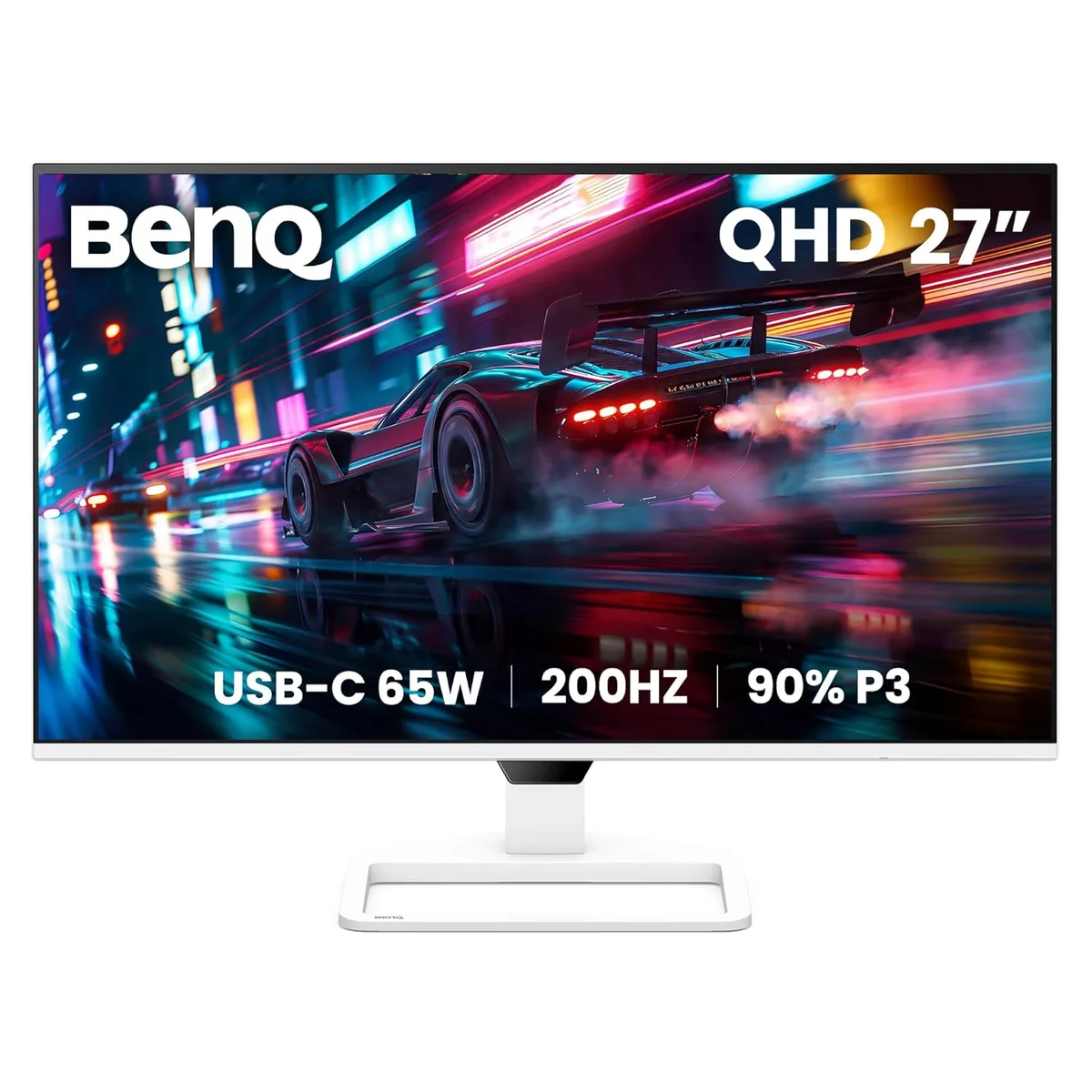
A 27-inch QHD IPS monitor with a 200Hz refresh rate, 90% DCI-P3 colour, USB-C 65W power delivery and built-in dual 5W speakers
The BenQ EW270Q is a 27-inch flat-panel display with a 2560 x 1440 resolution and a 200Hz refresh rate. Its IPS panel covers 90% of the DCI-P3 colour gamut and supports HDR10 for richer contrast. A USB-C port provides 65W power delivery alongside video and data, reducing cable clutter. Built-in dual 5W speakers and a headphone jack complete the multimedia package.
This monitor suits viewers who stream movies, play games at high frame rates and want a single-cable laptop connection. The 1ms overdrive response and 200Hz scan rate keep motion clear in fast scenes. Creative professionals needing factory-calibrated sRGB or Adobe RGB accuracy should verify the wide-gamut default meets their workflow before buying. Competitive esports players may prefer a faster native response panel.
At 2560 x 1440 the 200Hz refresh rate provides ample headroom for modern GPUs to deliver high frame rates without scaling artefacts. The 65W USB-C link powers most ultraportables while driving the display, simplifying desk setups. HDR10 support adds highlight detail in compatible content, though the 350 cd/m² peak brightness and 1200:1 contrast ratio limit the HDR impact compared to higher-spec displays.
| Brand | BenQ |
|---|---|
| Model | EW270Q |
| Cabinet Color | White |
| Screen Size | 27" |
| LED Backlight | Yes |
| Widescreen | Yes |
| Resolution | 2560 x 1440 (2K) |
| Refresh Rate | 200Hz |
| Viewing Angle | 178° (H) / 178° (V) |
| Display Colors | 1.07 Billion |
| Brightness | 350 cd/m2 |
| Contrast Ratio | 1,200:1 |
| Aspect Ratio | 16:9 |
| Response Time | 5.9ms (Typ.)/1ms (OD) |
| Panel | IPS |
| Color Gamut | 90% DCI-P3 |
| HDR Standard | HDR10 |
| Curved Surface Screen | Flat Panel |
| Video Ports | 1 x HDMI 2.0, 1 x DisplayPort 1.4 |
| Headphone | Headphone Jack |
| Power Supply | 100-240V, Built-in |
| Power Consumption | 26W (normal), 150W (max), 0.5W (sleep mode) |
| Stand Adjustments | Tilt: -5° to 20°, Swivel: -20° to 20° |
| Built-in Speakers | 2 x 5W |
| Built-in Webcam | No |
| HDCP Support | Yes |
| VESA Compatibility - Mountable | 100 x 100mm |
| Dimensions | 17.17" x 24.15" x 8.31" with Stand 14.64" x 24.15" x 2.35" without Stand |
| Weight | 10.23 lbs. with Stand 8.84 lbs. without Stand |
| Poids d’expédition | 6.80 kg |
| Dimensions du colis | 762 × 457 × 203 mm |
Yes, the monitor requires a GPU with DisplayPort 1.4 or HDMI 2.0 capable of driving 2560 x 1440 at 200Hz to use the full refresh rate.
The HDMI 2.0 port is backward compatible, but HDMI 1.4 sources are typically limited to 2560 x 1440 at 60Hz, so you will not reach 200Hz.
Open the on-screen display menu, select Color Settings, and verify the Color Gamut option reads DCI-P3; the panel covers 90% of that space.
Également dans ce rayon
Même rayon, même caisse — huit monnaies et un taux bloqué 30 minutes.
Ce que vous envoyez, et ce dans quoi vous lisez les prix.
Envoyé depuis votre portefeuille à la caisse
Affichage seul — le catalogue est libellé en dollars
Aucune monnaie ne correspond.
Choisissez la langue dans laquelle le site vous parle.
Première visite ?
Vous avez déjà un compte ?
Il n’y a pas de réinitialisation automatique : cette boutique n’envoie aucun e-mail, il n’existe donc aucun lien à usage unique à demander. Laissez l’adresse sur le compte, elle sera traitée à la main.
Demande enregistrée
Rien n’arrivera dans votre boîte de réception — cette boutique n’envoie aucun e-mail. Quelqu’un s’en occupe à la main.
Vous l’avez retrouvé ?