


BFKK
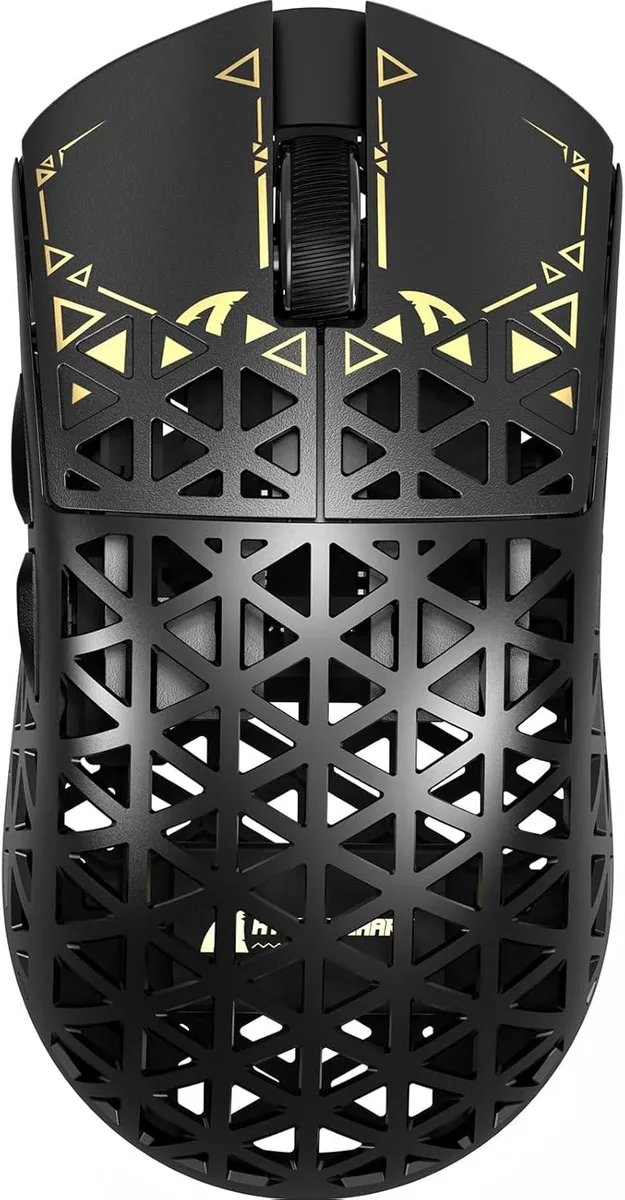
BFKK 8K Carbon Fiber Wireless Gaming Mouse 42000 DPI PAW3950 MAX 39g Black
Ultra-light 39 g carbon-fibre gaming mouse with PAW3950 MAX sensor, 42 000 DPI, 750 IPS, 50 g acceleration and tri-mode 2.4 GHz, Bluetooth and wired connectivity
- ColorBlack
- Ultra-light 39 g carbon-fiber shell for swift, precise aiming
- PAW3950 MAX sensor delivers 42 000 DPI, 750 IPS and 50 g acceleration
- Wireless 8 000 Hz polling rate cuts latency for competitive response
- Tri-mode Bluetooth, 2.4 GHz and wired USB works with PC, Mac and tablets
- Driver-free web app lets you remap buttons, record macros and tune DPI instantly
Ultra-Light Carbon Fibre Build
The BFKK gaming mouse weighs 39 grams thanks to an injection-moulded carbon fibre shell with a hollow structure. The material adds pressure and wear resistance while keeping the shape rigid enough for fast, precise movements across FPS, MMO, RPG, MOBA and Battle Royale titles.
PAW3950 MAX Sensor Performance
A PixArt PAW3950 MAX sensor delivers 42000 DPI, 750 IPS tracking speed and 50 g acceleration. Virgin-grade PTFE feet provide a consistent glide with reliable stopping power. Wireless polling runs at 8 kHz for low-latency response, while wired mode operates at 1 kHz without power-saving constraints.
Tri-Mode Connectivity and Cloud Driver
The mouse switches between Bluetooth, 2.4 GHz wireless and wired USB via a button on the underside, supporting Windows, macOS, PCs, laptops, Macs, tablets and consoles. An AI-designed cloud driver runs in the browser with no installation, handling DPI steps, polling rate, competitive mode, button remapping and macro recording.
Points forts
- Ultra-light 39 g carbon-fiber shell for swift, precise aiming
- PAW3950 MAX sensor delivers 42 000 DPI, 750 IPS and 50 g acceleration
- Wireless 8 000 Hz polling rate cuts latency for competitive response
- Tri-mode Bluetooth, 2.4 GHz and wired USB works with PC, Mac and tablets
- Driver-free web app lets you remap buttons, record macros and tune DPI instantly
Caractéristiques
| Color | Black |
|---|
Questions sur cet article
How do I install the BFKK wireless mouse and which step is often missed?
Plug the 2.4 GHz dongle into a USB port, press the bottom button to pick 2.4 GHz mode, and pair via the web driver; the step many skip is selecting 8 kHz polling in the driver before playing.
What part will need replacement first on the 39 g carbon-fibre shell?
The 100 % virgin-grade PTFE feet wear down with heavy use and should be swapped when glide consistency drops.
What limit appears first during long sessions at 42000 DPI?
Sustained 8 kHz wireless polling draws more power, so battery runtime becomes the limiting factor before sensor specs like 750 IPS or 50 g acceleration are reached.
Également dans ce rayon
Les clients ont aussi comparé
Même rayon, même caisse — huit monnaies et un taux bloqué 30 minutes.



AVID Products
AVID Products R-Go HE Vertical Wired 3400dpi Left Hand Mouse Black Silver
55,99 $US
0.00071393BTC
En stock