Seagate
Seagate Barracuda ST2000DM001 2 TB 3.5" 7200 rpm 64 MB SATA internal hard drive
58,99 $US
0.00074941BTC
En stockNous acceptons la cryptomonnaie — les cryptos que vous détenez peuvent ainsi acheter du matériel réel.Payez en crypto, dépensez-la en matériel réel. Livraison assurée offerte partout dans le monde au-delà de 399 $. Cartons neutres, sans marque, expédiés depuis l’Allemagne.Livraison assurée offerte au-delà de 399 $. Votre taux est bloqué pendant 30 minutes dès l’ouverture de la caisse.Taux bloqué 30 minutes. Chaque article est scellé, son numéro de série est vérifié, et il est couvert par une garantie de 24 mois.Scellé, garanti 24 mois.


DELL
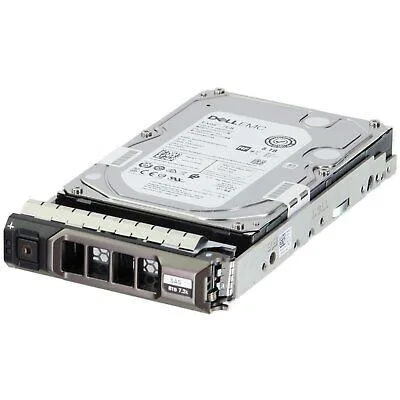
An 800 GB SAS enterprise SSD built for write-intensive workloads in compatible Dell PowerEdge servers
This new enterprise solid-state drive uses a 12 Gbps SAS interface and a 2.5-inch form factor. It provides 800 GB of capacity with write-intensive TLC flash for demanding server workloads.
The drive is validated for a wide range of PowerEdge rack, tower and modular chassis including R630, R740, R750, MX740c and MD1420. It is not for systems that lack a 12 Gbps SAS backplane or that require a different drive interface.
The single specification that determines fit is the 12 Gbps SAS connection. Only controllers and backplanes that support this exact link speed and protocol will recognise and run the drive at its rated performance.
| Brand | Dell |
|---|---|
| Model | DHRVV, KPM5XMUG800G |
| Interface | SAS |
The drive uses a 12Gbps SAS interface, so a matching SAS backplane or HBA is required for full speed; it will negotiate down on a 6Gbps link.
Yes, the 2.5-inch form factor matches the drive bays on the R730, R740 and all other listed PowerEdge models.
Check the drive status in the RAID controller BIOS or iDRAC; a healthy drive shows as Online with zero media errors and current firmware.
Également dans ce rayon
Même rayon, même caisse — huit monnaies et un taux bloqué 30 minutes.
Ce que vous envoyez, et ce dans quoi vous lisez les prix.
Envoyé depuis votre portefeuille à la caisse
Affichage seul — le catalogue est libellé en dollars
Aucune monnaie ne correspond.
Choisissez la langue dans laquelle le site vous parle.
Première visite ?
Vous avez déjà un compte ?
Il n’y a pas de réinitialisation automatique : cette boutique n’envoie aucun e-mail, il n’existe donc aucun lien à usage unique à demander. Laissez l’adresse sur le compte, elle sera traitée à la main.
Demande enregistrée
Rien n’arrivera dans votre boîte de réception — cette boutique n’envoie aucun e-mail. Quelqu’un s’en occupe à la main.
Vous l’avez retrouvé ?