


DELL
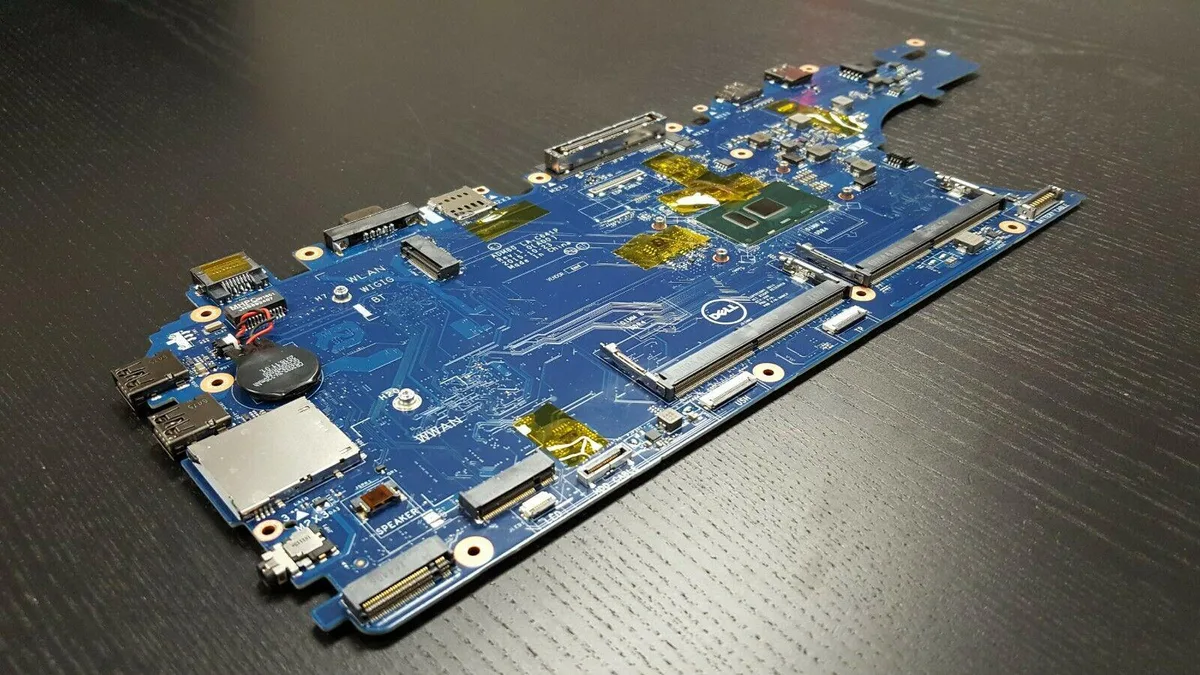
DELL Latitude E5570 Motherboard i5-6300U 2.4GHz 3MCRF
Genuine Dell replacement motherboard for Latitude 5570 with on-board Core i5-6300U at 2.4 GHz dual-core and integrated graphics, no USB-C
- Genuine Dell OEM replacement board for Latitude 5570
- Integrated Intel i5-6300U dual-core processor at 2.4 GHz
- Direct fit for models with UMA graphics and no USB-C
- Dell part number 3MCRF ensures exact match
- Ready-to-install system board with CPU already mounted
Genuine Dell Latitude E5570 replacement motherboard
This is a genuine Dell OEM system board built for the Latitude E5570 laptop. It carries an on-board Intel Core i5-6300U dual-core processor running at 2.4 GHz. The board matches the configuration that uses integrated Intel graphics and omits the optional USB-C port. Buyers should verify their part number before purchase.
Thermals noise and power draw in normal use
The motherboard is designed for the thermal envelope of the original Latitude E5570 chassis and its integrated graphics solution. Under typical office workloads the on-board i5-6300U operates within the laptop's standard cooling profile. Power consumption follows the processor's base specification for dual-core mobile operation.
Sustained load behaviour without the optional
During extended multi-threaded tasks the dual-core CPU maintains its rated frequency within the system's factory cooling limits. Integrated graphics share the same thermal budget so prolonged GPU compute will raise temperatures toward the design maximum. The board lacks the optional USB-C controller so that interface is unavailable regardless of workload.
Points forts
- Genuine Dell OEM replacement board for Latitude 5570
- Integrated Intel i5-6300U dual-core processor at 2.4 GHz
- Direct fit for models with UMA graphics and no USB-C
- Dell part number 3MCRF ensures exact match
- Ready-to-install system board with CPU already mounted
Caractéristiques
| Brand | DELL |
|---|
Questions sur cet article
How do I install the 3MCRF motherboard in my Latitude E5570 and what step is often missed?
Remove the battery, disconnect the display and keyboard cables, then swap the board; the step often missed is re‑applying thermal paste on the on‑board i5‑6300U before refitting the heatsink.
What maintenance or replacement will the 3MCRF board need later?
The CMOS coin cell will eventually need replacement, and the fan‑heatsink assembly should be cleaned periodically to keep the i5‑6300U at safe temperatures.
What limit appears first on the 3MCRF board under sustained load?
Thermal throttling of the soldered i5‑6300U at 2.4 GHz is the first limit, as the integrated graphics share the same cooling solution.
Également dans ce rayon
Les clients ont aussi comparé
Même rayon, même caisse — huit monnaies et un taux bloqué 30 minutes.


PrimoChill
PrimoChill Praxis Wetbench Open-Air Test Bench 461.8mm
- Open-Air
274,89 $US
0.00355238BTC
En stock
Silverstone Technology
SilverStone Technology Strider 1200W 80 Plus Platinum Modular Power Supply
- ATX Mid Tower
- 1200W
324,03 $US
0.00418741BTC
En stock