
DELL
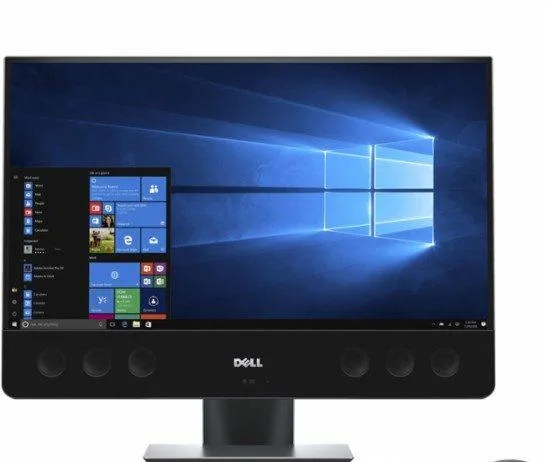
DELL Precision 27 5720 AIO i7-7700 32GB 500GB 4K Radeon Pro WX 4150
A 27-inch 4K all-in-one desktop with Intel Core i7-7700, 32GB DDR4, 500GB HDD and AMD Radeon Pro WX 4150 graphics
- Form FactorAll-in-One
- Operating SystemWindows 10 Pro
- Special FeaturesWebcam|Infra-Red Webcam|Fixed Stand|Built-in Bluetooth Adapt
- CPU TypeIntel Core i7 7th Gen
- L2 Cache Per CPUprocessor speed 3.60GHz - 4.20GHz
- CPU Main FeaturesIntel Core i7-7700 (Quad-core, 8M Cache)
- Sharp 27-inch 4K display for detailed visuals
- Intel Core i7-7700 up to 4.20 GHz handles demanding workloads
- 32 GB DDR4 memory keeps multi-tasking smooth
- AMD Radeon Pro WX 4150 4 GB GDDR5 drives professional graphics
- Thunderbolt 3 plus USB 3.1 and HDMI connect peripherals fast
All-in-One Workstation for Creative Professionals
The Precision 27 5720 AIO integrates a 27-inch UltraSharp 4K UHD display with an Intel Core i7-7700 processor, 32GB of 2400MHz DDR4 memory, and an AMD Radeon Pro WX 4150 graphics card with 4GB GDDR5. Windows 10 Pro, a 500GB 7200rpm hard drive, and Thunderbolt 3 connectivity complete a compact desktop built for colour-critical design and engineering tasks.
Upgrade from Dual-Monitor Towers
This system replaces a separate tower and monitor pair, reducing desk clutter and cable runs while delivering factory-calibrated 3840x2160 resolution. The jump is worth it when a single, verified 4K panel and workstation-class GPU drivers matter more than user-serviceable storage bays or discrete CPU upgrades.
Thunderbolt 3 and DisplayPort Define External
Thunderbolt 3 provides up to 40Gbps bandwidth for high-speed storage or additional displays, while the native DisplayPort output drives a second 4K panel at 60Hz. The all-in-one chassis limits internal drive upgrades to the single 2.5-inch bay, so capacity growth relies on external arrays rather than additional internal slots.
Points forts
- Sharp 27-inch 4K display for detailed visuals
- Intel Core i7-7700 up to 4.20 GHz handles demanding workloads
- 32 GB DDR4 memory keeps multi-tasking smooth
- AMD Radeon Pro WX 4150 4 GB GDDR5 drives professional graphics
- Thunderbolt 3 plus USB 3.1 and HDMI connect peripherals fast
Caractéristiques
| Series | Precision |
|---|---|
| Model | Precision 27 5720 AIO |
| Form Factor | All-in-One |
| Operating System | Windows 10 Pro |
| Special Features | Webcam|Infra-Red Webcam|Fixed Stand|Built-in Bluetooth Adapter|Built-in Speakers|Built-in Wi-Fi Adapter| |
| CPU Type | Intel Core i7 7th Gen |
| L2 Cache Per CPU | processor speed 3.60GHz - 4.20GHz |
| CPU Main Features | Intel Core i7-7700 (Quad-core, 8M Cache) |
| Graphics Card | AMD Radeon Pro WX 4150 4GB GDDR5 |
| Memory Capacity | 32GB DDR4 |
| Memory Spec | 32GB 4x8 2400MHz DDR4 |
| HDD | 500GB |
| HDD RPM | 7200rpm |
| Optical Drive Type | No |
| Screen Size | 27" |
| LAN Chipset | DW1820 |
| Video Ports | Display Port|Ethernet Port|USB 3.1|SD Card Slot|Audio Jack|Thunderbolt 3|HDMI|USB 3.0|USB-C| |
| Dimensions (H x W x D) | 1x1x1 |
| Weight | 1 |
| Package Type | Commercial |
| Package Contents | Desktop , power cord, mouse, keyboard |
Questions sur cet article
How much desk depth does the 27-inch All-in-One chassis require?
The Precision 27 5720 AIO uses a fixed stand, so the unit sits directly on the surface with no separate mount or adjustable arm to plan for.
What is the first step when adding more DDR4 memory to the four SO-DIMM slots?
Lay the screen face-down on a protected surface, remove the rear cover screws, then lift the cover to expose the 4×8 GB 2400 MHz modules before inserting new sticks.
When should the 500 GB 7200 rpm hard drive be replaced?
Plan a swap to an SSD once the mechanical drive shows SMART warnings or sustained throughput drops below what the i7-7700 and Radeon Pro WX 4150 need for 4K workloads.
Également dans ce rayon
Les clients ont aussi comparé
Même rayon, même caisse — huit monnaies et un taux bloqué 30 minutes.



HPE
HPE P22020B21 2U Cable Management Arm for DL38X Gen10 Plus Rail Kit
52,99 $US67,99 $US−22%
0.00067997BTC
En stock
Lenovo
Lenovo ThinkSystem ST250 V3 7DCEA01YNA Tower Server Xeon E-2434 16 GB RAM
1 267,99 $US
0.01627088BTC
En stock