DELL
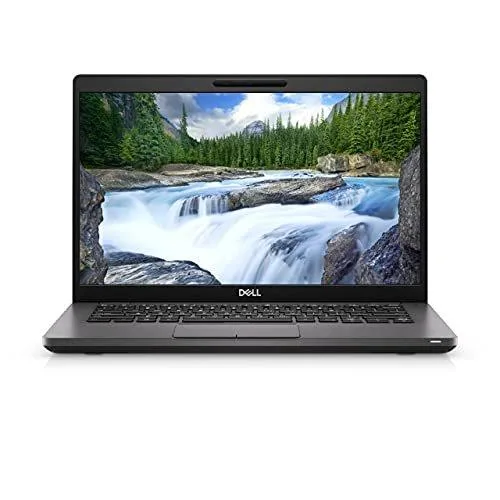
DELL Precision 3560 laptop i7-1165G7 32GB 512GB T500
- Gray
- Windows 10 Pro
641,99 $US
0.0081802BTC
En stockNous acceptons la cryptomonnaie — les cryptos que vous détenez peuvent ainsi acheter du matériel réel.Payez en crypto, dépensez-la en matériel réel. Livraison assurée offerte partout dans le monde au-delà de 399 $. Cartons neutres, sans marque, expédiés depuis l’Allemagne.Livraison assurée offerte au-delà de 399 $. Votre taux est bloqué pendant 30 minutes dès l’ouverture de la caisse.Taux bloqué 30 minutes. Chaque article est scellé, son numéro de série est vérifié, et il est couvert par une garantie de 24 mois.Scellé, garanti 24 mois.


DELL
A 15.6-inch mobile workstation with a quad-core Intel Core i7-1165G7 processor, 16 GB memory and a 512 GB SSD, running Windows 10 Pro
Options 16GB/512GB HD
The Dell Precision 3560 is a 15.6-inch mobile workstation built around a quad-core Intel Core i7-1165G7 processor that reaches 4.70 GHz with Turbo Boost. It ships with 16 GB of memory and a 512 GB SSD. The HD non-touch display runs at 1366 x 768 resolution. Integrated graphics handle the visual output. The unit comes upgraded to Windows 11 Pro and includes the charger.
The chassis measures 0.42 inches at the front and 0.56 inches at the rear, fitting a 45 W class processor into a frame that weighs 3.5 lb. Under sustained loads the cooling system manages the Tiger Lake core temperatures while fan noise remains typical for a thin-and-light workstation. Power draw scales with the 1.2 GHz base clock and the 4.7 GHz turbo ceiling. The 90 day hardware warranty covers the original thermal solution.
Two Thunderbolt 4 USB-C ports accept power input and carry video or data. Two USB 3.2 Gen 2 Type-A ports add legacy support, one of them power-enabled for charging devices. HDMI 2.0 drives an external monitor, RJ-45 provides wired networking, and a microSD reader handles media cards. A wedge lock slot secures the laptop physically. Buyers who need a higher-resolution panel or discrete graphics should consider other models.
| Style | Standard |
|---|---|
| Type | Workstation |
| Usage | Business |
| Brand | DELL |
| Series | Precision |
| Model | Precision 3560 Laptop |
| Part Number | Precision 3560 Laptop |
| Color | Gray |
| Cosmetic Condition | In overall Good condition - units will show signs of previous use. Upgraded to Windows 11 Pro. Box includes Laptop and Charger. 90 day hardware warranty. |
| Operating System | Windows 10 Pro |
| CPU Type | Intel Core i7 11th Gen |
| Processor Name | Intel Core i7-1165G7 |
| Core Name | Tiger Lake |
| Turbo Frequency | 4.70 GHz |
| Number of Cores | 4 |
| Screen Size | 15.6" |
| Touchscreen | Non-Touch Screen |
| Display Type | HD |
| Resolution | 1366 x 768 |
| Graphic Type | Integrated Card |
| SSD | 512GB |
| HDD | No |
| Memory | 16GB |
| WLAN | 802.11ac Wireless LAN |
| Bluetooth | Yes |
| Audio | Integrated Sound card |
| Speaker | Integrated Stereo Speakers |
| Touchpad | Yes |
| Webcam | Yes |
| Consumer Alert | In overall Good condition - units will show signs of previous use. Upgraded to Windows 11 Pro. Box includes Laptop and Charger. 90 day hardware warranty. |
Autres versions de ce modèle
Même famille, mémoire, ventirad ou fréquence différents — comparez avant de vous décider.
Remove the base cover, insert the drive at an angle into the M.2 slot, secure it with the single screw, then reinstall the cover and enable the drive in BIOS before the OS will see it.
The 512 GB SSD has a finite write endurance; after several years of heavy workloads it will wear out before the soldered 16 GB memory or the cooling fan.
The i7-1165G7 drops from its 4.7 GHz turbo to the 1.2 GHz base clock once the 3.5 lb chassis reaches its thermal ceiling.
Également dans ce rayon
Même rayon, même caisse — huit monnaies et un taux bloqué 30 minutes.
Ce que vous envoyez, et ce dans quoi vous lisez les prix.
Envoyé depuis votre portefeuille à la caisse
Affichage seul — le catalogue est libellé en dollars
Aucune monnaie ne correspond.
Choisissez la langue dans laquelle le site vous parle.
Première visite ?
Vous avez déjà un compte ?
Il n’y a pas de réinitialisation automatique : cette boutique n’envoie aucun e-mail, il n’existe donc aucun lien à usage unique à demander. Laissez l’adresse sur le compte, elle sera traitée à la main.
Demande enregistrée
Rien n’arrivera dans votre boîte de réception — cette boutique n’envoie aucun e-mail. Quelqu’un s’en occupe à la main.
Vous l’avez retrouvé ?