


GIGABYTE
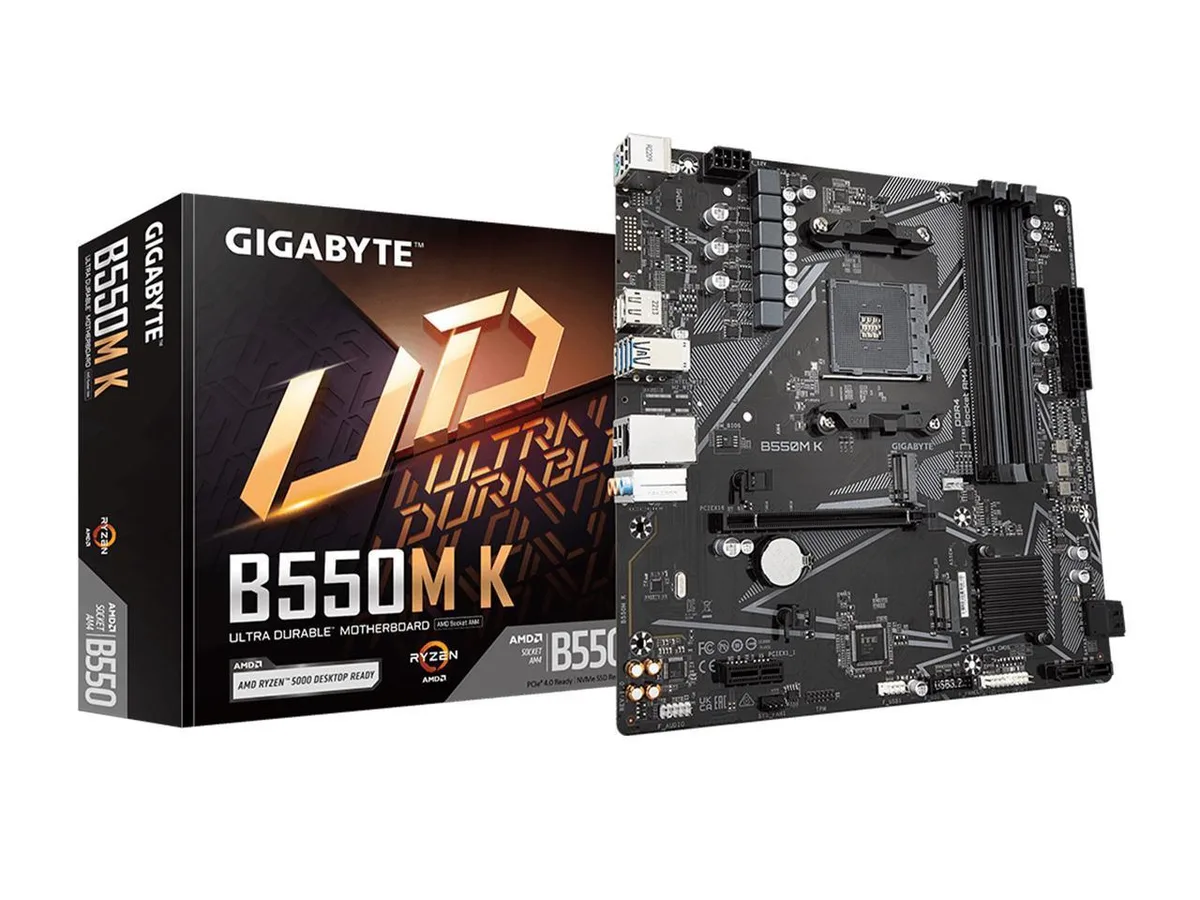
GIGABYTE B550M K AM4 AMD motherboard
Micro-ATX board for AM4 Ryzen 5000 and 3000 CPUs with four DDR4 slots up to 128 GB, PCIe 4.0 x16, dual M.2, four SATA 6Gb/s, Realtek GbE LAN and USB 3.2 Gen 1
- CPU Socket TypeAM4
- CPU TypeRyzen 5000 Series
- ChipsetAMD B550
- Number of Memory Slots4x288pin (DDR4)
- Memory StandardDDR4 3200
- Maximum Memory Supported128GB
- Supports Ryzen 5000, 4000 G-Series and 3000 Series CPUs on AM4 socket
- Dual-channel DDR4 up to 3200 MHz with four slots for 128 GB maximum
- PCIe 4.0 x16 slot plus M.2 connector for PCIe 4.0 or 3.0 SSDs
- Realtek GbE LAN delivers 1 Gbps wired networking
- Q-Flash Plus updates BIOS without CPU, memory or GPU installed
Micro-ATX board for Ryzen 5000 builds
The GIGABYTE B550M K fits the AM4 socket and uses the AMD B550 chipset in a micro-ATX layout. It accepts Ryzen 5000 Series and 3000 Series processors with four DDR4 DIMM slots supporting up to 128 GB in dual-channel mode. A single PCIe 4.0 x16 slot and one M.2 2280 connector wired to the CPU provide the primary expansion path for graphics and fast storage.
4+2 phase digital power with low RDS(on) MOSFETs
The 4+2 phase digital twin power design uses low RDS(on) MOSFETs to deliver stable voltage to supported CPUs. Smart Fan 5 headers allow header-based fan curves so cooling can stay quiet at idle and ramp up under load. No factory acoustics or thermal figures are published for this model.
Q-Flash Plus and RGB Fusion 2.0 included
Q-Flash Plus lets you update the BIOS without installing a CPU, memory or graphics card. RGB Fusion 2.0 software controls addressable and standard RGB strips connected to the onboard headers. The retail package supplies an I/O shield, two SATA cables and M.2 mounting hardware.
Points forts
- Supports Ryzen 5000, 4000 G-Series and 3000 Series CPUs on AM4 socket
- Dual-channel DDR4 up to 3200 MHz with four slots for 128 GB maximum
- PCIe 4.0 x16 slot plus M.2 connector for PCIe 4.0 or 3.0 SSDs
- Realtek GbE LAN delivers 1 Gbps wired networking
- Q-Flash Plus updates BIOS without CPU, memory or GPU installed
Caractéristiques
| Brand | GIGABYTE |
|---|---|
| Model | B550M K |
| CPU Socket Type | AM4 |
| CPU Type | Ryzen 5000 Series |
| Chipset | AMD B550 |
| Number of Memory Slots | 4x288pin (DDR4) |
| Memory Standard | DDR4 3200 |
| Maximum Memory Supported | 128GB |
| Channel Supported | Dual Channel |
| ECC Supported | Support for ECC Un-buffered DIMM 1Rx8/2Rx8 memory modules* * ECC memory (ECC mode) support varies by CPU Support for non-ECC Un-buffered DIMM 1Rx8/2Rx8/1Rx16 memory modules |
| Buffer Supported | Un-buffered |
| Memory Feature | Support for Extreme Memory Profile (XMP) memory modules |
| PCI Express 4.0 x16 | 1 x PCI Express x16 slot, integrated in the CPU: AMD Ryzen 5000 Series/3000 Series Processors support PCIe 4.0 x16 mode AMD Ryzen 5000 G-Series/4000 G-Series Processors support PCIe 3.0 x16 mode |
| PCI Express x1 | 1 x PCI Express x1 slot, integrated in the Chipset: Supporting PCIe 3.0 x1 mode |
| Serial ATA (SATA) | 4 x SATA 6Gb/s |
| M.2 | 1 x M.2 connector (M2A_CPU), integrated in the CPU, supporting Socket 3, M key, type 2280 SSDs: AMD Ryzen 5000 Series/3000 Series Processors support SATA and PCIe 4.0 x4/x2 SSDs AMD Ryzen 5000 G-Series/4000 G-Series Processors support SATA and PCIe 3.0 x4/x2 SSDs 1 x M.2 connector (M2B_SB), integrated in the Chipset, supporting Socket 3, M key, type 2280 SSDs: Supporting PCIe 3.0 x2 SSDs |
| Audio Channels | Realtek Audio CODEC High Definition Audio 2/4/5.1/7.1-channel * You can change the functionality of an audio jack using the audio software. To configure 7.1-channel audio, access the audio software for audio settings. |
| LAN Chipset | Realtek GbE LAN chip |
| Max LAN Speed | 1Gbps |
| Back I/O Ports | 1 x PS/2 keyboard/mouse port 1 x DisplayPort 1 x HDMI port 4 x USB 3.2 Gen 1 ports 4 x USB 2.0/1.1 ports 1 x RJ-45 port 3 x audio jacks |
| Onboard USB | 1 x USB 3.2 Gen 1 header 1 x USB 2.0/1.1 header |
| Other Connectors | 1 x CPU fan header 1 x system fan header 2 x M.2 Socket 3 connectors 4 x SATA 6Gb/s connectors 1 x front panel header 1 x front panel audio header 1 x Trusted Platform Module (TPM) header (2x6 pin, for the GC-TPM2.0_S module only) 1 x Clear CMOS jumper |
| Form Factor | Micro ATX |
| Dimensions (W x L) | 9.6" x 9.6" |
| Power Pin | 1 x 24-pin ATX main power connector 1 x 8-pin ATX 12V power connector |
| Windows 11 | Supported |
| Features | Support for APP Center * Available applications in APP Center may vary by motherboard model. Supported functions of each application may also vary depending on motherboard specifications. @BIOS EasyTune Smart Backup System Information Viewer Support for Q-Flash Support for Xpress Install |
Questions sur cet article
How do I install the M.2 2280 SSD into the M2A_CPU slot and what step do people miss?
Insert the M.2 2280 SSD at an angle into the M2A_CPU slot, secure it with the supplied standoff and screw, then verify in BIOS that the drive appears — many forget to enable the slot or to check the PCIe 4.0 x4 mode matches their Ryzen 5000 Series CPU.
What maintenance or replacement will the board need later?
The CMOS battery will eventually need replacement to keep BIOS settings; the 4+2 phase digital VRM with low RDS(on) MOSFETs and Smart Fan 5 headers should run for years without component swaps if airflow is adequate.
What limit appears first under sustained heavy load?
The 4+2 phase VRM thermal capacity is the first bottleneck during prolonged all-core loads on Ryzen 5000 Series CPUs; adequate case airflow and Smart Fan 5 tuning delay throttling.
Également dans ce rayon
Les clients ont aussi comparé
Même rayon, même caisse — huit monnaies et un taux bloqué 30 minutes.


PrimoChill
PrimoChill Praxis Wetbench Open-Air Test Bench 461.8mm
- Open-Air
274,89 $US
0.00354624BTC
En stock
Silverstone Technology
SilverStone Technology Strider 1200W 80 Plus Platinum Modular Power Supply
- ATX Mid Tower
- 1200W
324,03 $US
0.00418017BTC
En stock