


GIGABYTE
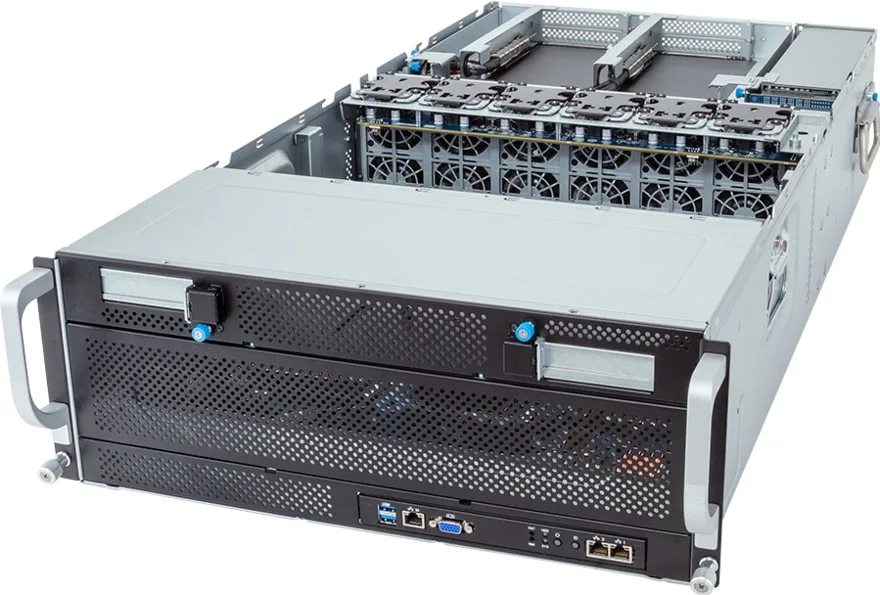
GIGABYTE G493-ZB0-AAP1-L1002 rack server Dual EPYC 9224 128GB DDR5 960GB M.2 25Gb LAN
Dual AMD EPYC 9224 processors, 128GB DDR5 4800 memory, 960GB M.2 storage and 25Gb LAN in a 24-bay GPU-dense chassis
- Dual EPYC 9224 CPUs deliver 48 threads for heavy workloads
- 128GB DDR5 4800 memory supports 12-channel bandwidth across 24 DIMM slots
- 960GB M.2 SSD provides fast boot and OS storage
- Broadcom BCM57414 25Gb/s dual-port LAN enables high-throughput networking
- Eight FHFL PCIe Gen5 x16 slots accommodate up to 8 dual-slot GPUs
Dual EPYC 9224 Server for GPU Workloads
This 4U rack system ships with two AMD EPYC 9224 processors, each delivering 24 cores and 48 threads. It includes 128 GB of DDR5 4800 memory across 24 DIMM slots and a 960 GB M.2 drive. The chassis supports up to 8 dual-slot Gen5 GPUs for heavy parallel compute.
Thermal Design and Network Throughput
Ten system fans maintain airflow across the CPU sockets and the full-length GPU slots under sustained load. Dual 10 Gb/s LAN ports from the Intel X710-AT2 controller and a Broadcom BCM57414 25 Gb/s two-port card provide high-bandwidth fabric connectivity for cluster deployment.
Rackmount Build and Expansion Layout
The barebones G493-ZB0-AAP1 frame offers eight full-height full-length PCIe Gen5 x16 slots for accelerators plus two additional Gen5 x16 slots for networking or storage add-in cards. Two M.2 sockets accept PCIe Gen3 x4 and x1 modules for boot or cache drives.
Points forts
- Dual EPYC 9224 CPUs deliver 48 threads for heavy workloads
- 128GB DDR5 4800 memory supports 12-channel bandwidth across 24 DIMM slots
- 960GB M.2 SSD provides fast boot and OS storage
- Broadcom BCM57414 25Gb/s dual-port LAN enables high-throughput networking
- Eight FHFL PCIe Gen5 x16 slots accommodate up to 8 dual-slot GPUs
Caractéristiques
Aucune caractéristique publiée pour cet article pour l’instant.
Questions sur cet article
How do I install the dual AMD EPYC 9224 processors into the G493-ZB0-AAP1-L1002 server?
Align each EPYC 9224 CPU with the socket triangle markers, lower gently without force, and secure the retention bracket evenly; the step often missed is applying thermal paste uniformly before mounting the heatsink to prevent hot spots.
What maintenance will the 128GB DDR5 4800 memory and 960GB M.2 SSD require over time?
DDR5 RDIMM modules need no routine service beyond firmware updates; the M.2 PCIe Gen3 drive should be monitored via SMART for wear leveling and replaced once its endurance rating is reached.
Which limit appears first when all 8 dual-slot Gen5 GPUs run sustained workloads?
The 12-channel DDR5 memory subsystem feeding 24 DIMM slots becomes the bottleneck before the PCIe Gen5 x16 lanes saturate under continuous GPU compute demand.
Également dans ce rayon
Les clients ont aussi comparé
Même rayon, même caisse — huit monnaies et un taux bloqué 30 minutes.



HPE
HPE P22020B21 2U Cable Management Arm for DL38X Gen10 Plus Rail Kit
52,99 $US67,99 $US−22%
0.00067489BTC
En stock
Lenovo
Lenovo ThinkSystem ST250 V3 7DCEA01YNA Tower Server Xeon E-2434 16 GB RAM
1 267,99 $US
0.01614945BTC
En stock