


GIGABYTE
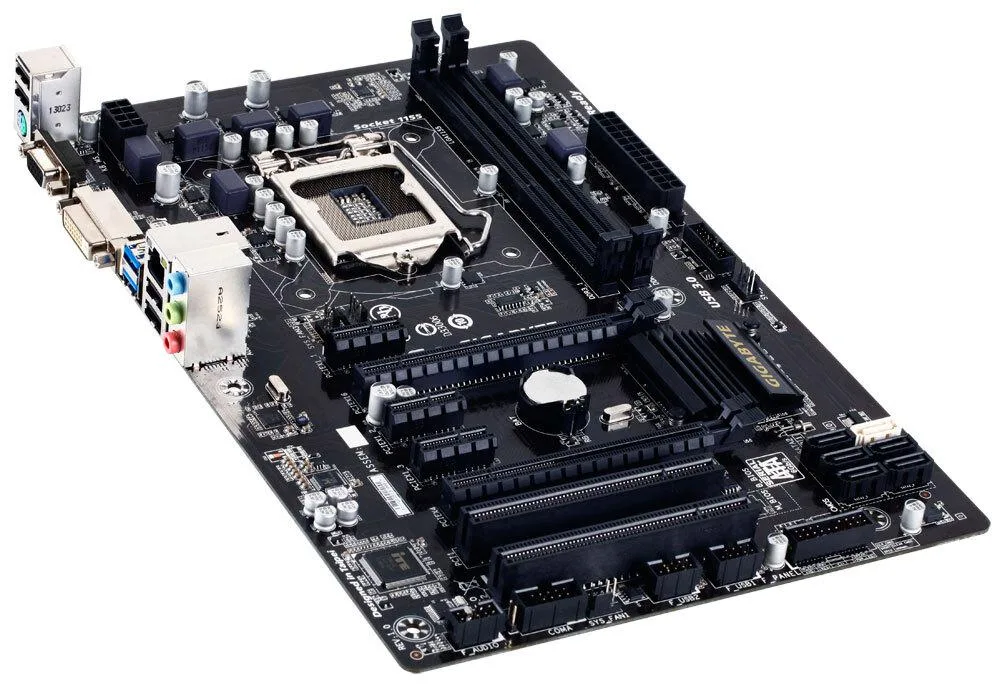
GIGABYTE GA-B75-DS3V Intel motherboard LGA 1155
LGA 1155 motherboard with Intel B75 chipset, dual-channel DDR3 to 16 GB, PCI Express Gen 3.0, USB 3.0, SATA 3.0, 2-way CrossFire and DVI output
- CPU Socket TypeLGA 1155
- Supports Intel 22nm CPUs via LGA 1155 socket
- Dual-channel DDR3 memory up to 16 GB capacity
- PCI Express Gen 3.0 enables faster GPU bandwidth
- All solid capacitor design for long-term reliability
- GIGABYTE 333 acceleration with USB 3.0 and SATA 3.0
Socket and purpose
The GIGABYTE GA-B75-DS3V is an LGA 1155 motherboard built around the Intel B75 Express chipset. It targets builders who need a straightforward platform for 2nd or 3rd generation Intel Core i7, i5, i3, Pentium or Celeron processors in a desktop system.
Upgrade context
It replaces older LGA 1155 boards that lack PCI Express Gen 3.0 support or native USB 3.0 and SATA 3.0 connectivity. The jump is worthwhile when moving to a 22 nm Ivy Bridge CPU to unlock DDR3 1600 MHz memory speeds and XMP profile support.
Interface limits
The board provides two DDR3 DIMM slots capped at 16 GB total system memory and a 32-bit OS will not show more than 4 GB. Integrated graphics output is limited to D-Sub and DVI-D with a maximum resolution of 1920x1200.
Points forts
- Supports Intel 22nm CPUs via LGA 1155 socket
- Dual-channel DDR3 memory up to 16 GB capacity
- PCI Express Gen 3.0 enables faster GPU bandwidth
- All solid capacitor design for long-term reliability
- GIGABYTE 333 acceleration with USB 3.0 and SATA 3.0
Caractéristiques
| CPU Socket Type | LGA 1155 |
|---|
Questions sur cet article
What size case and mounting holes does this LGA 1155 board need?
The GA-B75-DS3V uses a standard ATX form factor, so it fits any ATX case with the regular nine-hole mounting pattern and I/O shield cut-out.
Which BIOS setting often gets missed when installing a 22 nm Ivy Bridge CPU for DDR3 1600 support?
After seating the processor, enter the UEFI DualBIOS and enable the XMP profile on the memory; without that step the DDR3 1600 modules will run at 1333 MHz instead.
Which onboard video port gives the highest resolution for a legacy monitor?
The DVI-D output supports up to 1920x1200, while the D-Sub port is limited to lower resolutions, so use DVI-D for the sharpest image.
Également dans ce rayon
Les clients ont aussi comparé
Même rayon, même caisse — huit monnaies et un taux bloqué 30 minutes.


PrimoChill
PrimoChill Praxis Wetbench Open-Air Test Bench 461.8mm
- Open-Air
274,89 $US
0.00355155BTC
En stock
Silverstone Technology
SilverStone Technology Strider 1200W 80 Plus Platinum Modular Power Supply
- ATX Mid Tower
- 1200W
324,03 $US
0.00418643BTC
En stock