


GIGABYTE
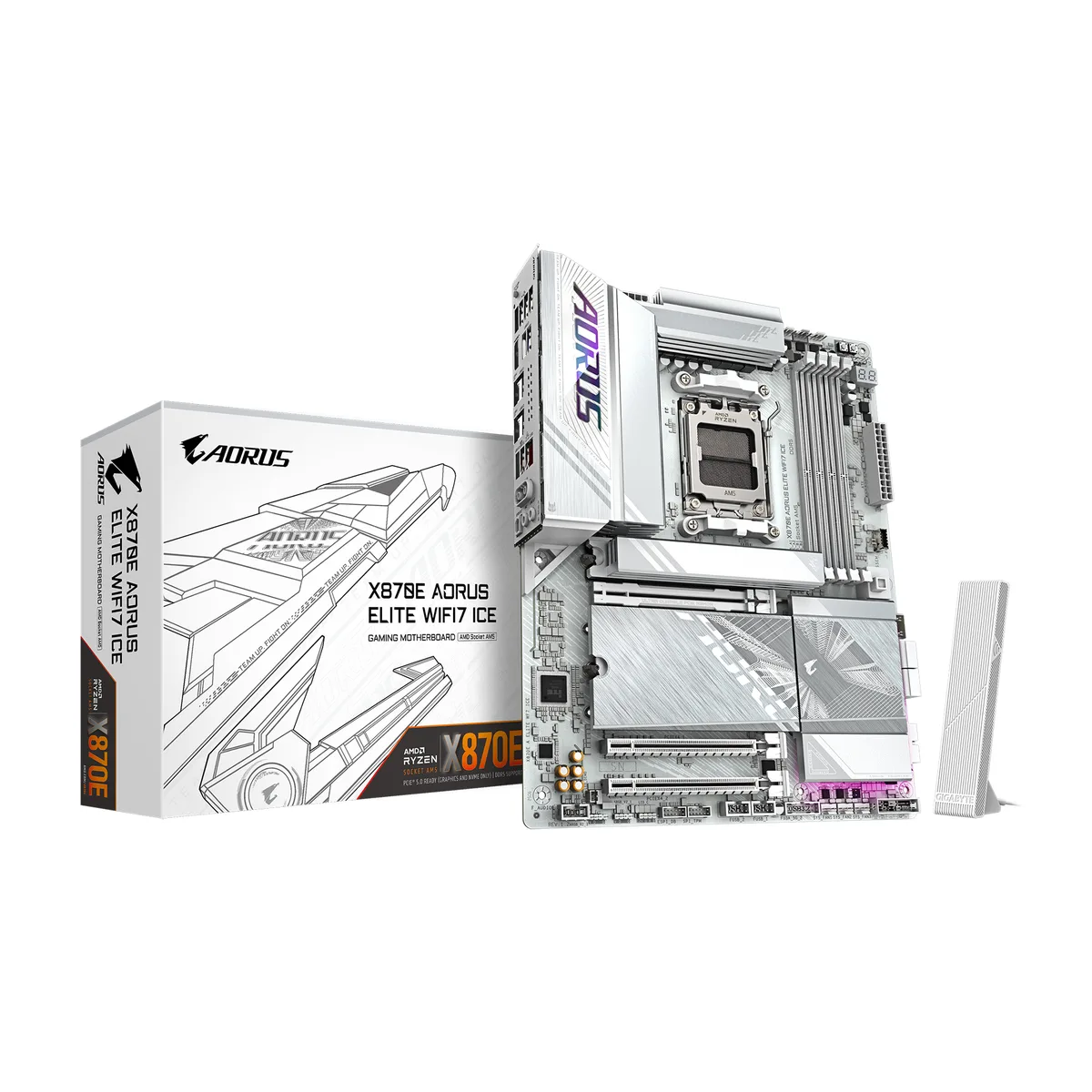
GIGABYTE X870E AORUS ELITE WIFI7 ICE AMD motherboard
ATX board for AM5 Ryzen CPUs with DDR5 up to 8200, four M.2 slots, PCIe 5.0, dual USB4, Wi-Fi 7 and 2.5GbE LAN
- CPU Socket TypeAM5
- CPU TypeRyzen 7000 Series / Ryzen 8000 Series / Ryzen 9000 Series
- ChipsetAMD X870E
- Number of Memory Slots4x288pin (DDR5)
- Memory StandardDDR5 4400 / DDR5 4800 / DDR5 5200 / DDR5 5600 / DDR5 6000 /
- Maximum Memory Supported256GB
- Supports Ryzen 9000, 8000 and 7000 series processors via AM5 socket
- 16+2+2 phase digital VRM delivers stable power for high-performance CPUs
- Four DDR5 DIMM slots with AMD EXPO support up to 256 GB total capacity
- Four M.2 slots including three PCIe 5.0 x4 for ultra-fast storage
- Wi-Fi 7, BLUETOOTH 5.4 and 2.5 GbE LAN provide high-speed connectivity
AM5 Platform For Ryzen 7000 8000 9000
This ATX motherboard uses the AMD X870E chipset and AM5 socket to support Ryzen 7000, 8000 and 9000 series processors. It provides four DDR5 DIMM slots with AMD EXPO profiles up to 8200 MT/s and a maximum capacity of 256 GB. A 16+2+2 phase digital VRM delivers stable power for multi-core workloads.
Four M.2 Slots With Three At PCIe 5.0
Three M.2 connectors run at PCIe 5.0 x4 from the CPU while the fourth uses chipset lanes. The primary PCIe 5.0 x16 graphics slot shares bandwidth with two of the CPU-attached M.2 slots, so builders adding two high-speed drives will see the GPU drop to x8. DIY features include screwless EZ-Latch releases for both the GPU and M.2 heatsinks, plus a Wi-Fi EZ-Plug antenna mount.
Dual USB4 Type-C Ports For 40 Gbps I/O
Two rear USB4 Type-C ports provide DisplayPort Alt Mode and up to 40 Gbps throughput for external storage or docks. Networking combines a 2.5 GbE LAN port with Wi-Fi 7 (802.11 be) and Bluetooth 5.4 using a directional high-gain antenna. Audio is handled by a Realtek ALC1220 codec with 7.1-channel output and audiophile-grade capacitors.
Points forts
- Supports Ryzen 9000, 8000 and 7000 series processors via AM5 socket
- 16+2+2 phase digital VRM delivers stable power for high-performance CPUs
- Four DDR5 DIMM slots with AMD EXPO support up to 256 GB total capacity
- Four M.2 slots including three PCIe 5.0 x4 for ultra-fast storage
- Wi-Fi 7, BLUETOOTH 5.4 and 2.5 GbE LAN provide high-speed connectivity
Caractéristiques
| Brand | GIGABYTE |
|---|---|
| Model | X870E AORUS ELITE WIFI7 ICE |
| CPU Socket Type | AM5 |
| CPU Type | Ryzen 7000 Series / Ryzen 8000 Series / Ryzen 9000 Series |
| Chipset | AMD X870E |
| Number of Memory Slots | 4x288pin (DDR5) |
| Memory Standard | DDR5 4400 / DDR5 4800 / DDR5 5200 / DDR5 5600 / DDR5 6000 / DDR5 6200 / DDR5 6400 / DDR5 6600 / DDR5 6666 / DDR5 6800 / DDR5 7000 / DDR5 7200 / DDR5 7600 / DDR5 7800 / DDR5 8000 / DDR5 8200 |
| Maximum Memory Supported | 256GB |
| Memory Performance Profile | AMD EXPO |
| ECC Supported | Non-ECC |
| Buffer Supported | Un-buffered |
| Memory Feature | Support for non-ECC Un-buffered DIMM 1Rx8/2Rx8/1Rx16 memory modules |
| PCI Express 5.0 x16 | 1 x PCI Express x16 slot (PCIEX16), integrated in the CPU: AMD Ryzen 9000/7000 Series Processors support PCIe 5.0 x16 mode * The M2B_CPU and M2C_CPU connectors share bandwidth with the PCIEX16 slot. When the M2B_CPU or M2C_CPU connector is populated, the PCIEX16 slot operates at up to x8 mode. AMD Ryzen 8000 Series-Phoenix 1 Processors support PCIe 4.0 x8 mode AMD Ryzen 8000 Series-Phoenix 2 Processors support PCIe 4.0 x4 mode (The PCIEX16 slot can only support a graphics card or an NVMe SSD. If only one graphics card is to be installed, be sure to install it in the PCIEX16 slot.) |
| PCI Express x4 | 1 x PCI Express x16 slot, supporting PCIe 4.0 and running at x4 (PCIEX4_1) 1 x PCI Express x16 slot, supporting PCIe 3.0 and running at x4 (PCIEX4_2) |
| M.2 | 1 x M.2 connector (M2A_CPU), integrated in the CPU, supporting Socket 3, M key, type 25110/22110/2580/2280 SSDs: AMD Ryzen 9000/7000 Series Processors support PCIe 5.0 x4/x2 SSDs AMD Ryzen 8000 Series-Phoenix 1 Processors support PCIe 4.0 x4/x2 SSDs AMD Ryzen 8000 Series-Phoenix 2 Processors support PCIe 4.0 x4/x2 SSDs 2 x M.2 connectors (M2B_CPU, M2C_CPU), integrated in the CPU, supporting Socket 3, M key, type 22110/2280 SSDs: AMD Ryzen 9000/7000 Series Processors support PCIe 5.0 x4/x2 SSDs * The M2B_CPU and M2C_CPU connectors become unavailable when an AMD Ryzen 8000 Series-Phoen |
| Audio Chipset | Realtek ALC1220 CODEC |
| Audio Channels | 7.1 Channels |
| Max LAN Speed | 2.5Gbps |
| Wireless LAN | Wi-Fi 802.11 be |
| Bluetooth | BLUETOOTH 5.4 |
| Back I/O Ports | 1 x Q-Flash Plus button 4 x USB 2.0/1.1 ports 4 x USB 3.2 Gen 1 ports 1 x HDMI port (Note) 2 x USB4 USB Type-C ports (DisplayPort (Note)) 1 x RJ-45 port 2 x USB 3.2 Gen 2 Type-A ports (red) 2 x antenna connectors (2T2R) 2 x audio jacks 1 x optical S/PDIF Out connector |
| Onboard USB | 1 x USB Type-C header, with USB 3.2 Gen 2x2 support 2 x USB 3.2 Gen 1 headers 2 x USB 2.0/1.1 headers |
| Other Connectors | 1 x CPU fan header 1 x CPU fan/water cooling pump header 3 x system fan headers 1 x system fan/water cooling pump header 3 x addressable RGB Gen2 LED strip headers 1 x RGB LED strip header 4 x M.2 Socket 3 connectors 4 x SATA 6Gb/s connectors 1 x front panel header 1 x front panel audio header 1 x Trusted Platform Module header (For the GC-TPM2.0 SPI/GC-TPM2.0 SPI 2.0/GC-TPM2.0 SPI V2 module only) 1 x HDMI port (Note) 1 x power button 1 x reset button 1 x reset jumper 1 x Clear CMOS jumper |
| Form Factor | ATX |
| Dimensions (W x L) | 12.0" x 9.6" |
| Power Pin | 1 x 24-pin ATX main power connector 2 x 8-pin ATX 12V power connectors |
| BIOS Feature | 1 x 256 Mbit flash Use of licensed AMI UEFI BIOS PnP 1.0a, DMI 2.7, WfM 2.0, SM BIOS 2.7, ACPI 5.0 |
| Windows 11 | Supported |
| Features | Support for GIGABYTE Control Center (GCC) Support for Q-Flash Support for Q-Flash Plus Support Smart Backup |
| Poids d’expédition | 1.02 kg |
| Dimensions du colis | 340 × 279 × 89 mm |
Questions sur cet article
How do I install the Wi-Fi 7 antenna using the WIFI EZ-Plug, and what step is often missed?
Align the keyed connector with the rear I/O port and push straight in until it clicks; the step often missed is not seating it fully, leaving the antenna loose and signal weak.
What maintenance will the VRM and M.2 thermal guards need over time?
Dust the VRM Thermal Armor Advanced fins and M.2 Thermal Guard L surfaces with compressed air every few months; the screwless EZ-Latch Click heatsinks lift off without tools for deep cleaning.
Which limit appears first when the PCIe 5.0 x16 slot runs at full speed with an M.2 drive in M2B_CPU or M2C_CPU?
The PCIEX16 slot drops from PCIe 5.0 x16 to x8 because M2B_CPU and M2C_CPU share CPU lanes with the primary graphics slot.
Également dans ce rayon
Les clients ont aussi comparé
Même rayon, même caisse — huit monnaies et un taux bloqué 30 minutes.


PrimoChill
PrimoChill Praxis Wetbench Open-Air Test Bench 461.8mm
- Open-Air
274,89 $US
0.0035499BTC
En stock
Silverstone Technology
SilverStone Technology Strider 1200W 80 Plus Platinum Modular Power Supply
- ATX Mid Tower
- 1200W
324,03 $US
0.00418449BTC
En stock