

Acer America
Acer America Aspire Go 15 AG15-51P-510U 15.3" WUXGA i5-1334U 8GB 256GB Steel Gray
- Steel Gray
- Windows 11 Home
431,99 $US
0.00549214BTC
En stockNous acceptons la cryptomonnaie — les cryptos que vous détenez peuvent ainsi acheter du matériel réel.Payez en crypto, dépensez-la en matériel réel. Livraison assurée offerte partout dans le monde au-delà de 399 $. Cartons neutres, sans marque, expédiés depuis l’Allemagne.Livraison assurée offerte au-delà de 399 $. Votre taux est bloqué pendant 30 minutes dès l’ouverture de la caisse.Taux bloqué 30 minutes. Chaque article est scellé, son numéro de série est vérifié, et il est couvert par une garantie de 24 mois.Scellé, garanti 24 mois.


HP
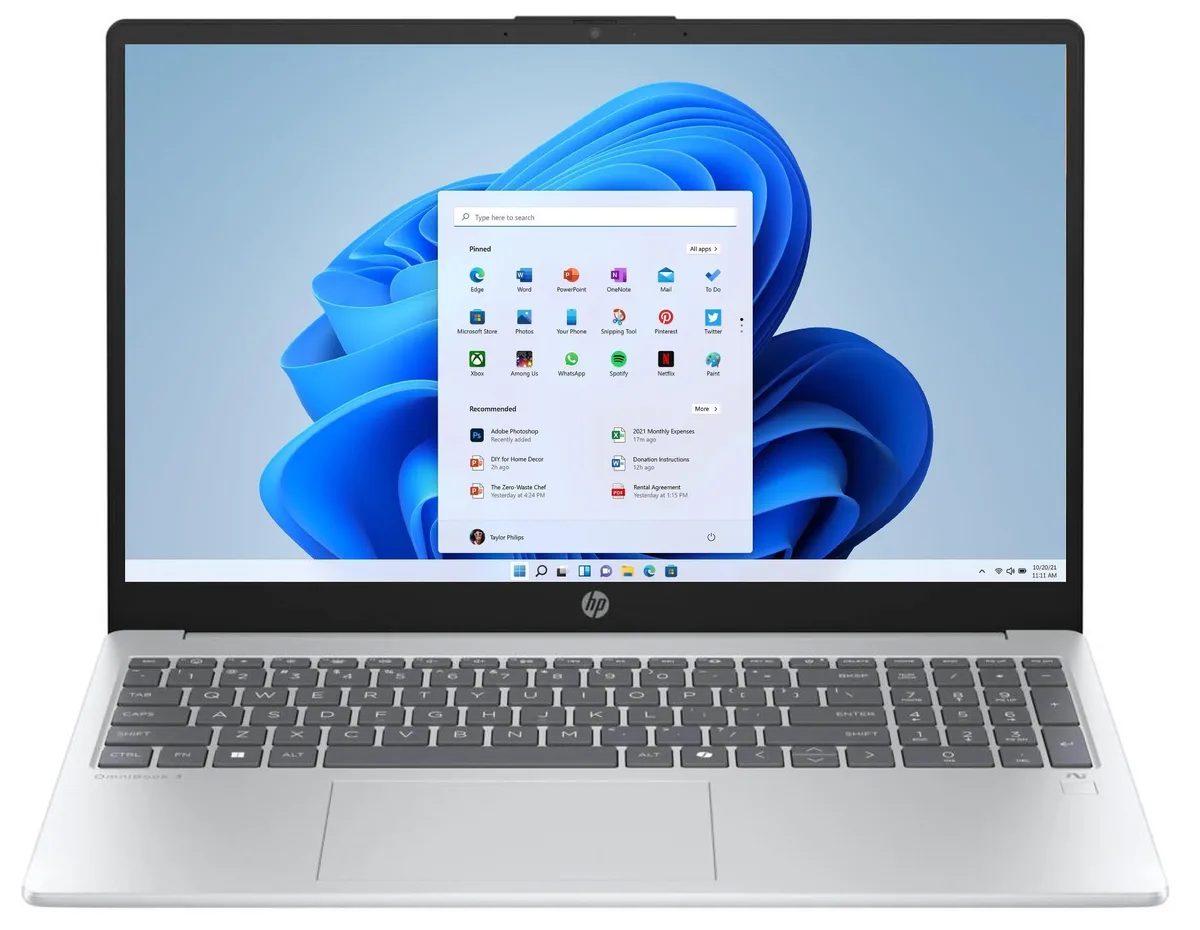
A 16-inch WUXGA touch laptop with an 8-core Ryzen 5 40 processor, 16 GB DDR5 memory and a 256 GB NVMe SSD
The HP OmniBook 3 is a new 16 inch notebook running Windows 11 Home. An AMD Ryzen 5 40 eight-core processor reaches 4.3 GHz turbo frequency with 4 MB L3 cache. Integrated AMD Radeon graphics drive a 16.0 inch WUXGA IPS touchscreen at 1920 x 1200 resolution. 16 GB DDR5 memory and a 256 GB NVMe SSD complete the core specification.
The NVMe SSD delivers up to 15x faster performance than a traditional hard drive for boot and app loading. The 16 inch 1920 x 1200 touch panel adds direct screen control that smaller or non-touch displays lack. The eight-core Ryzen 5 40 handles multitasking, streaming, 1080p gaming and photo or video editing more smoothly than dual-core or quad-core alternatives. Buyers who need more storage or a discrete GPU should look elsewhere.
Verify that 256 GB NVMe capacity suits your local file library and that integrated AMD Radeon graphics meet your rendering or gaming targets. Confirm Windows 11 Home covers any Pro-level management features you require. Ensure the 16 inch form factor fits your carrying routine and that the Silver finish matches your preference. The GaN power adapter is included for efficient charging.
| Brand | HP |
|---|---|
| Series | OmniBook |
| Model | 3 |
| Part Number | D10E8UA#ABA |
| Color | Silver |
| Operating System | Windows 11 Home |
| CPU Type | AMD Ryzen 5 4000 Series |
| Turbo Frequency | 4.3GHz |
| Number of Cores | 8-core Processor |
| CPU L3 Cache | 4 MB |
| Screen Size | 16.0" |
| Touchscreen | Yes |
| Wide Screen Support | Yes |
| Display Type | WUXGA |
| Resolution | 1920 x 1200 |
| Panel | IPS |
| GPU/VPU | AMD Radeon Graphics |
| Graphic Type | Integrated Card |
| SSD | 256 GB |
| HDD | No |
| Storage Spec | 256GB NVMe SSD |
| Memory | 16GB |
| Memory Speed | DDR5 5500 |
| Memory Spec | 16 GB onboard |
| Memory Slot (Total) | 0 |
| Memory Slot (Available) | 0 |
| Max Memory Supported | 16 GB |
| Optical Drive Type | No |
| WLAN | 802.11ax Wireless LAN |
| WiFi Generation | Wi-Fi 6 |
| Bluetooth | Bluetooth 5.4 |
| USB | 4 |
| Video Port | 1 x HDMI |
| HDMI | 1 x HDMI |
| Audio Ports | 1 x Headphone/Microphone Combo Jack |
| Audio | Integrated Sound card |
| Speaker | Integrated Stereo Speakers |
| Touchpad | Yes |
| Keyboard | Standard |
| Backlit Keyboard | Non-backlit |
| Webcam | Yes |
| Style | Standard |
| Type | Home / Personal |
| Battery | 3-cell Lithium Ion |
| Battery Life | Up to 8 Hours |
| Dimensions (W x D x H) | 9.91 x 14.12 x 0.58 in |
| Weight | 3 - 3.9 lbs. |
The laptop includes an HDMI port for connecting an external monitor or projector directly.
Use the Microsoft Media Creation Tool on a USB drive, boot from it, and follow the on-screen prompts to install Windows 11 Home.
The SSD is replaceable; a larger NVMe drive can be installed by a qualified technician.
Également dans ce rayon
Même rayon, même caisse — huit monnaies et un taux bloqué 30 minutes.
Ce que vous envoyez, et ce dans quoi vous lisez les prix.
Envoyé depuis votre portefeuille à la caisse
Affichage seul — le catalogue est libellé en dollars
Aucune monnaie ne correspond.
Choisissez la langue dans laquelle le site vous parle.
Première visite ?
Vous avez déjà un compte ?
Il n’y a pas de réinitialisation automatique : cette boutique n’envoie aucun e-mail, il n’existe donc aucun lien à usage unique à demander. Laissez l’adresse sur le compte, elle sera traitée à la main.
Demande enregistrée
Rien n’arrivera dans votre boîte de réception — cette boutique n’envoie aucun e-mail. Quelqu’un s’en occupe à la main.
Vous l’avez retrouvé ?



