


HyperX
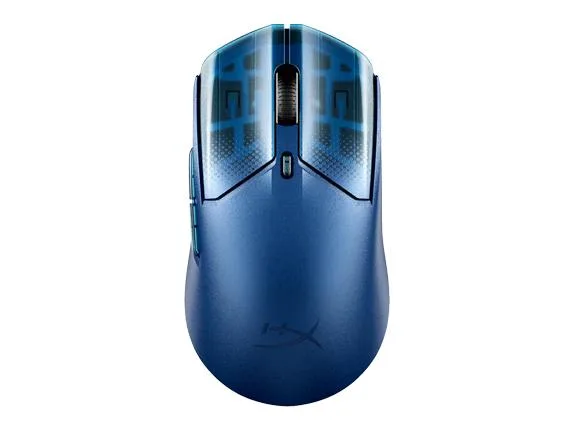
HyperX Pulsefire Haste 2 S Navy gaming mouse
Wireless gaming mouse with a navy finish for fast, responsive control
- Tracking MethodN/A
- FeaturesHyperX Pulsefire Haste 2 S Navy Wireless Gaming Mouse
- Wireless freedom with the HyperX Pulsefire Haste 2 S Navy
- Navy colourway suits a sleek gaming setup
- HyperX engineering for competitive gaming performance
- Lightweight design enables fast, precise movements
HyperX Pulsefire Haste 2 S Navy Wireless Gaming
This lightweight wireless gaming mouse is built for competitive players who value speed and low-latency performance. Its compact shape suits fingertip and claw grips during fast-paced sessions. The navy finish gives a distinct look on any desk setup. It connects without cables for unrestricted movement.
Thermals noise and power draw in normal use
The mouse runs cool during extended gaming because it has no high-wattage components to generate heat. Silent switches and a low-friction skates design keep operational noise to a minimum. Battery power consumption stays low thanks to efficient wireless technology. Regular charging keeps it ready for long play sessions.
Points forts
- Wireless freedom with the HyperX Pulsefire Haste 2 S Navy
- Navy colourway suits a sleek gaming setup
- HyperX engineering for competitive gaming performance
- Lightweight design enables fast, precise movements
Caractéristiques
| Brand | HyperX |
|---|---|
| Part Number | 9B001AA |
| Tracking Method | N/A |
| Features | HyperX Pulsefire Haste 2 S Navy Wireless Gaming Mouse |
Questions sur cet article
How do I install the HyperX Pulsefire Haste 2 S Navy wireless gaming mouse, and what step is often missed?
Plug the USB wireless receiver into a free port, turn the mouse on using the bottom switch, and wait for the operating system to recognise it; the step often missed is confirming the receiver is seated fully so the connection stays stable.
What maintenance or replacement will the HyperX Pulsefire Haste 2 S Navy wireless gaming mouse need later?
Recharge the internal battery via the USB-C cable when the indicator shows low power, and replace the PTFE skates if they wear down after extended use on rough pads.
Également dans ce rayon
Les clients ont aussi comparé
Même rayon, même caisse — huit monnaies et un taux bloqué 30 minutes.



BFKK
BFKK Wireless Gaming Mouse PAW 3950Max 42000 DPI 8KHz 38g Black & Sticker
- Black
106,99 $US
0.00136437BTC
En stock
BFKK
BFKK Wireless Gaming Mouse Red 7 Silent Buttons 5 Adjustable DPI
- Red
34,99 $US
0.0004462BTC
En stock
BFKK
BFKK Wireless Gaming Mouse Blue 7 Silent Buttons 1000-4000 DPI
- Blue
30,99 $US
0.00039519BTC
En stock