

NEMIX RAM
NEMIX RAM 64GB DDR4 3200 4Rx4 1.2V 288-PIN ECC LRDIMM server RAM
- DDR4 3200 (PC4 2560…
- 22
429,99 $US
0.00547925BTC
En stockNous acceptons la cryptomonnaie — les cryptos que vous détenez peuvent ainsi acheter du matériel réel.Payez en crypto, dépensez-la en matériel réel. Livraison assurée offerte partout dans le monde au-delà de 399 $. Cartons neutres, sans marque, expédiés depuis l’Allemagne.Livraison assurée offerte au-delà de 399 $. Votre taux est bloqué pendant 30 minutes dès l’ouverture de la caisse.Taux bloqué 30 minutes. Chaque article est scellé, son numéro de série est vérifié, et il est couvert par une garantie de 24 mois.Scellé, garanti 24 mois.
Intel
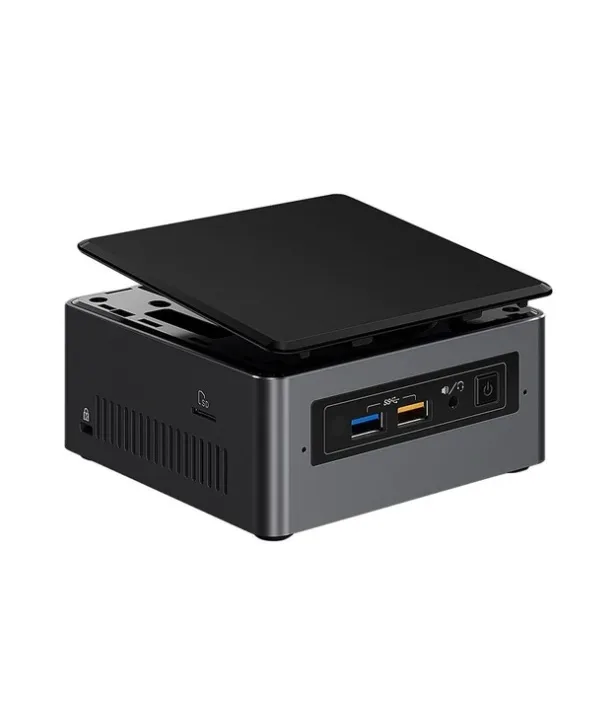
Barebone mini PC with a 2.4 GHz dual-core processor, supports up to 32 GB DDR4-2133, includes Gigabit LAN and Wi-Fi 5
The Intel BOXNUC7I3BNH is a UCFF barebone built around a 2.4 GHz dual-core i3-7100U with 15 W TDP. It ships without memory or storage so you choose the exact capacity and speed your workload requires. Two SO-DIMM slots accept up to 32 GB of DDR4-2133, while a 22 x 42/80 M.2 slot and dual SATA 6.0 Gb/s ports give flexible drive options.
Suits home-office users, digital-signage installs or secondary PCs that need a tiny footprint and quiet 15 W operation. Builders who want discrete graphics, more than two memory channels or a higher-core-count CPU should look at larger platforms.
The board only supports DDR4-2133 in 260-pin SO-DIMM form factor; standard DIMMs or faster DDR4 modules will not work. Matching this memory spec is the single decision that determines whether the kit boots.
| Brand | Intel |
|---|---|
| Series | NUC (Next Unit of Computing) |
| Model | BOXNUC7I3BNH |
| Color | Black |
| Form Factor | UCFF (4" x 4") |
| CPU Type | 7th Generation Intel Core i3-7100U 2.4 GHz, Dual Core 3MB cache, 15W TDP |
| Memory installed | No Memory |
| Memory slot | 2 x 260Pin SO-DIMM |
| Memory Type Supported | DDR4 2133 |
| Max Memory Supported | 32GB |
| Storage Installed | No Hard Drive |
| Serial ATA | 2 x SATA 6.0Gb/s |
| M.2 Slot | 22x42/80 |
| Integrated Graphics | Intel HD Graphics 620 |
| Channel | 7.1 Channel |
| LAN | Intel i219V |
| Max LAN Speed | 1Gbps |
| Wireless LAN | Intel Wireless-AC 8265 |
| Bluetooth | Bluetooth v4.2 |
| Front USB | 2 x front USB 3.0 |
| Card Reader | microSDXC with UHS-I support (Side) |
| Other Front Ports | 2 x USB 2.0 via internal headers |
| HDMI | HDMI 2.0a |
| Rear USB | 2 x USB 3.0 1 x USB 3.1 Gen 2 (10Gbps), Type-C |
| RJ45 | 1 |
| Input | 12V - 19V DC input range |
| Power Supply | 19V 65W wall-wart power supply with interchangeable plugs included |
| Dimensions | 2.01" x 4.53" x 4.37" |
| Features | Intel Optane Memory Supported Intel Virtualization Technology for Directed I/O (VT-d) Intel HD Audio Technology Intel Rapid Storage Technology Intel Virtualization Technology (VT-x) Intel Platform Trust Technology (Intel PTT) |
You must supply two 260-pin DDR4-2133 SO-DIMMs; the board supports up to 32 GB total across its two slots.
Yes, the unit provides two SATA 6.0Gb/s connectors so a 2.5-inch SATA SSD or hard drive can be installed directly.
After assembling the NUC and installing drivers, open Device Manager and verify Intel HD Graphics 620 appears under Display adapters without errors.
Également dans ce rayon
Même rayon, même caisse — huit monnaies et un taux bloqué 30 minutes.
Ce que vous envoyez, et ce dans quoi vous lisez les prix.
Envoyé depuis votre portefeuille à la caisse
Affichage seul — le catalogue est libellé en dollars
Aucune monnaie ne correspond.
Choisissez la langue dans laquelle le site vous parle.
Première visite ?
Vous avez déjà un compte ?
Il n’y a pas de réinitialisation automatique : cette boutique n’envoie aucun e-mail, il n’existe donc aucun lien à usage unique à demander. Laissez l’adresse sur le compte, elle sera traitée à la main.
Demande enregistrée
Rien n’arrivera dans votre boîte de réception — cette boutique n’envoie aucun e-mail. Quelqu’un s’en occupe à la main.
Vous l’avez retrouvé ?



