
Kingston Technology Corp.
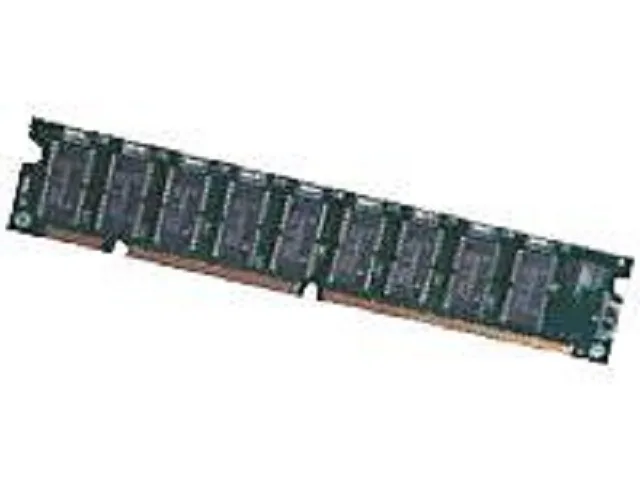
Kingston 128MB PC100 CL2 DIMM 168-Pin desktop RAM
128 MB PC100 SDRAM module in 168-pin DIMM form for older desktop systems
- 128 MB capacity expands legacy desktop memory
- PC100 100 MHz speed matches older system buses
- CL2 latency supports responsive operation on compatible boards
- 168-pin DIMM form factor fits period-correct motherboard slots
- Non-ECC unbuffered design suits standard desktop configurations
128 MB PC100 desktop memory module
This Kingston DIMM supplies 128 MB of SDRAM running at 100 MHz with CL2 latency. It is intended for older desktop systems that use 168-pin memory slots and require non-ECC registered modules. Buyers restoring or maintaining legacy hardware will find it matches the original specification.
168-pin DIMM build and daily handling
The module follows the standard 168-pin DIMM form factor, so it seats directly into compatible desktop motherboards without adapters. Gold-edge contacts resist oxidation during long storage, and the low-profile green PCB clears most CPU coolers in period-correct chassis. No heatsink or RGB lighting is present, keeping installation straightforward.
Compatibility checks before ordering
Verify that the motherboard accepts PC100 non-ECC SDRAM and provides 168-pin DIMM sockets. Confirm the board’s maximum supported capacity per slot and total memory limit, as many chipsets of that era cap well below modern amounts. Ensure the system BIOS recognises 128 MB modules; some early revisions require an update to detect the full capacity.
Points forts
- 128 MB capacity expands legacy desktop memory
- PC100 100 MHz speed matches older system buses
- CL2 latency supports responsive operation on compatible boards
- 168-pin DIMM form factor fits period-correct motherboard slots
- Non-ECC unbuffered design suits standard desktop configurations
Caractéristiques
Aucune caractéristique publiée pour cet article pour l’instant.
Questions sur cet article
What bus speed does the PC100 100MHz rating cap in practice?
The module is rated for 100 MHz operation, so the memory bus will not run faster than 100 MHz with this DIMM installed.
What physical slot does the 168-pin DIMM form factor need?
It requires a standard 168-pin SDRAM DIMM socket on the motherboard.
How is the 128MB module installed, and what step is often missed?
Align the notches on the module with the socket keys, press down firmly until both side clips snap shut, then verify the system recognises the full 128MB on boot.
Également dans ce rayon
Les clients ont aussi comparé
Même rayon, même caisse — huit monnaies et un taux bloqué 30 minutes.


PrimoChill
PrimoChill Praxis Wetbench Open-Air Test Bench 461.8mm
- Open-Air
274,89 $US
0.00355284BTC
En stock
Silverstone Technology
SilverStone Technology Strider 1200W 80 Plus Platinum Modular Power Supply
- ATX Mid Tower
- 1200W
324,03 $US
0.00418795BTC
En stock