DELL
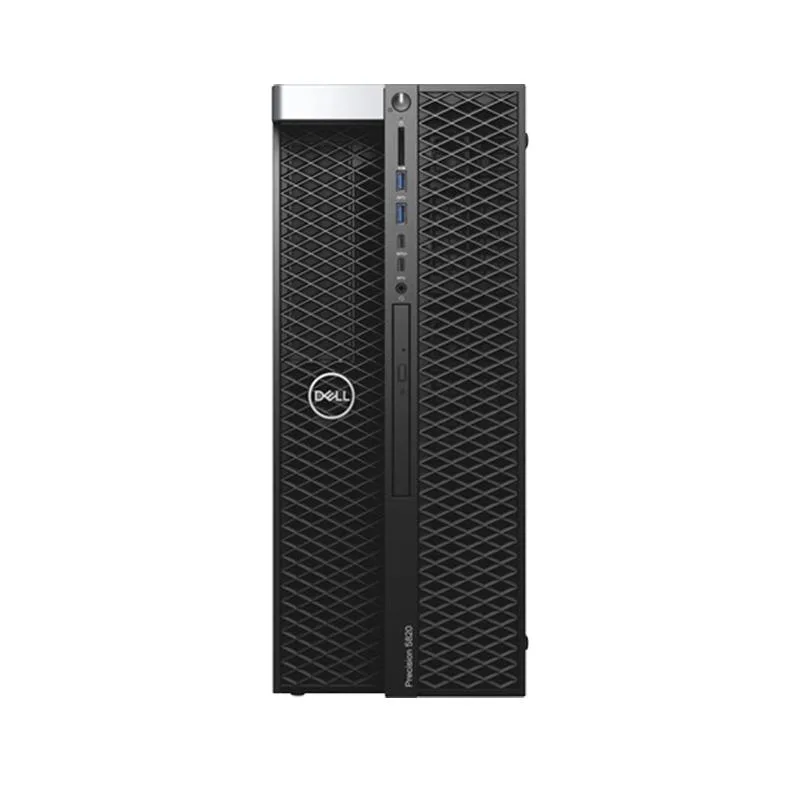
DELL Precision T5820 Tower Xeon W-2255 10C 64GB 500GB NVMe Quadro P5000 Win 11 Pro
- Business Desktops &…
- Mid Tower
1 327,99 $US
0.01672342BTC
En stockNous acceptons la cryptomonnaie — les cryptos que vous détenez peuvent ainsi acheter du matériel réel.Payez en crypto, dépensez-la en matériel réel. Livraison assurée offerte partout dans le monde au-delà de 399 $. Cartons neutres, sans marque, expédiés depuis l’Allemagne.Livraison assurée offerte au-delà de 399 $. Votre taux est bloqué pendant 30 minutes dès l’ouverture de la caisse.Taux bloqué 30 minutes. Chaque article est scellé, son numéro de série est vérifié, et il est couvert par une garantie de 24 mois.Scellé, garanti 24 mois.


Lenovo
A slim desktop with a 14th Gen Core i9, 64 GB DDR5 and a 1 TB SSD, running Windows 11 Pro
The Lenovo ThinkCentre M90s Gen 5 is a small-form-factor desktop PC built around an Intel Core i9-14900 processor with 64 GB of DDR5 memory at 4000 MHz and a 1 TB SSD. It ships with Windows 11 Pro and uses integrated Intel UHD Graphics 770 for display output. The slim chassis fits tight workspaces while providing a DVD±RW drive and Gigabit Ethernet.
This configuration serves professionals who need high single-thread speed and large memory capacity for business applications, virtualisation or data analysis without a discrete graphics card. Buyers who require dedicated GPU performance for 3D rendering, video editing or gaming should look at a different system. The compact form factor also limits internal expansion compared with tower designs.
The 64 GB DDR5 configuration running at 4000 MHz is the specification that determines whether this desktop matches the workload. Workloads that demand more memory capacity or faster memory speeds will need a platform that supports larger modules or higher frequencies. Systems with lower memory specifications will not deliver the same multi-tasking headroom.
| Brand | Lenovo |
|---|---|
| Series | ThinkCentre |
| Model | ThinkCentre M90s Gen 5 |
| Part Number | 12V4000QUS |
| Type | Student / Home Office |
| Form Factor | Slim/Small Form Factor |
| Monitor | Monitor not included |
| Operating System | Windows 11 Pro |
| External I/O Ports | 1x USB-C (USB 10Gbps / USB 3.2 Gen 2), with 15W charging; 2x USB-A (USB 5Gbps / USB 3.2 Gen 1); 2x USB-A (USB 10Gbps / USB 3.2 Gen 2); 1x headphone / microphone combo jack (3.5mm); 1x microphone (3.5mm); 4x USB-A (USB 5Gbps / USB 3.2 Gen 1); 1x HDMI 2.1 TMDS; 2x DisplayPort 1.4a (HBR2, DSC); 1x Ethernet (RJ-45); 1x line-out (3.5mm) |
| CPU Type | Intel Core i9 14th Gen |
| CPU Name | Intel Core i9-14900 |
| CPU Base Frequency | 2.00GHz |
| Turbo Frequency | 5.8GHz |
| GPU/VGA Type | Intel UHD Graphics 770 |
| Memory Capacity | 64GB DDR5 |
| Memory Speed | 4000 MHz |
| SSD | 1TB |
| Optical Drive Type | DVD±RW |
| Screen Size | No Screen |
| LAN Speed | Gigabit Ethernet |
| WLAN | 802.11ax Wireless LAN |
| WiFi Generation | Wi-Fi 6E |
| Bluetooth | Bluetooth 5.3 |
| Dimensions (H x W x D) | Width: 3.6 Inch Depth: 11.7 Inch Height: 13.4 Inch |
| Weight | 5.3 Kg |
| Poids d’expédition | 9.98 kg |
| Dimensions du colis | 533 × 394 × 191 mm |
Power off, open the chassis, align the notch on the DDR5 module with the slot key, press firmly until the retention clips click, then verify 64GB appears in BIOS before booting Windows 11 Pro.
Clean the laser lens with a disc-cleaning kit when read errors appear, and replace the drive if writing fails after cleaning; no other scheduled service is required for the drive.
The Intel UHD Graphics 770 thermal ceiling is reached before the CPU hits its power limit, causing graphics throttling during extended heavy workloads.
Également dans ce rayon
Même rayon, même caisse — huit monnaies et un taux bloqué 30 minutes.
Ce que vous envoyez, et ce dans quoi vous lisez les prix.
Envoyé depuis votre portefeuille à la caisse
Affichage seul — le catalogue est libellé en dollars
Aucune monnaie ne correspond.
Choisissez la langue dans laquelle le site vous parle.
Première visite ?
Vous avez déjà un compte ?
Il n’y a pas de réinitialisation automatique : cette boutique n’envoie aucun e-mail, il n’existe donc aucun lien à usage unique à demander. Laissez l’adresse sur le compte, elle sera traitée à la main.
Demande enregistrée
Rien n’arrivera dans votre boîte de réception — cette boutique n’envoie aucun e-mail. Quelqu’un s’en occupe à la main.
Vous l’avez retrouvé ?