


MAIWO
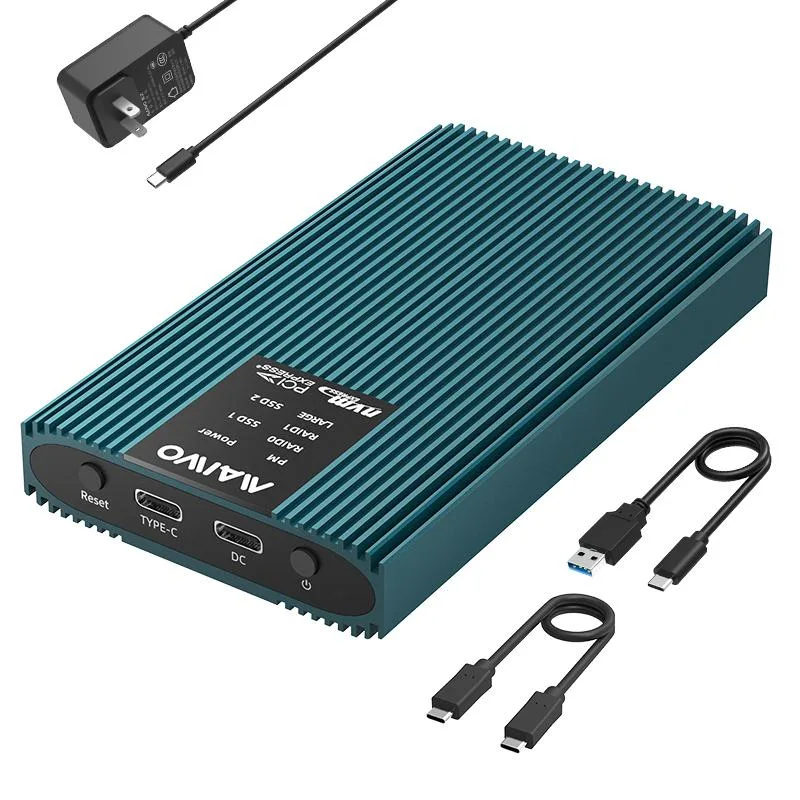
MAIWO K2022R Dual Bay NVMe RAID Enclosure 20Gbps USB3.2 Blue
Dual-bay M.2 NVMe RAID enclosure with USB 3.2 Gen 2×2 20 Gbps, four RAID modes, tool-free aluminium build, thermal pad and auto-sleep
- ColorBlue
- SizeM.2
- TypeEnclosure
- MaterialAluminum
- Internal InterfaceM.2 NVME M-Key
- External InterfaceUSB3.2 Gen2X2
- 20Gbps USB3.2 Gen2x2 bandwidth accelerates large-file transfers
- Four RAID modes including RAID 0 and RAID 1 match speed or redundancy needs
- Tool-free dual-bay design accepts 2230 2242 2260 2280 M.2 NVMe drives
- Aluminium shell with thermal pad keeps drives cool during sustained workloads
- Driver-free plug-and-play operation on Windows macOS and Linux
Dual-bay NVMe RAID enclosure
The MAIWO K2022R accepts two M.2 NVMe SSDs in 2230, 2242, 2260 or 2280 form factors with M-key or B+M-key pinouts. Each bay supports up to 8 TB of storage in an aluminium chassis that doubles as a heatsink. A built-in thermal pad and automatic sleep after three minutes of inactivity help manage drive temperature during sustained workloads.
RAID 0/1/JBOD upgrade from single-drive enclosures
Moving from a single-bay dock to this dual-bay unit adds hardware RAID 0 for sequential throughput gains, RAID 1 for real-time mirroring, and JBOD/large mode for combined capacity without striping. The jump is worth it when workflows demand faster scratch volumes, automatic backup or a single logical volume larger than one drive can provide. PM normal mode keeps both drives visible independently for mixed workloads.
USB 3.2 Gen 2x2 20 Gbps host limit
The Type-C USB 3.2 Gen 2x2 interface caps theoretical bandwidth at 20 Gbps, so aggregated RAID 0 performance cannot exceed that ceiling even with two fast NVMe drives. Real-world throughput will be lower due to protocol overhead and host-controller capabilities. The enclosure includes both USB-C-to-C and USB-C-to-A cables for broad host compatibility across Windows, macOS and Linux without drivers.
Points forts
- 20Gbps USB3.2 Gen2x2 bandwidth accelerates large-file transfers
- Four RAID modes including RAID 0 and RAID 1 match speed or redundancy needs
- Tool-free dual-bay design accepts 2230 2242 2260 2280 M.2 NVMe drives
- Aluminium shell with thermal pad keeps drives cool during sustained workloads
- Driver-free plug-and-play operation on Windows macOS and Linux
Caractéristiques
| Model | K2022R |
|---|---|
| Color | Blue |
| Size | M.2 |
| Type | Enclosure |
| Material | Aluminum |
| Internal Interface | M.2 NVME M-Key |
| External Interface | USB3.2 Gen2X2 |
| HDD Count Supported | Dual HDD |
| Number of Bay | 2 |
| Maximum Capacity (per Bay) | Up to 8TB |
| Specifications | Dual-Bay M.2 NVME SSD RAID Adapter: The SSD Raid Enclosure supports 2x 4TB NVME M.2 SSDs for independent simultaneous operations for M.2 NVME B Key 2230/2242/2260/2280 SSDs. (DOES NOT SUPPORT M.2 SATA SSD) 4 RAID Modes: This NVMe RAID Enclosure supports RAID 0/RAID 1/PM/LARGE Modes.Helping you to accelerate, expand and protect your data.(NOTE: please back up data before setting raid mode to avoid losing important data.) 20Gbps Exceptional Speed Data Transfer: The 2 Bay M.2 Raid Docking Station equips with JMS586R chipset, USB3.2 GEN2x2 output interface and 20Gbps C-to-C data cable, t |
| Package Contents | M.2 NVMe SSD RAID Enclosure Dual Bay |
Questions sur cet article
What SSD form factors fit the K2022R dual-bay enclosure?
The enclosure accepts M.2 NVMe M-Key and B+M-Key drives in 2230, 2242, 2260 and 2280 lengths; SATA or B-Key modules are not supported.
How do I switch RAID modes and which step is often missed?
Use the hardware mode switch to select PM, RAID 0, RAID 1 or Large/JBOD, then power-cycle the enclosure; the step most users miss is the mandatory reboot after changing the switch position.
What ongoing care does the aluminium enclosure need?
Keep the vents clear so the built-in thermal pad can dissipate heat, and verify the 5 V / 3 A power adapter remains firmly seated; no other user-serviceable parts are inside.
Également dans ce rayon
Les clients ont aussi comparé
Même rayon, même caisse — huit monnaies et un taux bloqué 30 minutes.




