


MSI
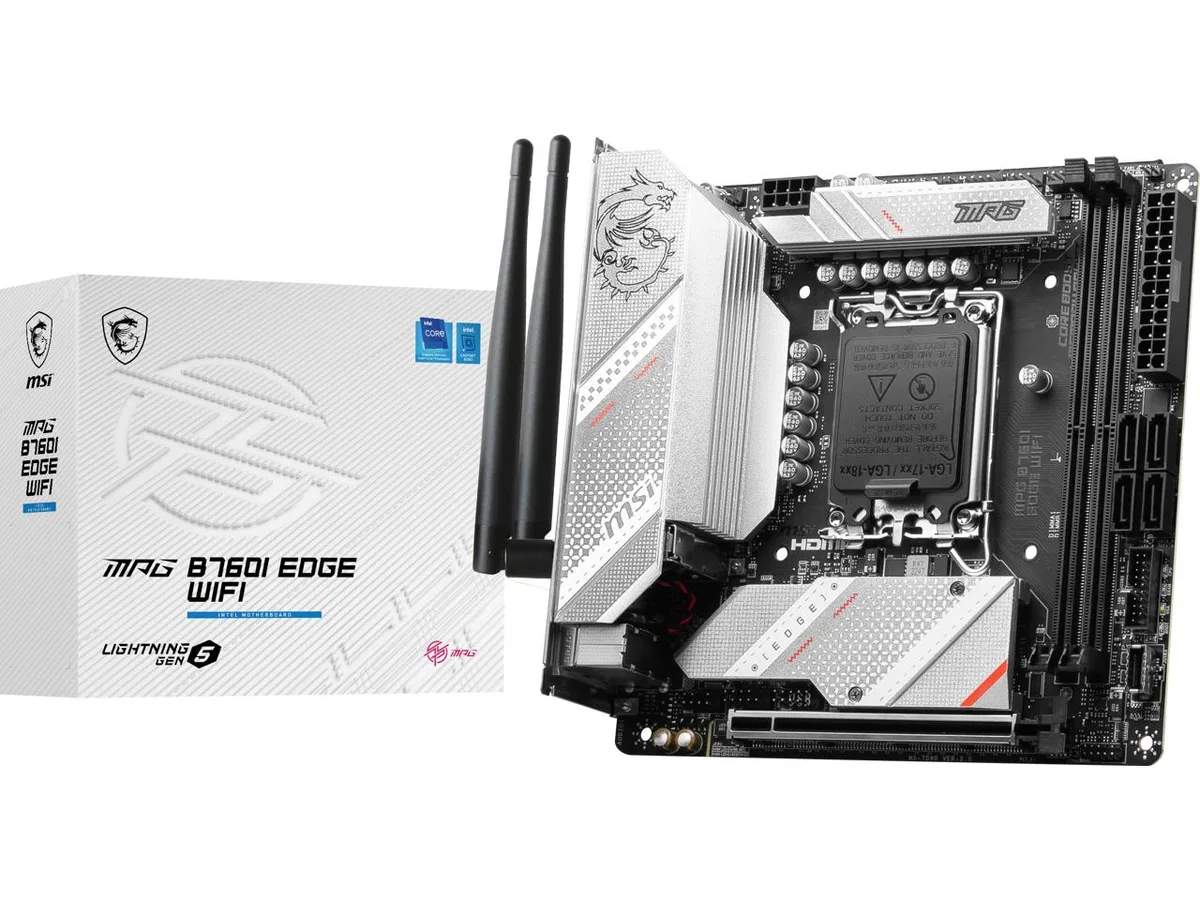
MSI MPG B760I EDGE WIFI Intel motherboard
Mini ITX board for LGA 1700 CPUs with DDR5 memory, PCIe 5.0 x16, dual M.2 slots, Wi-Fi 6E and 2.5Gbps LAN
- CPU Socket TypeLGA 1700
- CPU TypeSupports 12th / 13th Gen Intel Core Processors, Pentium Gold
- ChipsetIntel B760
- Number of Memory Slots2x288pin (DDR5)
- Memory StandardMemory Support 7200+(OC)/ 7000(OC)/ 6800(OC)/ 6600(OC)/ 6400
- Maximum Memory Supported96GB
- Supports 12th, 13th and 14th Gen Intel Core CPUs on LGA 1700 socket
- DDR5 memory up to 7200 MHz overclocked with 96 GB maximum capacity
- PCIe 5.0 x16 slot delivers 128 GB/s bandwidth for graphics cards
- Dual M.2 slots with PCIe 4.0 and M.2 Shield Frozr cooling
- Wi-Fi 6E plus 2.5 Gbps LAN for high-speed wired and wireless networking
Compact Intel platform
The MSI MPG B760I EDGE WIFI is a Mini ITX motherboard for LGA 1700 processors. It supports 12th, 13th and 14th generation Intel Core, Pentium Gold and Celeron CPUs. Two DDR5 slots accept up to 96 GB of memory running at speeds from 4800 to 7200 MHz. The board includes Wi-Fi 6E and 2.5 Gbps LAN for connectivity.
Dual M.2 and PCIe 5.0 upgrade
Two M.2 sockets both operate at PCIe 4.0 x4, with the primary slot wired to the CPU and the second to the chipset. A single PCIe 5.0 x16 slot provides 128 GB/s bandwidth for current graphics cards. Four SATA 6 Gb/s ports remain available for additional storage. The 8+1+1 phase 90 A power delivery handles higher-wattage CPUs that would overwhelm basic B760 boards.
Sustained load behaviour
M.2 Shield Frozr covers both M.2 slots to keep SSD temperatures stable during long writes. The direct 90 A power stages run cooler than lower-rated designs when the CPU holds elevated frequencies for extended periods. Realtek ALC897 8-channel audio and Intel AX211 wireless maintain consistent output without throttling. DDR5 memory support up to 7200 MHz remains stable under continuous load.
Points forts
- Supports 12th, 13th and 14th Gen Intel Core CPUs on LGA 1700 socket
- DDR5 memory up to 7200 MHz overclocked with 96 GB maximum capacity
- PCIe 5.0 x16 slot delivers 128 GB/s bandwidth for graphics cards
- Dual M.2 slots with PCIe 4.0 and M.2 Shield Frozr cooling
- Wi-Fi 6E plus 2.5 Gbps LAN for high-speed wired and wireless networking
Caractéristiques
| Brand | MSI |
|---|---|
| Model | MPG B760I EDGE WIFI |
| CPU Socket Type | LGA 1700 |
| CPU Type | Supports 12th / 13th Gen Intel Core Processors, Pentium Gold and Celeron Processors |
| Chipset | Intel B760 |
| Number of Memory Slots | 2x288pin (DDR5) |
| Memory Standard | Memory Support 7200+(OC)/ 7000(OC)/ 6800(OC)/ 6600(OC)/ 6400(OC)/ 6200(OC)/ 6000(OC)/ 5800(OC)/ 5600(JEDEC)/ 5400(JEDEC)/ 5200(JEDEC)/ 5000(JEDEC)/ 4800(JEDEC) MHz Max. overclocking frequency: - 1DPC 1R Max speed up to 7200+ MHz - 1DPC 2R Max speed up to 6600+ MHz |
| Maximum Memory Supported | 96GB |
| Channel Supported | Dual Channel |
| Memory Feature | Supports Dual-Channel mode Supports non-ECC, un-buffered memory Supports Intel Extreme Memory Profile (XMP) |
| PCI Express 5.0 x16 | 1 x PCI Express 5.0 x16 |
| Serial ATA (SATA) | 4 x SATA 6Gb/s |
| M.2 | 1 x Key M (CPU PCIe) + 1 x Key M (PCIe/SATA) + 1 x Key E (WiFi/BT) 2 x M.2 M.2_1 Source (From CPU) supports up to PCIe 4.0 x4, supports 2280 devices M.2_2 Source (From Chipset) supports up to PCIe 4.0 x4 / SATA mode, supports 2280 devices |
| Audio Chipset | Realtek ALC897 |
| Audio Channels | 8 Channels |
| Wireless LAN | Intel AX211 |
| Form Factor | Mini ITX |
Questions sur cet article
What Mini ITX case clearance does the MPG B760I EDGE WIFI need for its M.2 Shield Frozr heatsink?
The board is a standard Mini ITX form factor. The M.2 Shield Frozr covers both M.2 slots and adds a few millimetres of height; check your case specifications for motherboard-component clearance.
Which BIOS version must be flashed before installing a 14th generation Intel Core processor on the LGA 1700 socket?
A BIOS update may be required for some 14th generation Intel Core processors. Download the latest BIOS from the MSI support site, rename the file, and flash it via the USB BIOS Flashback button before installing the CPU.
How often should the M.2 Shield Frozr thermal pads be inspected or replaced on this motherboard?
Thermal pads under the M.2 Shield Frozr do not have a fixed replacement interval. Inspect them when you remove an M.2 drive; replace if they are torn, compressed, or no longer make full contact.
Également dans ce rayon
Les clients ont aussi comparé
Même rayon, même caisse — huit monnaies et un taux bloqué 30 minutes.


PrimoChill
PrimoChill Praxis Wetbench Open-Air Test Bench 461.8mm
- Open-Air
274,89 $US
0.00353779BTC
En stock
Silverstone Technology
SilverStone Technology Strider 1200W 80 Plus Platinum Modular Power Supply
- ATX Mid Tower
- 1200W
324,03 $US
0.00417022BTC
En stock