


MSI
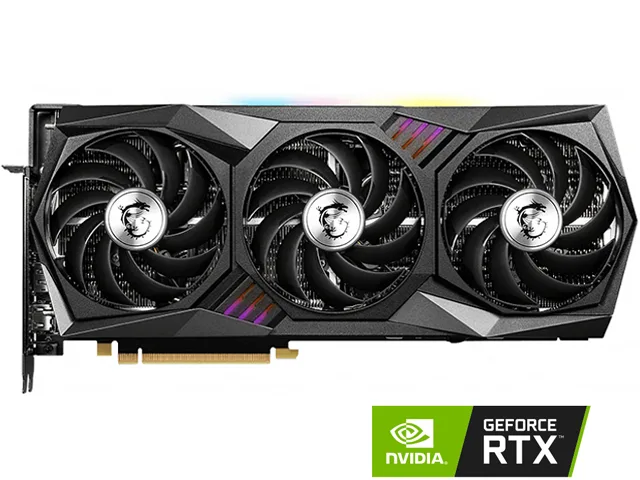
MSI RTX3070TGAMINGTRIO8G GeForce RTX 3070 Ti graphics card 8GB GDDR6X
Refurbished GeForce RTX 3070 Ti with 8GB GDDR6X, 6144 CUDA cores and a 1800 MHz boost clock on a 256-bit bus
- InterfacePCI Express 4.0
- Chipset ManufacturerNVIDIA
- GPU SeriesNVIDIA GeForce RTX 30 Series
- GPUGeForce RTX 3070 Ti
- Boost Clock1800 MHz
- CUDA Cores6144
- 8GB 256-bit GDDR6X memory delivers 19 Gbps bandwidth for high-resolution textures
- 6144 CUDA cores and 1800 MHz boost clock accelerate 3070 Ti performance
- TRI FROZR 2 thermal design with TORX Fan 4.0 keeps temperatures controlled
- HDMI 2.1 and three DisplayPort 1.4a outputs drive four monitors at 7680 x 4320
- PCI Express 4.0 interface and 750 W PSU requirement support modern system builds
8GB GDDR6X 256-bit memory
The MSI RTX 3070 Ti Gaming Trio 8G delivers 8GB of GDDR6X memory on a 256-bit bus running at 19 Gbps. The GPU provides 6144 CUDA cores with a boost clock of 1800 MHz. It connects through PCI Express 4.0 and supports DirectX 12 Ultimate and OpenGL 4.6 for modern rendering workloads.
1440p gaming and creative work
This card suits players targeting 1440p high refresh rates and creators using GPU-accelerated applications that fit within 8GB VRAM. The triple-fan TRI FROZR 2 cooler handles the 310 W thermal design power, requiring a 750 W power supply and two 8-pin connectors. Buyers needing more VRAM for 4K texture packs or large 3D scenes should consider a model with a larger frame buffer.
310 W TDP and 750 W PSU requirement
The single specification that decides compatibility is the 310 W thermal design power paired with a 750 W recommended PSU. Your power supply must deliver that wattage and provide two 8-pin PCIe connectors. If your PSU falls short, the system will be unstable regardless of the GPU's raw performance.
Points forts
- 8GB 256-bit GDDR6X memory delivers 19 Gbps bandwidth for high-resolution textures
- 6144 CUDA cores and 1800 MHz boost clock accelerate 3070 Ti performance
- TRI FROZR 2 thermal design with TORX Fan 4.0 keeps temperatures controlled
- HDMI 2.1 and three DisplayPort 1.4a outputs drive four monitors at 7680 x 4320
- PCI Express 4.0 interface and 750 W PSU requirement support modern system builds
Caractéristiques
| Brand | MSI |
|---|---|
| Series | Gaming |
| Model | RTX 3070 Ti GAMING TRIO 8G |
| Interface | PCI Express 4.0 |
| Chipset Manufacturer | NVIDIA |
| GPU Series | NVIDIA GeForce RTX 30 Series |
| GPU | GeForce RTX 3070 Ti |
| Boost Clock | 1800 MHz |
| CUDA Cores | 6144 |
| Effective Memory Clock | 19 Gbps |
| Memory Size | 8GB |
| Memory Interface | 256-Bit |
| Memory Type | GDDR6X |
| DirectX | DirectX 12 Ultimate |
| OpenGL | OpenGL 4.6 |
| Multi-Monitor Support | 4 |
| HDMI | 1 x HDMI 2.1 |
| DisplayPort | 3 x DisplayPort 1.4a |
| Max Resolution | 7680 x 4320 |
| Virtual Reality Ready | Yes |
| Cooler | Triple Fans |
| Thermal Design Power | 310W |
| System Requirements | Recommended PSU: 750W |
| Recommended PSU Wattage | 750W |
| Power Connector | 2 x 8-Pin |
| HDCP Ready | Yes |
| Features | TRI FROZR 2 Thermal Design TORX Fan 4.0: A masterpiece of teamwork, fan blades work in pairs to create unprecedented levels of focused air pressure. Core Pipe: Precision-crafted heat pipes ensure max contact to the GPU and spread heat along the full length of the heatsink. Airflow Control: Don't sweat it, Airflow Control guides the air to exactly where it needs to be for maximum cooling. RGB Mystic Light Mystic Light gives you complete control of the RGB lighting for MSI devices and compatible RGB products. MSI Center The exclusive MSI Center software lets you monitor, tweak and opti |
| Max GPU Length | 323 mm |
| Card Dimensions (L x H) | 12.72" x 5.51" |
| Poids d’expédition | 2.33 kg |
| Dimensions du colis | 401 × 297 × 89 mm |
Questions sur cet article
How many PCIe slots does the triple-fan cooler occupy?
The TRI FROZR 2 thermal design with three TORX Fan 4.0 units uses a triple-slot form factor, so the card needs three rear expansion slots and enough case length for a 310 W board.
Which power cables must be connected before first boot?
Attach both 8-pin PCIe connectors from a 750 W or larger PSU; the card will not start if either plug is left loose or daisy-chained from a single cable.
When should the thermal pads and fan bearings be inspected?
After roughly two years of heavy use, check the Core Pipe contact pads for pump-out and spin each TORX Fan 4.0 blade by hand — any grit or wobble means the cooler needs servicing.
Également dans ce rayon
Les clients ont aussi comparé
Même rayon, même caisse — huit monnaies et un taux bloqué 30 minutes.


PrimoChill
PrimoChill Praxis Wetbench Open-Air Test Bench 461.8mm
- Open-Air
274,89 $US
0.00357046BTC
En stock
Silverstone Technology
SilverStone Technology Strider 1200W 80 Plus Platinum Modular Power Supply
- ATX Mid Tower
- 1200W
324,03 $US
0.00420873BTC
En stock