

Dynatron
Dynatron A26 CPU cooler AMD SP3 60mm PWM 180W 2U
- Fan & Heatsinks
- 60mm
32,99 $US
0.0004164BTC
En stockNous acceptons la cryptomonnaie — les cryptos que vous détenez peuvent ainsi acheter du matériel réel.Payez en crypto, dépensez-la en matériel réel. Livraison assurée offerte partout dans le monde au-delà de 399 $. Cartons neutres, sans marque, expédiés depuis l’Allemagne.Livraison assurée offerte au-delà de 399 $. Votre taux est bloqué pendant 30 minutes dès l’ouverture de la caisse.Taux bloqué 30 minutes. Chaque article est scellé, son numéro de série est vérifié, et il est couvert par une garantie de 24 mois.Scellé, garanti 24 mois.


NZXT
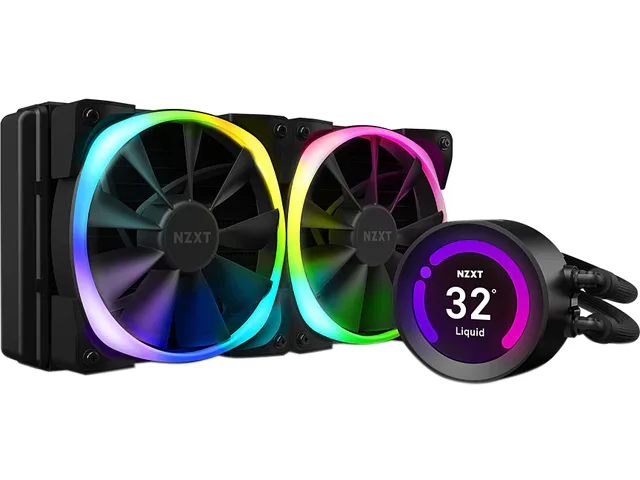
240 mm AIO liquid cooler with a 2.36" LCD display for CPU temperatures or custom GIFs, two 120 mm Aer P fans running 500–2000 RPM at 21–36 dBA, and nylon-sleeved rubber tubing
The NZXT Kraken Z53 is a 240mm all-in-one liquid cooler built around a 2.36" LCD screen that shows 24-bit colour images, GIFs or live CAM system data. It targets PC builders who want both thermal headroom for modern CPUs and a visible, programmable display on the cold plate. The unit ships with two 120mm Aer P fans and 400mm nylon-sleeved rubber tubes.
This cooler replaces stock air coolers or entry-level AIOs when noise, temperature or aesthetics need improvement. The fans run between 500 and 2,000 RPM, delivering 18.28 to 73.11 CFM at 21 to 36 dBA, while the pump and radiator handle higher sustained loads than single-fan or 120mm designs. The jump is worthwhile when case airflow is limited or when the builder wants the LCD for monitoring without extra software overlays.
Verify your motherboard uses Intel LGA 2066, 2011-3, 2011, 1366, 1200 or 115x, or AMD AM4; Threadripper sTRX4 and TR4 require a separate bracket not included. Ensure the case fits a 275 x 123 x 30 mm radiator with two 120mm fan slots and that 400mm tubing reaches the CPU block from the chosen mount location. Confirm a 4-pin fan header and USB 2.0 header are available for pump and CAM control.
| Brand | NZXT |
|---|---|
| Model | RL-KRZ53-R1 |
| Part Number | RL-KRZ53-R1 |
| Type | Liquid Cooling System |
| Block Compatibility | Intel LGA 2066 / 2011-3 / 2011 / 1366 / 1200 / 115x AMD AM4 / sTRX4* / TR4* (*Threadripper bracket not included) |
| Block Material | Copper & Plastic |
| Radiator Size | 275.00 x 123.00 x 30.00 mm |
| Radiator Material | Aluminum |
| Fan Size | 2 Fan Slots (120 mm) |
| Fan RPM | 500 - 2,000 (+/- 300) RPM |
| Fan Air Flow | 18.28 - 73.11 CFM |
| Fan Noise | 21 - 36 dBA |
| Fan Connector | 4 Pin |
| Color | Black |
| LED Color | RGB |
| Tube Dim. | 400mm |
| Tube Material | Rubber with Nylon Sleeve |
| Poids d’expédition | 2.09 kg |
| Dimensions du colis | 349 × 210 × 156 mm |
The radiator measures 275.00 x 123.00 x 30.00 mm and occupies two 120 mm fan slots, so verify your case supports a 240 mm radiator with that thickness and the 400 mm tube length reaches the CPU socket.
Plug the pump’s USB cable into a motherboard header, connect each fan’s 4-pin PWM connector to the motherboard or fan controller, then attach the NZXT RGB cable to the RGB header or controller; finally set display orientation in CAM.
The nylon-sleeved rubber tubing and fluid dynamic bearing fans are rated for long service; plan to inspect tubes for seepage and fan noise after several years, and replace only if leakage or bearing rattle appears.
Également dans ce rayon
Même rayon, même caisse — huit monnaies et un taux bloqué 30 minutes.
Ce que vous envoyez, et ce dans quoi vous lisez les prix.
Envoyé depuis votre portefeuille à la caisse
Affichage seul — le catalogue est libellé en dollars
Aucune monnaie ne correspond.
Choisissez la langue dans laquelle le site vous parle.
Première visite ?
Vous avez déjà un compte ?
Il n’y a pas de réinitialisation automatique : cette boutique n’envoie aucun e-mail, il n’existe donc aucun lien à usage unique à demander. Laissez l’adresse sur le compte, elle sera traitée à la main.
Demande enregistrée
Rien n’arrivera dans votre boîte de réception — cette boutique n’envoie aucun e-mail. Quelqu’un s’en occupe à la main.
Vous l’avez retrouvé ?


