Seagate
Seagate Barracuda ST2000DM001 2 TB 3.5" 7200 rpm 64 MB SATA internal hard drive
58,99 $US
0.00074941BTC
En stockNous acceptons la cryptomonnaie — les cryptos que vous détenez peuvent ainsi acheter du matériel réel.Payez en crypto, dépensez-la en matériel réel. Livraison assurée offerte partout dans le monde au-delà de 399 $. Cartons neutres, sans marque, expédiés depuis l’Allemagne.Livraison assurée offerte au-delà de 399 $. Votre taux est bloqué pendant 30 minutes dès l’ouverture de la caisse.Taux bloqué 30 minutes. Chaque article est scellé, son numéro de série est vérifié, et il est couvert par une garantie de 24 mois.Scellé, garanti 24 mois.


Qnap
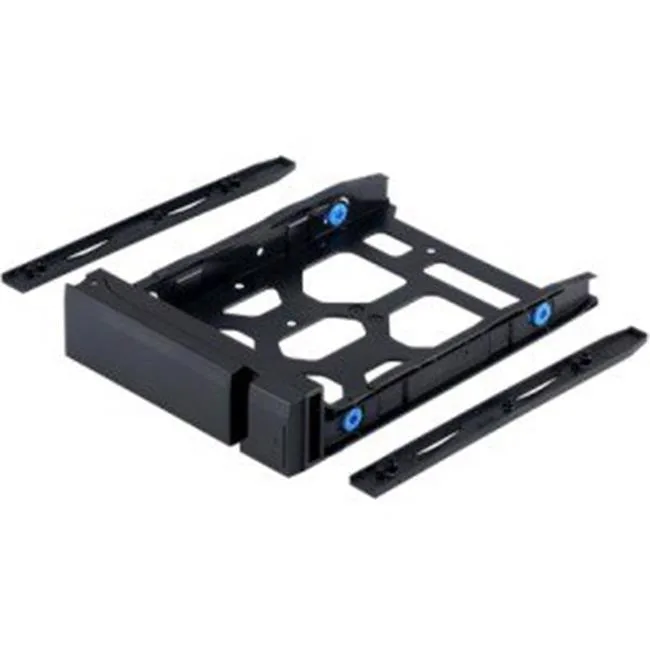
3.5-inch drive tray compatible with TS-473, TS-673, TS-873 and TS-1677X NAS models
This Qnap TRAY-35-NK-BLK06 is a drive mounting tray designed for TS-473, TS-673, TS-873 and TS-1677X desktop NAS units. It provides the mechanical interface needed to install a 3.5 inch hard drive into the corresponding drive bay. The accessory is supplied new and ready for immediate installation.
System builders adding storage capacity to the listed Qnap models will find this tray essential for each additional drive. Users of other NAS series or different form-factor bays cannot use this specific tray and should verify their chassis requirements before ordering. It serves strictly as a physical mounting carrier.
The single specification that decides compatibility is the explicit model list: TS-473, TS-673, TS-873 and TS-1677X. Only those units accept the TRAY-35-NK-BLK06, so confirming the exact NAS model is the only check required before purchase.
| Brand | QNAP |
|---|---|
| Model | TRAY-35-NK-BLK06 |
| Type | Accessory |
| Features | HDD tray for TS-473, TS-673, TS-873, TS-1677X |
| Poids d’expédition | 1.36 kg |
| Dimensions du colis | 254 × 127 × 76 mm |
Slide the 3.5 inch drive into the tray, secure it with the four side screws, then insert the tray into the bay until the latch clicks; the step most people miss is tightening those four screws before insertion.
The tray itself has no moving parts and requires no scheduled maintenance; only replace it if the plastic latch or metal rails become cracked or bent from repeated drive swaps.
The plastic release latch is the first component to show wear under frequent drive changes, so inspect it regularly if you swap drives daily.
Également dans ce rayon
Même rayon, même caisse — huit monnaies et un taux bloqué 30 minutes.
Ce que vous envoyez, et ce dans quoi vous lisez les prix.
Envoyé depuis votre portefeuille à la caisse
Affichage seul — le catalogue est libellé en dollars
Aucune monnaie ne correspond.
Choisissez la langue dans laquelle le site vous parle.
Première visite ?
Vous avez déjà un compte ?
Il n’y a pas de réinitialisation automatique : cette boutique n’envoie aucun e-mail, il n’existe donc aucun lien à usage unique à demander. Laissez l’adresse sur le compte, elle sera traitée à la main.
Demande enregistrée
Rien n’arrivera dans votre boîte de réception — cette boutique n’envoie aucun e-mail. Quelqu’un s’en occupe à la main.
Vous l’avez retrouvé ?