


ROCCAT
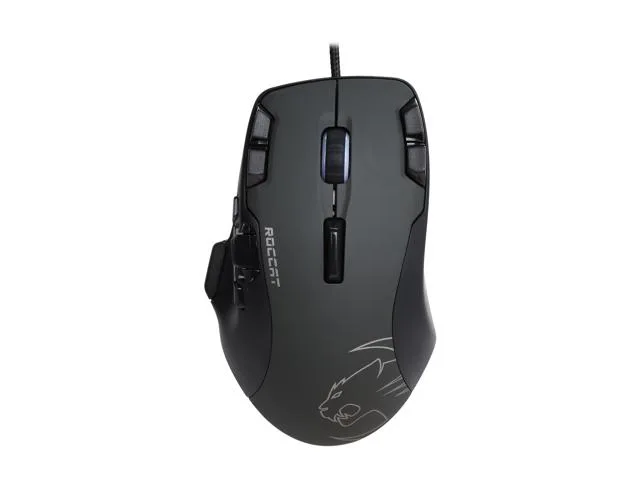
ROCCAT Tyon ROC-11-850 Black 14 Buttons 8200 dpi Gaming Mouse
Wired laser gaming mouse with 14 programmable buttons and 8200 dpi sensitivity
- NameTyon
- TypeWired
- InterfaceUSB 2.0
- Tracking MethodLaser
- Resolution (DPI)8200 dpi
- Buttons14
- 14 programmable buttons expand in-game control options
- 8200 dpi laser sensor delivers precise tracking
- USB 2.0 wired connection ensures stable data transfer
- Easy-Shift[+] technology doubles button functions
- Compatible with Windows XP through Windows 10
ROCCAT Tyon ROC-11-850 Gaming Mouse
The ROCCAT Tyon ROC-11-850 is a wired laser gaming mouse built for players who want extensive button access. It connects via USB 2.0 and offers a 8200 dpi sensor with 14 programmable buttons plus a scroll wheel. The black finish suits a standard desktop setup. It supports Windows operating systems from XP through Windows 10.
Upgrading from Basic Office Mice
This mouse replaces standard two or three button office peripherals that lack programmable inputs. The jump is worth it when games or applications benefit from binding numerous commands directly to the hand. The laser tracking method works on a wider variety of surfaces than older optical sensors. Buyers who need wireless freedom or a lighter chassis should look elsewhere.
14 Button Layout and 8200 DPI Headroom
The 14 buttons provide comfortable headroom for complex MMO ability rotations or productivity macros. The 8200 dpi maximum resolution handles fast twitch aiming across high resolution monitors. The single scroll wheel covers standard vertical navigation but lacks horizontal tilt input. The wired USB 2.0 connection removes battery management but limits cable routing flexibility.
Points forts
- 14 programmable buttons expand in-game control options
- 8200 dpi laser sensor delivers precise tracking
- USB 2.0 wired connection ensures stable data transfer
- Easy-Shift[+] technology doubles button functions
- Compatible with Windows XP through Windows 10
Caractéristiques
| Brand | ROCCAT |
|---|---|
| Name | Tyon |
| Model | ROC-11-850 |
| Type | Wired |
| Interface | USB 2.0 |
| Tracking Method | Laser |
| Resolution (DPI) | 8200 dpi |
| Buttons | 14 |
| Scrolling Capability | 1 x Wheel |
| Color | Black |
| Operating System Supported | Windows 10, Windows 8, Windows 7, Windows Vista 64 Bit, Windows Vista 32 Bit, Windows XP 64 Bit, Windows XP 32 Bit |
Questions sur cet article
Does the ROCCAT Tyon ROC-11-850 need a free USB 2.0 port?
Yes, it connects through a wired USB 2.0 cable and requires one available port on the PC.
What is the first step when installing the mouse so the 14 buttons work correctly?
Plug the mouse into a USB 2.0 port, then install the ROCCAT driver suite before assigning any button macros.
Which part of the ROCCAT Tyon ROC-11-850 is most likely to wear out first?
The laser sensor and the single scroll wheel are the primary moving components that may need replacement after heavy use.
Également dans ce rayon
Les clients ont aussi comparé
Même rayon, même caisse — huit monnaies et un taux bloqué 30 minutes.



BFKK
BFKK Wireless Gaming Mouse PAW 3950Max 42000 DPI 8KHz 38g Black & Sticker
- Black
106,99 $US
0.00136495BTC
En stock
BFKK
BFKK Wireless Gaming Mouse Red 7 Silent Buttons 5 Adjustable DPI
- Red
34,99 $US
0.00044639BTC
En stock
BFKK
BFKK Wireless Gaming Mouse Blue 7 Silent Buttons 1000-4000 DPI
- Blue
30,99 $US
0.00039536BTC
En stock