
SAMSUNG
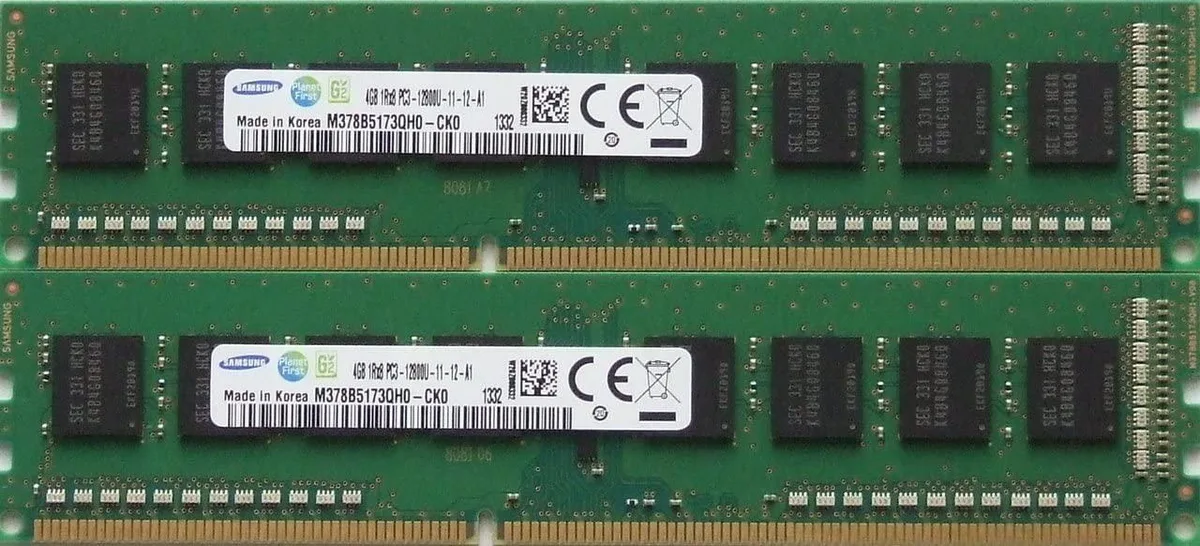
SAMSUNG 8GB kit (2 x 4GB) DDR3 PC3-12800 240-pin DIMM desktop RAM
Dual-channel 8 GB DDR3 kit with two 240-pin DIMMs at 1600 MT/s, CL11, 1.5 V, unbuffered non-ECC
- 8GB kit expands desktop capacity with two 4GB modules
- DDR3-1600 speed delivers 12800 MB/s bandwidth for responsive multitasking
- CL11 timing reduces latency for smoother application performance
- 5V operation lowers power draw and heat output
- 240-pin unbuffered non-ECC design fits standard desktop DIMM slots
Kit overview
This Samsung kit supplies 8 GB of DDR3 desktop memory in two 4 GB modules. Each stick is a 240-pin DIMM rated at PC3-12800 with a CAS latency of 11. The modules run at 1.5 V and are unbuffered, non-ECC parts. They are intended for standard desktop systems that accept DDR3 DIMMs.
Who this suits
Builders upgrading or repairing a desktop that uses DDR3 memory and has slots able to accept 4 GB per module will find this kit a direct fit. The dual-channel pair delivers 8 GB total capacity for everyday office and home workloads. Buyers who need more than 8 GB of system memory or who require ECC error correction should look at other options. Systems limited to lower per-slot capacities or different memory types cannot use these modules.
Deciding spec
The critical specification is the DDR3 PC3-12800 rating combined with the 240-pin DIMM form factor. Your motherboard must support DDR3 at 1600 MT/s and accept 240-pin unbuffered non-ECC DIMMs with a 4 GB per slot limit. If the board calls for a different voltage, pin count, or memory standard, this kit will not be compatible.
Points forts
- 8GB kit expands desktop capacity with two 4GB modules
- DDR3-1600 speed delivers 12800 MB/s bandwidth for responsive multitasking
- CL11 timing reduces latency for smoother application performance
- 5V operation lowers power draw and heat output
- 240-pin unbuffered non-ECC design fits standard desktop DIMM slots
Caractéristiques
| Brand | SAMSUNG |
|---|
Questions sur cet article
Does my motherboard need to support 4 GB per DIMM slot for this 2 x 4 GB kit to work?
The kit uses 4 GB modules, so the board must accept at least 4 GB per slot; check the motherboard manual for the maximum capacity per DIMM.
Will this DDR3-1600 kit run at its rated speed if I keep slower DDR3 modules installed?
All installed memory usually runs at the speed of the slowest module; the kit is rated at DDR3-1600 with CL11, so mixing slower sticks will drop the whole system to that lower speed.
How can I confirm the kit is operating at DDR3-1600 with CL11 after installation?
Open the BIOS or a tool such as CPU-Z and verify the memory frequency shows 800 MHz (DDR3-1600) and the CAS latency reads 11.
Également dans ce rayon
Les clients ont aussi comparé
Même rayon, même caisse — huit monnaies et un taux bloqué 30 minutes.


PrimoChill
PrimoChill Praxis Wetbench Open-Air Test Bench 461.8mm
- Open-Air
274,89 $US
0.00355155BTC
En stock
Silverstone Technology
SilverStone Technology Strider 1200W 80 Plus Platinum Modular Power Supply
- ATX Mid Tower
- 1200W
324,03 $US
0.00418643BTC
En stock