


Sapphire Tech
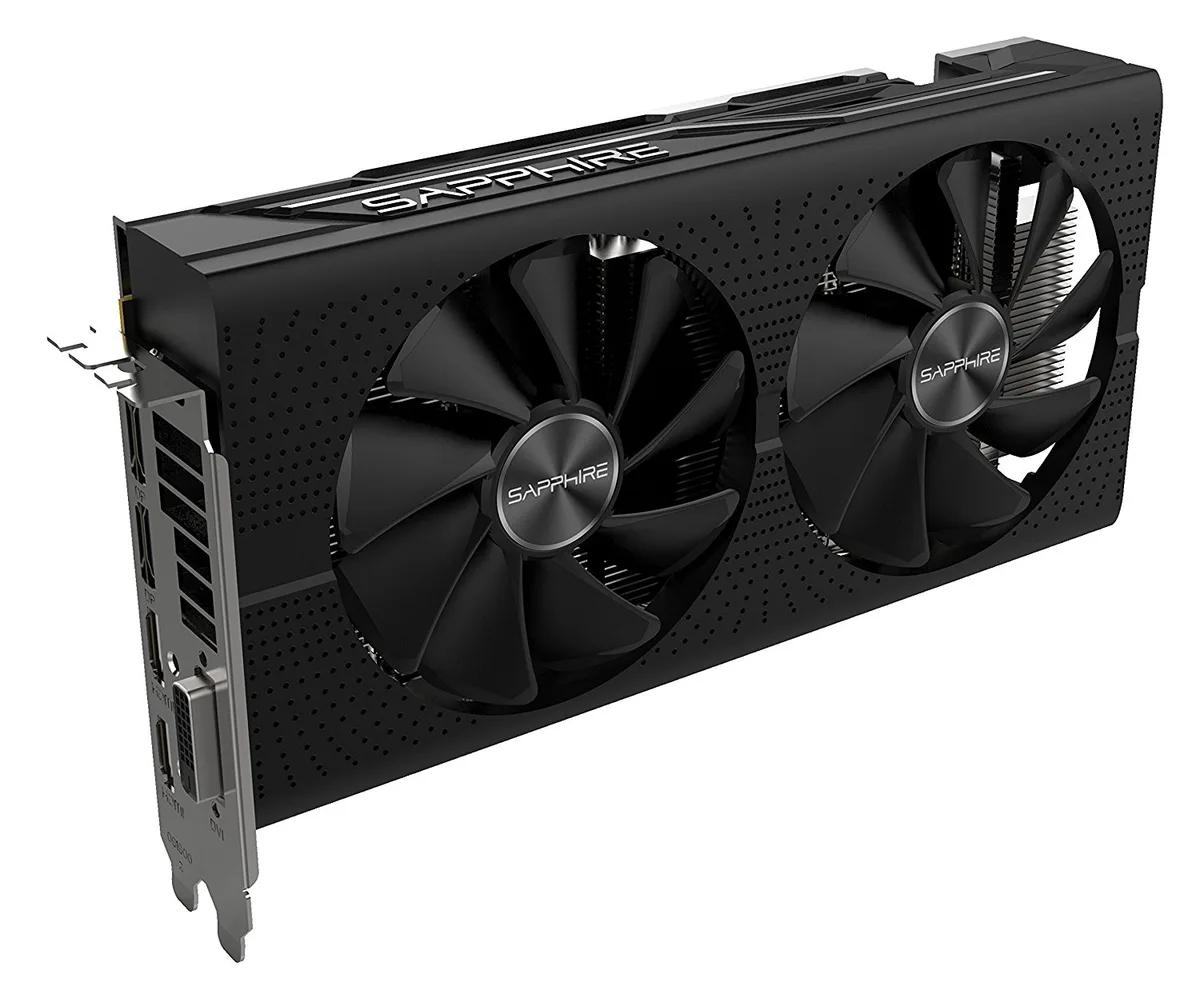
Sapphire Tech 11265-05-20G Radeon PULSE RX 580 8GB GDDR5 graphics card
Radeon RX 580 with 8 GB GDDR5, 2304 stream processors and a 1366 MHz boost clock, plus dual HDMI, dual DisplayPort 1.4 and DVI-D for five displays
- Chipset ManufacturerAMD
- GPU SeriesAMD Radeon RX 500 Series
- GPURadeon RX 580
- Boost Clock1366 MHz
- Stream Processors2304
- Effective Memory Clock2000 MHz, 8000 MHz Effective
- 8 GB GDDR5 memory handles high-resolution textures
- Boost clock reaches 1366 MHz for responsive gaming
- Dual-X dual-fan cooler with Quick Connect simplifies maintenance
- Five display outputs support multi-monitor setups
- 2304 stream processors deliver strong compute performance
Target audience
The Sapphire Pulse RX 580 is a factory-overclocked graphics card built around the AMD Radeon RX 580 GPU with 2304 stream processors and 8GB of GDDR5 memory on a 256-bit bus. It targets gamers who want to run modern titles at 1440p resolution and 60 frames per second. The boost clock reaches 1366 MHz for extra headroom. It suits PC builders looking for strong value in the Radeon RX 500 series.
Upgrade context
This card replaces older GPUs that lack the memory bandwidth or API support for current games at high settings. The jump is worth it when moving from a card with 4GB or less VRAM, or from an architecture limited to DirectX 11. The 8GB frame buffer and DirectX 12 capability unlock higher texture quality and modern rendering features. OpenGL 4.5 support also benefits compatible professional workloads.
Build integration
The dual-fan cooler uses a dual ball-bearing design with a quick-connect feature for simple fan maintenance. Outputs include two HDMI ports, two DisplayPort 1.4 connectors and one dual-link DVI-D, driving up to five monitors at a maximum resolution of 3840 x 2160. The card requires a power supply with sufficient PCIe connectors and a case with adequate length clearance for a dual-slot design.
Points forts
- 8 GB GDDR5 memory handles high-resolution textures
- Boost clock reaches 1366 MHz for responsive gaming
- Dual-X dual-fan cooler with Quick Connect simplifies maintenance
- Five display outputs support multi-monitor setups
- 2304 stream processors deliver strong compute performance
Caractéristiques
| Brand | SAPPHIRE |
|---|---|
| Series | PULSE |
| Model | 11265-05-20G |
| Chipset Manufacturer | AMD |
| GPU Series | AMD Radeon RX 500 Series |
| GPU | Radeon RX 580 |
| Boost Clock | 1366 MHz |
| Stream Processors | 2304 |
| Effective Memory Clock | 2000 MHz, 8000 MHz Effective |
| Memory Size | 8GB |
| Memory Interface | 256-Bit |
| Memory Type | GDDR5 |
| DirectX | DirectX 12 |
| OpenGL | OpenGL 4.5 |
| Multi-Monitor Support | 5 |
| HDMI | 2 x HDMI |
| DisplayPort | 2 x DisplayPort 1.4 |
| DVI | 1 x DL-DVI-D |
| Max Resolution | 3840 x 2160 |
| Cooler | Double Fans |
| Operating Systems Supported | Windows 10 Windows 7 👉Check gaming pc with Windows 11 Pro |
| Thermal Design Power | 300W |
| System Requirements | Power Consumption: <225W 500-Watt Power Supply (Suggestion) 1 x 8-pin AUX Power Connector Blue-ray / HD DVD playback requires Blu-ray / HD DVD drive PCI Express 2.0 or higher version based PC is required with one X16 lane graphics slot available on the motherboard in order for the card to be compatible with |
| Power Connector | 8-Pin |
| Dual-Link DVI Supported | Yes |
| Features | FreeSync Technology Quad HD Display (4K*2K Support) Black Diamond Choke AMD Liquid VR Technology AMD Xconnect ready Radeon VR ready Premium HDR Ready Frame Rate Target Control NITRO Quick Connect system Dual-X Cooling Black Diamond Choke 4 Fuse protection Precision fan control Robust VRM Cooling Radeon Chill Radeon Relive |
| Max GPU Length | 230 mm |
| Card Dimensions (L x H) | 9.06" x 4.92" |
| Slot Width | 2 Slots |
| Poids d’expédition | 1.09 kg |
| Dimensions du colis | 284 × 168 × 84 mm |
Questions sur cet article
What clearance does the dual-fan Pulse RX 580 need inside my case?
The card uses a dual-slot, dual-fan cooler that fits a standard ATX bracket; measure your case length and ensure the PCIe power plug has room.
How do I install the card and what step is often missed?
Seat the card in the primary PCIe x16 slot, connect the required 8-pin power cable, then install the AMD Radeon driver package before launching games.
What maintenance will the Quick Connect fans need later?
Unclip the fans periodically to blow out dust; if a fan becomes noisy or stops spinning, detach it and fit a replacement unit.
Également dans ce rayon
Les clients ont aussi comparé
Même rayon, même caisse — huit monnaies et un taux bloqué 30 minutes.


PrimoChill
PrimoChill Praxis Wetbench Open-Air Test Bench 461.8mm
- Open-Air
274,89 $US
0.00355238BTC
En stock
Silverstone Technology
SilverStone Technology Strider 1200W 80 Plus Platinum Modular Power Supply
- ATX Mid Tower
- 1200W
324,03 $US
0.00418741BTC
En stock