

Sapphire Tech
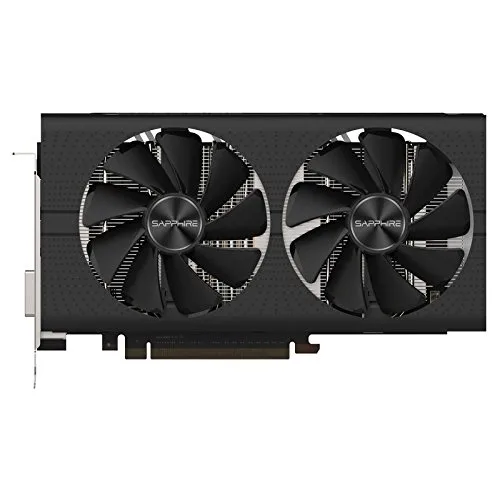
Sapphire Tech PULSE Radeon RX 580 8GB GDDR5 graphics card
8GB 256-bit GDDR5 GPU with 2304 stream processors boosting to 1366 MHz, dual HDMI, dual DisplayPort 1.4 and DVI for five-monitor 5120×2880 output
- InterfacePCI Express 3.0
- Chipset ManufacturerAMD
- GPU SeriesAMD Radeon RX 500 Series
- Boost Clock1366 MHz
- Stream Processors2304
- Effective Memory Clock2000 MHz, 8000 MHz Effective
- 8GB GDDR5 on a 256-bit bus for high memory bandwidth
- Boost clock of 1366 MHz drives strong compute performance
- 2304 stream processors handle parallel workloads efficiently
- Five-display support via dual HDMI, dual DisplayPort 1.4 and DVI-D
- PCI Express 3.0 interface and DirectX 12 compatibility for modern APIs
Sapphire PULSE RX 580 8GB GDDR5
This Sapphire PULSE Radeon RX 580 8GB GDDR5 graphics card targets 1080p and 1440p gamers who want smooth frame rates in current titles. It delivers 2304 stream processors and an 8GB 256-bit frame buffer for modern texture workloads. The PCI Express 3.0 interface fits most mainstream motherboards without a platform change. A factory boost clock of 1366 MHz and 8000 MHz effective memory speed provide strong out-of-the-box performance.
Upgrade from 4GB or older Polaris cards
Moving from a 4GB Polaris board or an earlier RX 500 Series model adds 8GB GDDR5 capacity and a higher 1366 MHz boost clock for noticeably better 1440p stability. The jump is worth it when texture-heavy games stutter on 4GB buffers or when you need DisplayPort 1.4 for high-refresh panels. Dual HDMI 2.0 and DVI-D outputs also simplify multi-monitor setups without adapters. The UEFI-compatible BIOS ensures clean boot on modern systems.
Sustained load with PULSE cooling and backplate
The PULSE dual-fan cooler and metal backplate keep temperatures in check during extended gaming sessions rather than short benchmark runs. Consistent clocks hold near the 1366 MHz boost target while the 2000 MHz memory clock feeds the 256-bit bus steadily. DirectX 12 and OpenGL 4.5 support remain stable under continuous compute or render workloads. Five-display Eyefinity stays reliable without thermal throttling.
Points forts
- 8GB GDDR5 on a 256-bit bus for high memory bandwidth
- Boost clock of 1366 MHz drives strong compute performance
- 2304 stream processors handle parallel workloads efficiently
- Five-display support via dual HDMI, dual DisplayPort 1.4 and DVI-D
- PCI Express 3.0 interface and DirectX 12 compatibility for modern APIs
Caractéristiques
| Brand | SAPPHIRE |
|---|---|
| Series | PULSE |
| Model | 100411P8GOCL |
| Interface | PCI Express 3.0 |
| Chipset Manufacturer | AMD |
| GPU Series | AMD Radeon RX 500 Series |
| Boost Clock | 1366 MHz |
| Stream Processors | 2304 |
| Effective Memory Clock | 2000 MHz, 8000 MHz Effective |
| Memory Size | 8GB |
| Memory Interface | 256-Bit |
| Memory Type | GDDR5 |
| DirectX | DirectX 12 |
| OpenGL | OpenGL 4.5 |
| Multi-Monitor Support | 5 |
| HDMI | 2 x HDMI |
| DisplayPort | 2 x DisplayPort 1.4 |
| DVI | 1 x DVI |
| Max Resolution | 5120 x 2880 |
| Eyefinity Support | Yes |
| CrossFireX Support | Yes |
| Virtual Reality Ready | Yes |
| Cooler | Double Fans |
| Operating Systems Supported | Windows 10 Windows 7 👉Check gaming pc with Windows 11 Pro |
| System Requirements | Power Consumption: <225W 500-Watt Power Supply (Suggestion) 1 x 8-pin AUX Power Connector Blue-ray / HD DVD playback requires Blu-ray / HD DVD drive PCI Express 2.0 or higher version based PC is required with one X16 lane graphics slot available on the motherboard in order for the card to be compatible with |
| Features | FreeSync Technology Quad HD Display (4K*2K Support) Black Diamond Choke AMD Liquid VR Technology AMD Xconnect ready Radeon VR ready Premium HDR Ready Frame Rate Target Control NITRO Quick Connect system Dual-X Cooling Black Diamond Choke 4 Fuse protection Precision fan control Robust VRM Cooling Radeon Chill Radeon Relive |
Questions sur cet article
What clearance does the Sapphire PULSE RX 580 need for its backplate and dual-slot cooler?
The card occupies two expansion slots and includes a metal backplate; verify your chassis allows a dual-slot card and that no cables press against the backplate.
How do I connect the required PCIe power and avoid the common mistake of leaving one pin unseated?
Plug one 8-pin PCIe connector firmly until the latch clicks; the card will not power on if the connector is only partially inserted.
When should I replace the thermal paste on the GPU die and memory modules?
Re-paste only if temperatures rise noticeably after several years; the stock compound is rated for long-term use under normal loads.
Également dans ce rayon
Les clients ont aussi comparé
Même rayon, même caisse — huit monnaies et un taux bloqué 30 minutes.


PrimoChill
PrimoChill Praxis Wetbench Open-Air Test Bench 461.8mm
- Open-Air
274,89 $US
0.00355155BTC
En stock
Silverstone Technology
SilverStone Technology Strider 1200W 80 Plus Platinum Modular Power Supply
- ATX Mid Tower
- 1200W
324,03 $US
0.00418643BTC
En stock