BFKK
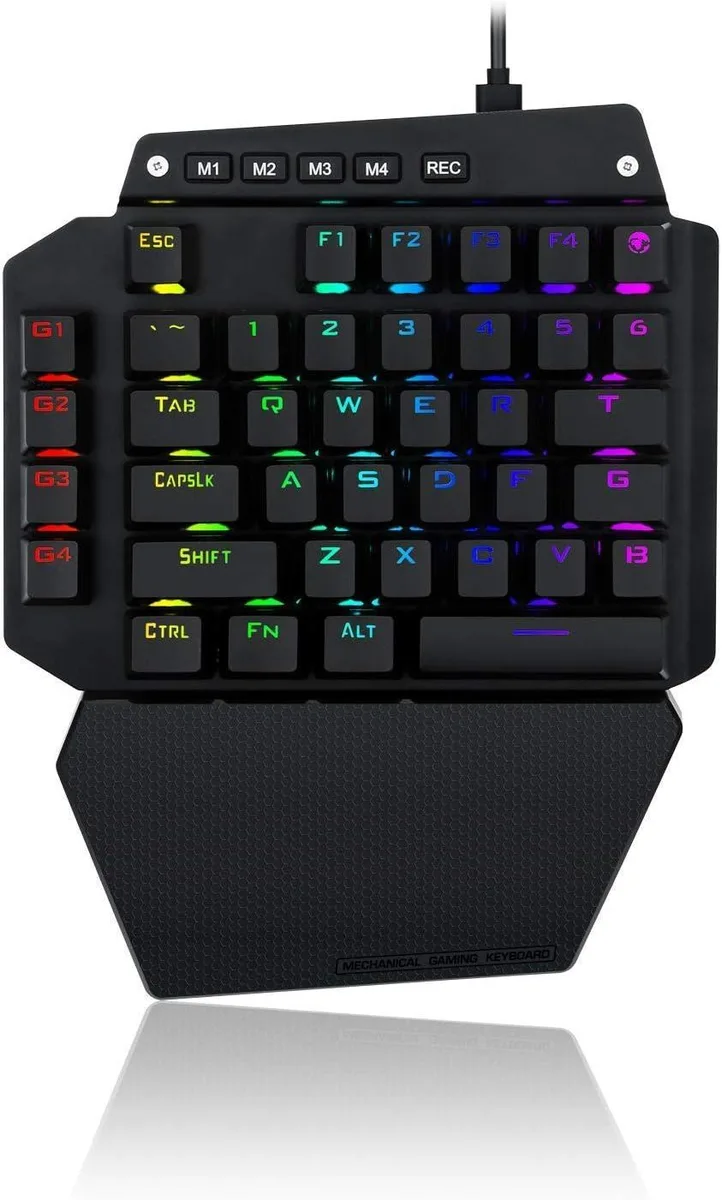
BFKK One-Handed Mechanical Gaming Keyboard, Blue Switch, 6 Macro Keys, Detachable Wrist Rest, USB-C
58,99 $US
0.00075215BTC
En stockNous acceptons la cryptomonnaie — les cryptos que vous détenez peuvent ainsi acheter du matériel réel.Payez en crypto, dépensez-la en matériel réel. Livraison assurée offerte partout dans le monde au-delà de 399 $. Cartons neutres, sans marque, expédiés depuis l’Allemagne.Livraison assurée offerte au-delà de 399 $. Votre taux est bloqué pendant 30 minutes dès l’ouverture de la caisse.Taux bloqué 30 minutes. Chaque article est scellé, son numéro de série est vérifié, et il est couvert par une garantie de 24 mois.Scellé, garanti 24 mois.


TUKO
A full-size wireless keyboard and mouse combo with retro round keycaps, 15 hotkeys, a numeric keypad and a pebble-shaped mouse that enters power-saving mode after 20 seconds of inactivity
The TUKO wireless keyboard and mouse combo pairs a full-size keyboard with round retro keycaps and a pebble-shaped mouse. It connects through a plug-and-play wireless receiver so no driver installation is needed. The set is aimed at home and office users who want a colourful, typewriter-inspired look on their desk.
The 15 hotkeys and numeric keypad help with productivity shortcuts and data entry. The ergonomic mouse shape reduces wrist strain during long sessions. Buyers who need programmable macros, per-key lighting or mechanical switches should look at a different keyboard.
The keyboard uses a full-size layout with a dedicated numeric keypad and 15 extra hotkeys. This width demands more desk space than a compact or tenkeyless model. Check your available surface area before ordering.
| Layout | Full-size |
|---|
The keyboard sits flat on the desk with its built-in numeric keypad and 15 hotkeys; no extra mounting hardware or clearance is required.
Insert the USB receiver into a Windows PC port — the set pairs instantly with no driver installation, but users often forget to remove the receiver from its storage slot first.
The optical mouse draws 0.11 mA and enters power-saving after 20 seconds idle, so a single AA battery typically lasts months under normal use.
Également dans ce rayon
Même rayon, même caisse — huit monnaies et un taux bloqué 30 minutes.
Ce que vous envoyez, et ce dans quoi vous lisez les prix.
Envoyé depuis votre portefeuille à la caisse
Affichage seul — le catalogue est libellé en dollars
Aucune monnaie ne correspond.
Choisissez la langue dans laquelle le site vous parle.
Première visite ?
Vous avez déjà un compte ?
Il n’y a pas de réinitialisation automatique : cette boutique n’envoie aucun e-mail, il n’existe donc aucun lien à usage unique à demander. Laissez l’adresse sur le compte, elle sera traitée à la main.
Demande enregistrée
Rien n’arrivera dans votre boîte de réception — cette boutique n’envoie aucun e-mail. Quelqu’un s’en occupe à la main.
Vous l’avez retrouvé ?