


ViewSonic
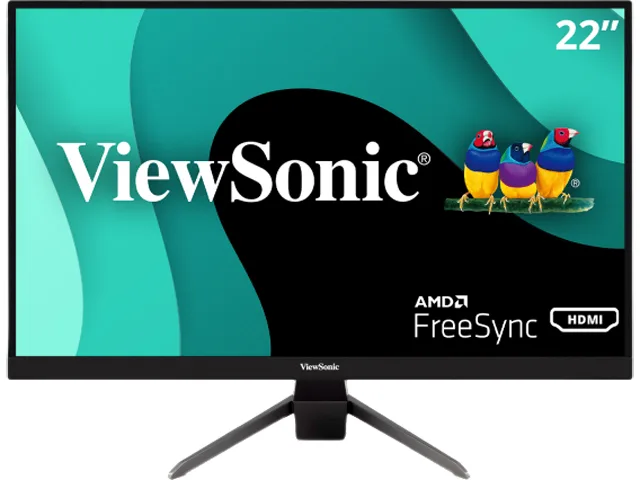
ViewSonic VX2267-MHD 22" 1080p 75Hz gaming monitor
A 22 inch Full HD gaming monitor with a 75 Hz refresh rate, 1 ms MPRT response time and AMD FreeSync for tear-free play
- Screen Size22" (21.5" Viewable)
- Refresh Rate75Hz
- Resolution1920 x 1080
- Response Time1 ms (MPRT)
- Display Colors16.7 Million
- PanelMVA
- Smooth 75 Hz gameplay with AMD FreeSync sync
- 1 ms MPRT response clears motion blur fast
- High 3000:1 contrast gives deep blacks
- 178° wide viewing keeps colours consistent
- HDMI 1.4, DisplayPort and VGA connect everything
Compact 22-inch gaming display
The ViewSonic VX2267-MHD is a 22-inch Full HD monitor with a 75 Hz refresh rate and a 1 ms MPRT response time. It uses an MVA panel with a 3000:1 contrast ratio and 178-degree viewing angles. AMD FreeSync support reduces tearing during gameplay. The flat, anti-glare screen suits desktop gaming and everyday entertainment.
Suits budget-conscious gamers
This display fits players who want smooth 1080p motion at 75 Hz without spending on high-refresh panels. The three video inputs — DisplayPort, HDMI 1.4 and VGA — connect PCs and consoles alike. Buyers who need higher refresh rates for competitive play or wider colour coverage for creative work should look at other models.
75 Hz refresh rate decides fit
The single specification that determines suitability is the 75 Hz maximum refresh rate. If your graphics card and games benefit from faster updates, this monitor will not deliver them. If 75 Hz matches your target frame rates, the FreeSync support and 1 ms response time provide a responsive experience.
Points forts
- Smooth 75 Hz gameplay with AMD FreeSync sync
- 1 ms MPRT response clears motion blur fast
- High 3000:1 contrast gives deep blacks
- 178° wide viewing keeps colours consistent
- HDMI 1.4, DisplayPort and VGA connect everything
Caractéristiques
| Screen Size | 22" (21.5" Viewable) |
|---|---|
| Refresh Rate | 75Hz |
| Resolution | 1920 x 1080 |
| Response Time | 1 ms (MPRT) |
| Display Colors | 16.7 Million |
| Panel | MVA |
| Aspect Ratio | 16:9 |
| Curved Surface Screen | Flat Panel |
| Widescreen | Yes |
| LED Backlight | Yes |
| Brightness | 250 cd/m2 |
| Contrast Ratio | 3000:1 |
| Glare Screen | Anti-glare |
| Maximum Resolution | 1920x1080 |
| Viewing Angle | 178° (H) / 178° (V) |
| Display Type | FHD |
| Adaptive Sync Technology | FreeSync (AMD Adaptive Sync) |
| Brand | ViewSonic |
| Model | VX2267-MHD |
| Cabinet Color | Black |
| Bezel Design | Standard Frame |
| D-Sub | 1 |
| DVI | No |
| HDMI | 1 x HDMI 1.4 |
| Connectors | D-Sub, HDMI, DisplayPort, Audio |
| Thunderbolt 2 | No |
| DisplayPort | 1 |
| Video Ports | 1 x D-Sub / 1 x DisplayPort / 1 x HDMI 1.4 |
| Headphone | 1 x 3.5mm Audio in 1 x 3.5mm Audio out |
| Stand Adjustments | Tilt: 5° / 23° |
| Built-in Speakers | 2W x 2 |
| Built-in Webcam | No |
| VESA Compatibility - Mountable | 100 x 100mm |
| Power Supply | 100 - 240 VAC, 50/60Hz |
| Power Consumption | Eco Mode (Conserve): 15W Eco Mode (Optimized): 17W Consumption (Typical): 22W Consumption (Max): 27W |
| Dimensions | 14.80" x 19.40" x 8.00" w/ stand 11.50" x 19.40" x 1.80" w/o stand |
| Weight | 7.05 lbs. |
| Package Contents | VX2267-MHD, Power Cable, HDMI Cable, Quick Start Guide |
| Poids d’expédition | 4.29 kg |
| Dimensions du colis | 546 × 378 × 127 mm |
Questions sur cet article
What cable must I already have to connect this monitor to a graphics card?
You need a DisplayPort cable, an HDMI 1.4 cable or a VGA cable — the monitor provides one port of each type.
Will my older PC with only a VGA output drive the 1920x1080 75Hz signal?
Yes, the VGA port supports the full 1920x1080 resolution at 75Hz, so legacy systems can use the native mode.
How do I confirm FreeSync is active after I enable it in the driver?
Open the on-screen menu, select the FreeSync option and verify it shows On; supported games will then run without tearing.
Également dans ce rayon
Les clients ont aussi comparé
Même rayon, même caisse — huit monnaies et un taux bloqué 30 minutes.


Lenovo
Lenovo Legion Pro 32UD-10 31.5 inch 144 Hz gaming monitor
- 31.5 inch"
- 144 Hz
$819.99
0.01060432BTC
En stock