TP-Link
TP-Link Archer TXE72E Wi-Fi 6E Bluetooth 5.3 PCIe Adapter
- PCIE Wi-Fi Adapter
- Black
35,99 USD38,49 USD−6%
0.00046009BTC
DisponibileAccettiamo criptovalute — così le crypto che Lei possiede possono comprare hardware reale.Paghi in crypto, la spenda in hardware reale. Spedizione assicurata gratuita in tutto il mondo oltre i 399 $. Cartoni neutri, senza marchio, spediti dalla Germania.Spedizione assicurata gratuita oltre i 399 $. Il Suo tasso resta bloccato per 30 minuti dall’apertura del checkout.Tasso bloccato 30 minuti. Ogni articolo è sigillato, il numero di serie è verificato, ed è coperto da una garanzia di 24 mesi.Sigillato, garantito 24 mesi.


ASUS
PCIe Wi-Fi 6 adapter adding 1800 Mbps wireless and Bluetooth 5.2 to desktops
Options WiFi 6 AX1800 + BT 5.2
Le versioni barrate esistono, ma non sono disponibili qui.
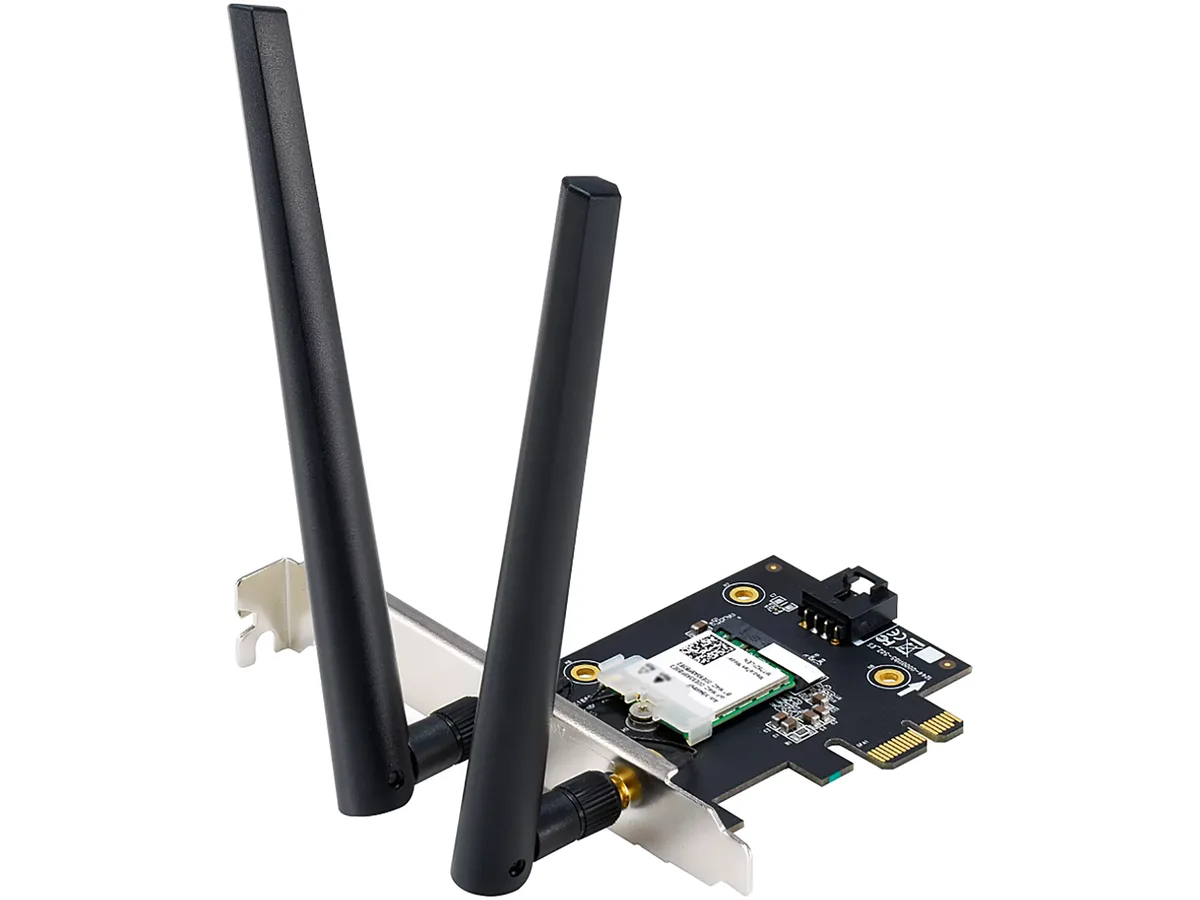
The ASUS PCE-AX1800 adds Wi-Fi 6 and Bluetooth 5.2 to a desktop through a PCI Express x1 slot. It supports dual-band operation on 2.4 GHz and 5 GHz with a combined data rate up to 1800 Mbps. The card includes two external antennas for flexible positioning. Windows 10 64-bit is required for driver support.
The adapter draws power directly from the PCIe slot and runs without active cooling. In normal use it adds negligible heat inside the chassis and produces no audible noise. The external antennas keep radio components away from other expansion cards, reducing interference with graphics cards or storage controllers.
Because the radio connects internally, no USB dongle occupies a front or rear port. The two detachable antennas can be placed on the case rear or on a short extension cable for better signal. The x1 slot requirement leaves larger PCIe slots free for GPUs or capture cards. Not suited for systems lacking a spare PCIe x1 slot or running an OS other than Windows 10 64-bit.
| Brand | ASUS |
|---|---|
| Model | PCE-AX1800 |
| Type | PCIE Wi-Fi Adapter |
| Standards | IEEE 802.11ax |
| Wireless Data Rates | WiFi 6 (802.11ax) (2.4GHz) : up to 574 Mbps WiFi 6 (802.11ax) (5GHz) : up to 1201 Mbps |
| WiFi Generation | Wi-Fi 6 |
| Interface | PCI Express |
| Frequency Band | 2.4 GHz / 5 GHz |
| Antenna | External Antenna |
| Bluetooth | Bluetooth 5.2 |
| System Requirements | OS Support : Windows 10 64-bit |
| Features | 1.5X Faster WiFi, Even in Crowded Networks With WiFi 6 (802.11ax) technology, ASUS PCE-AX1800 delivers wireless speeds that are up to 1.5X faster than WiFi 5 (802.11ac) devices. A revolutionary combination of OFDMA and MU-MIMO technologies ensures the most efficient WiFi connection for your PC. * PCE-AX1800 only supports PCI-Express x1 standard, please install the adapter in PCI-e x1 slot. Still Fast, Even In Crowded Network ASUS PCE-AX1800 pairs trusted MU-MIMO connectivity and innovative OFDMA technology to efficiently allocate bandwidth and communicate with multiple devices simult |
| Weight | 0.11 lb. |
| Peso di spedizione | 0.23 kg |
| Dimensioni del pacco | 180 × 136 × 52 mm |
Insert the card into any PCI Express x1 slot, secure the bracket screw, then attach the two external antennas before booting; the step most people skip is screwing the antennas on fully so the 2.4 GHz and 5 GHz bands reach their rated 574 Mbps and 1201 Mbps.
The two external antennas are the only moving parts; their RP-SMA connectors can loosen from vibration, so re-tighten them periodically and replace an antenna if the hinge cracks or the cable frays.
Sustained 1800 Mbps aggregate throughput is capped by the single PCI Express x1 lane and the Windows 10 64-bit driver stack, so prolonged heavy transfers will hit the bus ceiling before the radio overheats.
Anche in questo reparto
Stesso reparto, stessa cassa — otto monete e un cambio bloccato per 30 minuti.
Cosa invia per pagare, e in quale valuta legge i prezzi.
Inviato dal Suo portafoglio alla cassa
Solo a titolo indicativo — il catalogo è espresso in dollari
Nessuna valuta corrisponde.
Scelga la lingua in cui il sito Le parla.
Nessuna lingua corrisponde.
Prima visita?
Ne ha già uno?
Non esiste un ripristino automatico: questo negozio non invia e-mail, quindi non esiste alcun link monouso da richiedere. Lasci l’indirizzo sull’account: verrà gestito manualmente.
Richiesta registrata
Non arriverà nulla nella Sua casella di posta — questo negozio non invia e-mail. Qualcuno se ne occupa manualmente.
L’ha ritrovata?