

ASUS
ASUS TM420IA-DB71T 2-in-1 laptop 14" FHD touch AMD Ryzen 7 4700U 8GB 512GB
- Bespoke Black
- Convertible
593,99 USD
0.00739124BTC
DisponibileAccettiamo criptovalute — così le crypto che Lei possiede possono comprare hardware reale.Paghi in crypto, la spenda in hardware reale. Spedizione assicurata gratuita in tutto il mondo oltre i 399 $. Cartoni neutri, senza marchio, spediti dalla Germania.Spedizione assicurata gratuita oltre i 399 $. Il Suo tasso resta bloccato per 30 minuti dall’apertura del checkout.Tasso bloccato 30 minuti. Ogni articolo è sigillato, il numero di serie è verificato, ed è coperto da una garanzia di 24 mesi.Sigillato, garantito 24 mesi.


HP
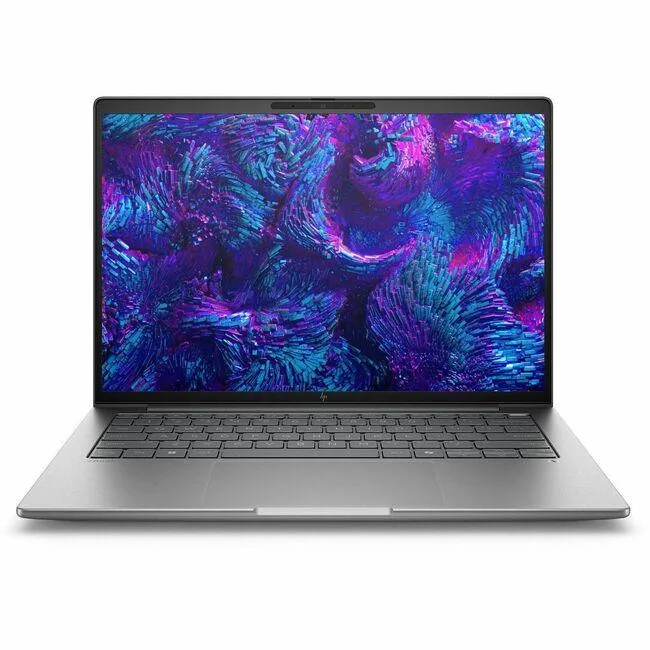
16-inch WUXGA touchscreen mobile workstation with Intel Core Ultra 7 255H, 16GB DDR5, 512GB SSD and NVIDIA RTX 500 Ada graphics
The HP ZBook 8 G1i BX7V2UT#ABA is a 16-inch mobile workstation built for professionals who need a touchscreen display and dedicated graphics in a Meteor Silver chassis. It runs Windows 11 Pro on an Intel Core Ultra 7 255H processor with 16GB of DDR5 memory and a 512GB SSD. The NVIDIA RTX 500 Ada Generation GPU provides 4GB of video memory for hardware-accelerated workflows.
The 16.0-inch WUXGA panel delivers a 1920 x 1200 resolution at 60 Hz with touch input and an anti-glare finish. Wireless connectivity uses Wi-Fi 7 (802.11be) alongside Bluetooth for cable-free peripherals. The dedicated graphics card and touchscreen combination supports direct manipulation in design and engineering applications without external monitors.
Confirm that 16GB of soldered DDR5 memory meets your workload before ordering, as the capacity cannot be upgraded after purchase. The 512GB SSD may require supplementation for large project libraries or local datasets. Ensure Windows 11 Pro aligns with your software licensing and management policies. Buyers who need more storage or user-upgradeable memory should consider a different configuration.
| Processor Name | Intel Core Ultra 7 255H |
|---|---|
| CPU Type | Intel Core Ultra 7 (Series 2) |
| Memory | 16GB DDR5 |
| Type | Workstation |
| Resolution | 1920 x 1200 |
| Screen Size | 16.0" |
| Wide Screen Support | Yes |
| Touchscreen | Touch Screen |
| Refresh Rate | 60 Hz |
| SSD | 512GB |
| Brand | HP |
| Series | ZBook 8 G1i |
| Part Number | BX7V2UT#ABA |
| GPU/VPU | NVIDIA RTX 500 Ada Generation |
| Video Memory | 4GB |
| Graphic Type | Dedicated Card |
| Operating System | Windows 11 Pro |
| WiFi Generation | Wi-Fi 7 |
| WLAN | 802.11be Wireless LAN |
| Bluetooth | Yes |
| Dimensions (W x D x H) | 14.1" x 9.8" x 0.76" |
| Weight | 3.87 lbs. |
| Optical Drive Type | No |
| Webcam | Yes |
| HDMI | 1 x HDMI |
| Peso di spedizione | 3.52 kg |
| Dimensioni del pacco | 505 × 302 × 69 mm |
The 802.11be wireless LAN supports Wi-Fi 7, delivering multi-gigabit throughput for large file transfers and low-latency video calls.
The 16.0" WUXGA panel with 1920 x 1200 resolution fits the standard ZBook 8 G1i chassis; no extra bezel or hinge adapters are needed.
Boot the preloaded Windows 11 Pro, complete OOBE, then enable BitLocker only after the first update cycle finishes.
Anche in questo reparto
Stesso reparto, stessa cassa — otto monete e un cambio bloccato per 30 minuti.
Cosa invia per pagare, e in quale valuta legge i prezzi.
Inviato dal Suo portafoglio alla cassa
Solo a titolo indicativo — il catalogo è espresso in dollari
Nessuna valuta corrisponde.
Scelga la lingua in cui il sito Le parla.
Prima visita?
Ne ha già uno?
Non esiste un ripristino automatico: questo negozio non invia e-mail, quindi non esiste alcun link monouso da richiedere. Lasci l’indirizzo sull’account: verrà gestito manualmente.
Richiesta registrata
Non arriverà nulla nella Sua casella di posta — questo negozio non invia e-mail. Qualcuno se ne occupa manualmente.
L’ha ritrovata?


