


MSI
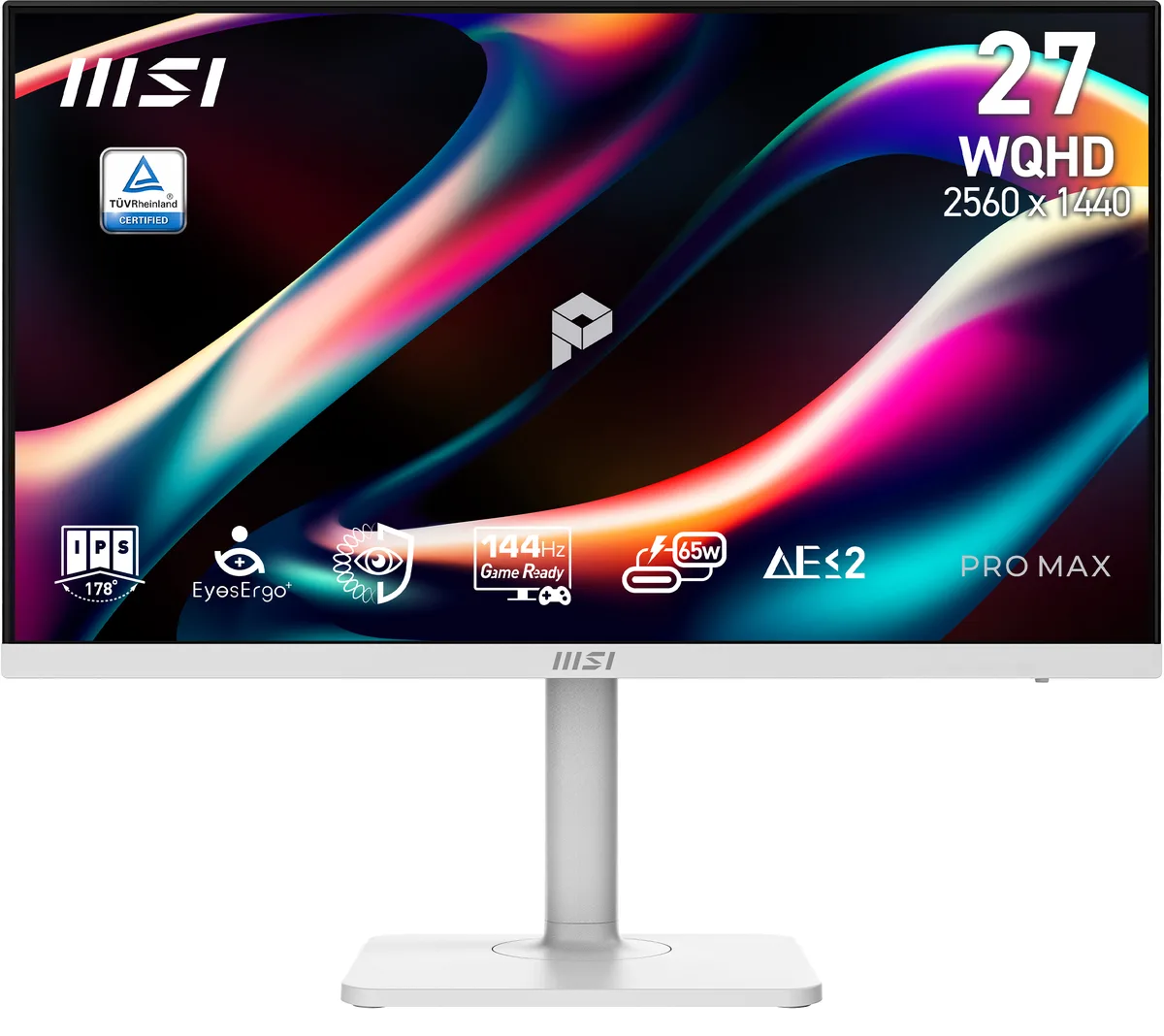
MSI PRO MAX 271QPHW E14 27" 1440p 144Hz IPS monitor
A 27" 1440p 144Hz IPS monitor with 300 cd/m² brightness, 1500:1 contrast, 1ms response, 178° viewing angles, USB-C 65W charging, and a height-adjustable white stand
- Cabinet ColorMatte White
- Screen Size27"
- Glare ScreenNon-glare
- WidescreenYes
- Resolution2560 x 1440 (2K)
- Refresh Rate144Hz
- Sharp 27" 2560 x 1440 IPS panel delivers crisp detail for coding and design
- 144 Hz refresh rate with 1 ms response time keeps motion smooth and flicker-free
- 178° wide viewing angles maintain consistent colour and contrast from any position
- USB-C with 65 W power delivery carries video, data and charging in one cable
- TÜV-certified low-blue-light hardware and MSI Eye-Q Check reduce eye strain during long sessions
27-inch WQHD monitor for coding workspaces
The MSI PRO MAX 271QPHW E14 is a 27-inch WQHD display built for programming, coding and website design. Its IPS panel delivers 16.7 million colours at 2560 x 1440 resolution with a 144 Hz refresh rate. The non-glare matte white cabinet reduces reflections during long sessions.
Installation and common issues
The monitor uses a height-adjustable stand with pivot, swivel and tilt movement. A single USB-C cable carries video, data and 65 W charging through DisplayPort Alt Mode. Ensure the host device supports USB-C video and power delivery, otherwise the one-cable feature will not function.
Pre-purchase checks
Verify that your laptop or desktop provides USB-C DisplayPort Alt Mode and at least 65 W power output for charging. Confirm the graphics output can drive 2560 x 1440 at 144 Hz over the available port. The stand requires desk space for its full range of ergonomic adjustments.
Punti di forza
- Sharp 27" 2560 x 1440 IPS panel delivers crisp detail for coding and design
- 144 Hz refresh rate with 1 ms response time keeps motion smooth and flicker-free
- 178° wide viewing angles maintain consistent colour and contrast from any position
- USB-C with 65 W power delivery carries video, data and charging in one cable
- TÜV-certified low-blue-light hardware and MSI Eye-Q Check reduce eye strain during long sessions
Caratteristiche tecniche
| Brand | MSI |
|---|---|
| Series | PRO MAX |
| Model | PRO MAX 271QPHW E14 |
| Part Number | PRO MAX 271QPHW E14 |
| Cabinet Color | Matte White |
| Screen Size | 27" |
| Glare Screen | Non-glare |
| Widescreen | Yes |
| Resolution | 2560 x 1440 (2K) |
| Refresh Rate | 144Hz |
| Viewing Angle | 178° (H) / 178° (V) |
| Monitor Pixel Density | 0.2331mm |
| Display Colors | 16.7 Million |
| Brightness | 300 cd/m2 |
| Contrast Ratio | 1,500:1 |
| Aspect Ratio | 16:9 |
| Response Time | 1 ms |
| Panel | IPS |
| Display Type | WQHD |
| HDR Standard | HDR Ready |
| Adaptive Sync Technology | FreeSync (AMD Adaptive Sync) |
| Curved Surface Screen | Flat Panel |
| Video Ports | 1 x DisplayPort / 2 x HDMI 2.0b |
| USB Ports | 1 x USB 3.2 Gen 1 Type-B / 2 x USB 3.2 Gen 1 Type-A |
| HDMI | 2 x HDMI 2.0 |
| DisplayPort | 1 |
| Headphone | yes |
| Power Supply | 100 - 240 VAC, 50/60Hz |
| Power Consumption | Power On: 17W Power Saving/Off: <0.5W |
| Stand Adjustments | Height, Pivot, Swivel, Tilt |
| Built-in Speakers | 2 x 3W |
| Built-in Webcam | No |
| VESA Compatibility - Mountable | 100 x 100mm |
| Dimensions | 16.17" x 24.15" x 7.91" with stand 14.27" x 24.15" x 2.51" without stand |
| Weight | 14.11 lbs. |
| Package Contents | Power Cord, HDMI Cable, USB Type A to Type B Cable, USB Type C to Type C Cable |
| Peso di spedizione | 10.30 kg |
| Dimensioni del pacco | 886 × 457 × 146 mm |
Domande su questo articolo
Does the USB-C port supply enough power to charge a typical laptop while driving the display?
The port delivers up to 65W of power alongside DisplayPort Alt Mode video, which covers many ultrabooks and thin-and-light notebooks.
Will the stand let me use the screen in portrait orientation for coding or long documents?
The stand supports pivot, so the panel can be rotated for a vertical layout.
Is the panel certified for reduced blue-light emission without shifting colours to yellow?
TÜV-certified Low Blue Light PRO shifts the spectrum at hardware level, cutting harmful blue light while keeping colour accuracy intact.
Anche in questo reparto
Anche i clienti hanno confrontato questi
Stesso reparto, stessa cassa — otto monete e un cambio bloccato per 30 minuti.



Philips
Philips 49B2U5900C 49" Dual QHD Curved Monitor
651,99 USD652,99 USD−0%
0.00812773BTC
Disponibile