

Das Keyboard
Das Keyboard 5QS Smart RGB Mechanical Keyboard Gamma Zulu Switches
$193.99
0.00250039BTC
在庫あり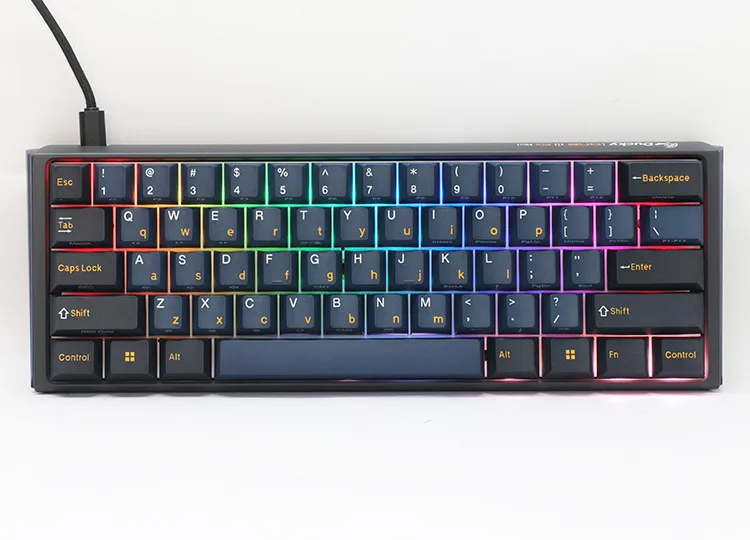


Ducky
A compact 61-key mechanical keyboard with Cherry MX2A Blue switches, triple-shot PBT keycaps, south-facing RGB lighting and an 8,000 Hz polling rate for low input lag
The Ducky ONE 3 Pro Mini Nazca Line is a 61-key mechanical keyboard built for users who value desk space and rapid input. Its mini layout removes the function row, navigation cluster and numeric pad, suiting competitive typists and gamers who keep their mouse close. Cherry MX2A Blue switches provide tactile, clicky feedback with an 8000 Hz polling rate over USB 2.0. The board weighs 650 g and measures 310 x 110 x 40 mm.
A dual-layer hot-swappable PCB lets you change switches without soldering, while south-facing LEDs shine through triple-shot PBT keycaps for durable legends and even backlighting. The detachable USB-C cable connects via a USB 2.0 interface, making transport and cable routing straightforward. Two-step feet offer three tilt angles so you can set the typing slope that fits your posture. No palm rest is included.
The bundled Webby Mat sits inside the case to reduce sound rebound, giving each keystroke a cleaner acoustic profile. Onboard RGB lighting effects are stored on the keyboard itself, so your custom patterns travel with the device without extra software. Triple-shot PBT keycaps resist shine and wear far longer than standard ABS alternatives. Buyers who need dedicated macro keys, a full-size layout or wireless connectivity will not find those features here.
| Brand | Ducky |
|---|---|
| Name | ONE 3 Pro Mini Nazca Line |
| Model | DKON2361ST-CCUSPTCHNAZ001 |
| Keyboard Interface | USB 2.0 |
| Design Style | Mechanical |
| Layout | Mini |
| Palm Rest | No |
| Normal Keys | 61 |
| Mechanical Keyboard | Yes |
| Key Switch | Cherry MX2A Blue |
| Keycaps | PBT |
| Keyboard Color | Black |
| Backlit | RGB |
| Dimensions | 310 x 110 x 40mm / 650g |
| Mouse Included | No |
| Features | 8K Polling Rate: The frequency at which the keyboard reports to the computer. A higher polling rate results in lower input lag. Ducky One 3 Pro Mini Nazca Line delivers inputs with an 8,000 Hz polling rate for optimal performance. Faster polling rates mean that keystrokes are detected more quickly, resulting in less lag and fewer missed keystrokes. Triple-Shot PBT Keycaps: Ducky spares no expense and undergoes a meticulous manufacturing process, utilizing triple-shot molding technology to offer users high-quality, durable PBT keycaps. South-Facing Design: Diverging from the typical n |
The keyboard reports inputs at 8000 Hz over a standard USB 2.0 connection, giving very low input lag for gaming.
It fits a 310 mm by 110 mm desk area, weighs 650 g, and has two-step feet for three tilt angles; no palm rest is included.
Pull the keycaps off, use the included switch puller to remove each switch, then press the new switch straight down until the pins seat fully — forcing it at an angle bends the pins.
同じ売り場の商品
同じ売り場、同じレジ — 8種類のコインと30分間のレートロック。
お支払いに使うコインと、価格表示に使う通貨です。
チェックアウト時にウォレットから送信されます。
表示のみ—カタログの価格は米ドル建てです。
該当する通貨がありません。
サイトの表示言語を選択してください。
初めてのご利用ですか?
すでにお持ちですか?
自動的な再設定はありません。当店はメールを送信しないため、ワンタイムリンクをお送りすることもできません。アカウントにメールアドレスを残しておいていただければ、担当者が手作業で確認いたします。
リクエストを受け付けました
受信箱に何かが届くことはありません — 当店はメールを一切送信していません。担当者が手作業で確認いたします。
思い出しましたか?



