ASUS
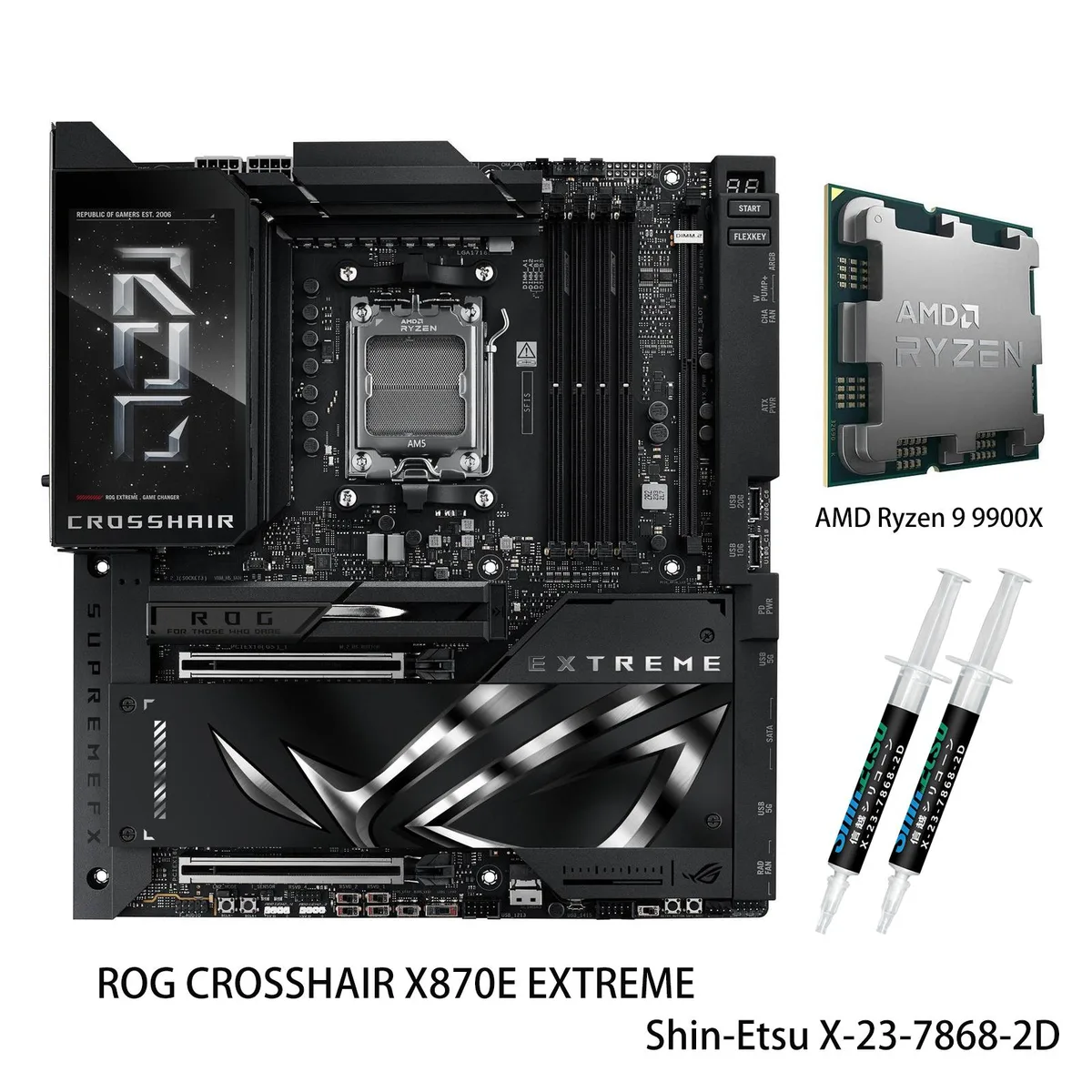
ASUS ROG CROSSHAIR X870E EXTREME+ R7 9700X AMD motherboard
- AM5
- Supports up to 8200…
US$1,910.99
0.02435561BTC
재고 있음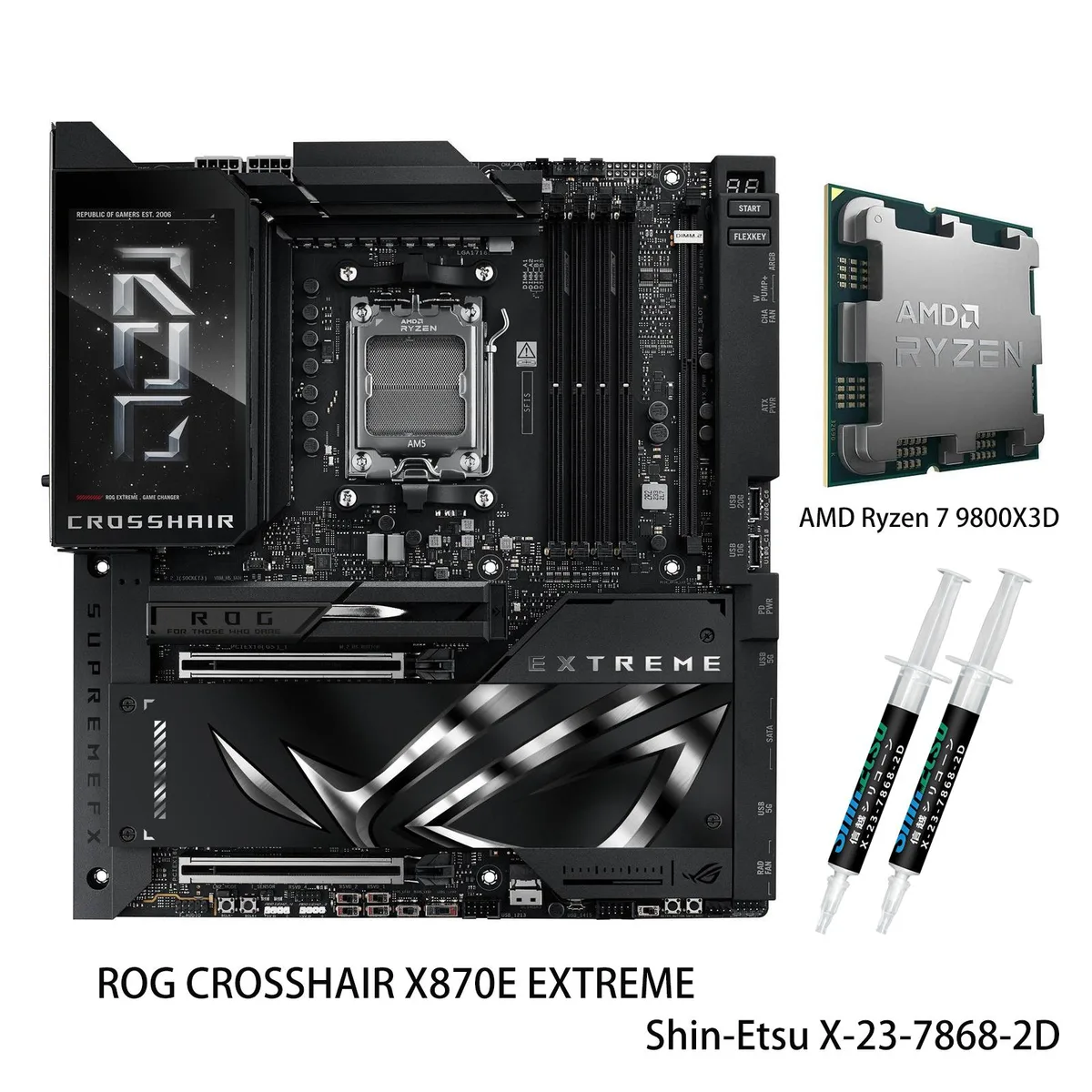


ASUS
AM5 motherboard and Ryzen 7 9800X3D combo with 20+2+2 power stages, DDR5 to 8200 MT/s, three PCIe 5.0 M.2 slots, 10G and 5G LAN, Wi-Fi 7 and a 5" LCD
model ROG CROSSHAIR X870E EXTREME
+CPU +Ryzen 7 9800X3D
This bundle pairs the ROG Crosshair X870E Extreme motherboard with a Ryzen 7 9800X3D processor, ready for high-performance gaming and workstation tasks on the AM5 platform. The board supports Ryzen 9000, 8000 and 7000 series CPUs and accepts up to 256GB of DDR5 across four 288-pin slots with AEMP and NitroPath DRAM technology.
A 20+2+2 phase VRM uses 110A power stages, ProCool II connectors, MicroFine alloy chokes and premium metallic capacitors to deliver clean power under heavy loads. Massive heatsinks integrated with the I/O cover, two U-shaped heatpipes, high-conductivity thermal pads and a 3D vapour-chamber M.2 heatsink keep key components cool during sustained workloads.
Three onboard PCIe 5.0 M.2 slots support 2242, 2260, 2280 and 22110 form factors, while two additional PCIe 4.0 slots are available via the Q-DIMM.2 module, all with substantial cooling. This density lets you install multiple high-speed drives without add-in cards, a decisive factor for storage-heavy builds.
| Brand | ASUS |
|---|---|
| Series | ROG |
| Model | ROG CROSSHAIR X870E EXTREME+(R7 9800X3D) |
| CPU Socket Type | AM5 |
| CPU Type | Supports up to 8200+MT/s(OC) with Ryzen 9000 Series Processors 8600+MT/s(OC) with Ryzen 8000 Series Processors 8000+MT/s(OC) with Ryzen 7000 Series Processors |
| Chipset | AMD X870E |
| Number of Memory Slots | 4x288pin (DDR5) |
| Maximum Memory Supported | 256GB |
| Channel Supported | Dual Channel |
| ECC Supported | Non-ECC |
| Memory Feature | ASUS Enhanced Memory Profile (AEMP) NitroPath DRAM Technology |
| PCI Express 5.0 x16 | AMD Ryzen 9000 & 7000 Series Desktop Processors* 2 x PCIe 5.0 x16 slots with Q-Release Slim (supports x16 or x8/x8** or x8/x4/x4 modes***) ** When you use both PCIEX16(G5)_1 and PCIEX16(G5)_2, PCIEX16(G5)_1 and PCIEX16(G5)_2 will run x8. ***When M.2_3 is enabled, PCIEX16(G5)_1 will run x8, and PCIEX16(G5)_2 will run x4. **** When M.2_2 and M.2_3 are enabled simultaneously, PCIEX16(G5)_2 will be disabled. |
| PCI Express 4.0 x16 | AMD Ryzen 8700 & 8600 & 8400 Series Desktop Processors* 2 x PCIe 4.0 x16 slots with Q-Release Slim (only supports PCIEx16(G5)_1 & total bandwidth for x8, PCIEx16(G5)_2 will be disabled) AMD Ryzen 8500 & 8300 Series Desktop Processors* 2 x PCIe 4.0 x16 slots with Q-Release Slim (only supports PCIEx16(G5)_1 & total bandwidth for x4, PCIEx16(G5)_2 will be disabled) |
| Serial ATA (SATA) | 4 x SATA 6Gb/s |
| M.2 | AMD Ryzen 9000 & 7000 Series Desktop Processors M.2_1 slot (Key M), type 2242/2260/2280/22110 (supports PCIe 5.0 x4 mode) M.2_2 slot (Key M), type 2242/2260/2280 (supports PCIe 5.0 x4 mode)* M.2_3 slot (Key M), type 2242/2260/2280/22110 (supports PCIe 5.0 x4 mode)** AMD Ryzen 8000 Series Desktop Processors M.2_1 slot (Key M), type 2242/2260/2280/22110 (supports PCIe 4.0 x4 mode) M.2_2 slot (Key M), type 2242/2260/2280 (Not supports) M.2_3 slot (Key M), type 2242/2260/2280/22110 (Not supports) AMD X870E Chipset DIMM.2_1 slot (Key M) via ROG Q-DIMM.2, type 2230/2242/2260/2280/22110 (su |
| SATA RAID | 0/1/5/10 |
| Audio Channels | Audio Features - SupremeFX Shielding Technology - ESS ES9219 QUAD DAC - LED-illuminated audio jacks - Rear optical S/PDIF out port - Premium audio capacitors * A chassis with an HD audio module in the front panel is required to support 7.1 Surround Sound audio output. ** The LINE OUT port on the rear panel does not support spatial audio. If you wish to use spatial audio, make sure to connect your audio output device to the audio jack on the front panel of your chassis or use a USB interface audio device. |
| LAN Chipset | 1 x Realtek 5Gb Ethernet |
| Second LAN Chipset | 1 x Marvell AQtion 10Gb Ethernet |
| Max LAN Speed | 10Gbps |
| Wireless LAN | Wi-Fi 802.11 be |
| Bluetooth | Bluetooth 5.4 |
| Back I/O Ports | 2 x USB4 (40Gbps) ports (2 x USB Type-C) 10 x USB 10Gbps ports (8 x Type-A + 2 x USB Type-C) 1 x HDMI port 1 x Wi-Fi Module 1 x Realtek 5Gb Ethernet port 1 x Marvell AQtion 10Gb Ethernet port 2 x LED-illuminated audio jacks 1 x Optical S/PDIF out port 1 x BIOS FlashBack button 1 x Clear CMOS button |
| Onboard USB | 1 x USB 20Gbps connector (supports USB Type-C) 1 x USB 10Gbps connector (supports USB Type-C) 2 x USB 5Gbps headers support 4 additional USB 5Gbps ports 2 x USB 2.0 headers support 4 additional USB 2.0 ports |
| Other Connectors | Fan and Cooling related 1 x 4-pin CPU Fan header 1 x 4-pin CPU OPT Fan header 2 x 4-pin Chassis Fan headers 2 x 4-pin Radiator Fan headers 2 x W_PUMP+ headers 1 x VRM Heatsink Fan header Miscellaneous 1 x 6-pin ARGB Gen 2 header to support 2 x ARGB Gen 2 headers 2 x Addressable Gen 2 header 1 x Alteration PCIe mode switch 2 x BCLK button 1 x BIOS Switch 1 x FlexKey button 1 x Front Panel Audio header (F_AUDIO) 1 x LN2 Mode jumper 12 x ProbeIt Measurement Points 1 x ReTry button 2 x RSVD switchs 1 x RSVD header 1 x Safe Boot button 1 x Slow Mode switch 1 x Start button 1 x 10⁻¹ pin Sy |
| Form Factor | Extended ATX |
| Dimensions (W x L) | 12.0" x 10.9" |
| Power Pin | 1 x 24-pin Main Power connector 2 x 8-pin +12V CPU Power connector 1 x 8-pin PCIe Power connector |
| BIOS Feature | 2 x 256 Mb Flash ROM, UEFI AMI BIOS |
| Software | ROG Exclusive Software - ROG CPU-Z - Dolby Atmos - Internet Security (1-year full version) ASUS Exclusive Software Armoury Crate - AIDA64 Extreme (1 year full version) - Aura Creator - Aura Sync - Fan Xpert 4 (with AI Cooling II) - GameFirst - HWiNFO - Power Saving - LCD Display ASUS AI Advisor ASUS DriverHub Turbo Vcore ASUS GlideX USB Wattage Watcher WinRAR (40 Days Free Trial) Adobe Creative Cloud (Free Trial) UEFI BIOS AI Overclocking Guide ASUS EZ DIY - ASUS CrashFree BIOS 3 - ASUS EZ Flash 3 - ASUS UEFI BIOS EZ Mode - ASUS MyHotkey FlexKey |
| Windows 11 | Supported |
| Features | Extreme OC Kit - FlexKey button - LN2 Mode - ProbeIt - ReTry button - Safe boot button - Start button - Slow Mode Extreme Engine Digi+ - 10K Black Metallic Capacitors - MicroFine Alloy Choke ASUS Q-Design - M.2 Q-Latch - M.2 Q-Release - M.2 Q-Slide - Q-Release Slim (with PCIe SafeSlot) - Q-Antenna - Q-Code - Q-Connector - Q-Dashboard - Q-LED (CPU [red], DRAM [yellow], VGA [white], Boot Device [yellow green]) - Q-Slot - Q-DIMM.2 ASUS Thermal Solution - Fan bracket - M.2 heatsink backplate - M.2 heatsink - Metal backplate - VRM heatsink design - 3D VC M.2 Heatsink ASUS EZ DIY - Backpla |
이 모델의 다른 버전
같은 제품군에서 메모리·쿨러·클럭이 다릅니다 — 결정 전에 비교해 보세요.
Align the triangle marker on the CPU with the socket corner, lower it gently without pressure, then close the retention arm; the step often missed is removing the protective plastic cover from the motherboard socket before placement
The LCD panel is a passive display driven by the board firmware; it has no user-serviceable parts and requires no scheduled replacement, only occasional cleaning with a soft dry cloth
The VRM heatsink temperature rises first; the massive integrated heatsinks with two U-shaped heatpipes and high-conductivity thermal pads are designed to delay throttling under continuous 110A per stage operation
이 진열대의 다른 상품
같은 진열대, 같은 체크아웃 — 코인 8종, 환율 잠금 30분.
결제할 코인과 가격을 확인할 통화입니다.
체크아웃 시 지갑에서 전송됩니다.
표시 전용 — 카탈로그 가격은 달러 기준입니다.
일치하는 통화가 없습니다.
사이트에서 사용할 언어를 선택하십시오.
일치하는 언어가 없습니다.
처음 방문하셨나요?
이미 계정이 있으신가요?
자동 재설정 기능은 없습니다. 이 쇼핑몰은 어떠한 메일도 보내지 않으므로 요청할 일회용 링크 자체가 없습니다. 계정에 등록된 이메일 주소를 그대로 두시면 담당자가 직접 확인해 처리합니다.
요청 접수
받은편지함으로 오는 것은 아무것도 없습니다 — 이 쇼핑몰은 메일을 전혀 보내지 않습니다. 담당자가 직접 확인해 처리합니다.
기억나셨나요?