ASUS
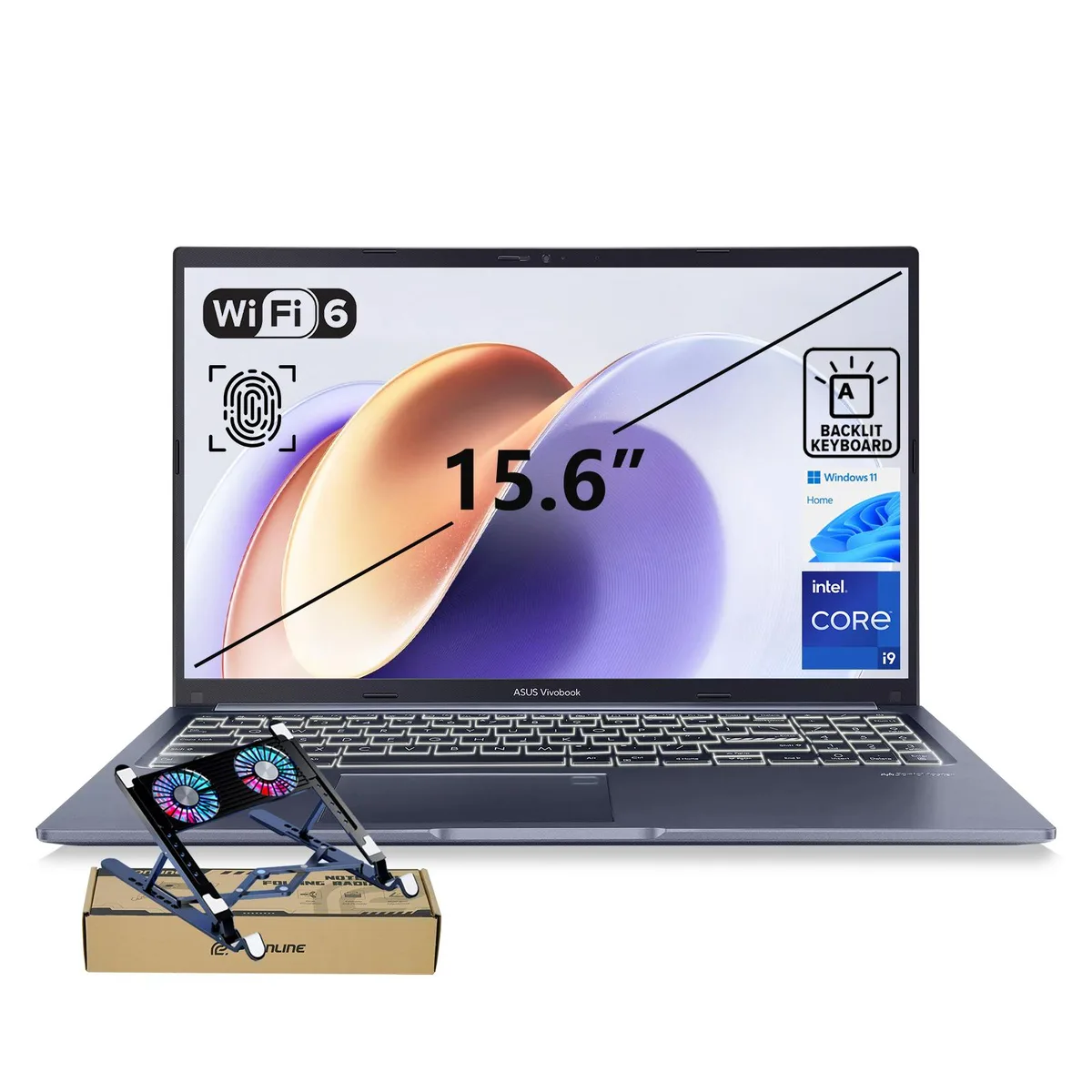
ASUS Vivobook F1502 laptop Intel Core i9-13900H 48GB 2TB 15.6" FHD
- Fingerprint reader
- Windows 11 Pro
US$922.99
0.01195026BTC
재고 있음


ASUS
A 15.6-inch FHD laptop with a 14-core Intel Core i9-13900H processor, 24GB RAM, 1TB PCIe SSD, fingerprint reader and bundled PCO cooler
SizeName 24GB RAM · 1TB SSD
Operation System Windows 11 Pro
This ASUS VivoBook F1502 laptop pairs a 14-core Intel Core i9-13900H processor with 24GB of RAM and a 1TB PCIe SSD. The combination targets professionals who run demanding multitasking, content creation or AI-enhanced applications and need strong single-thread speed up to 5.40 GHz. The system ships with Windows 11 Pro and includes a PCO Cooler in the bundle.
A 15.6-inch FHD IPS panel at 60 Hz provides anti-glare viewing for extended sessions. The chassis offers one USB Type-C port, two USB Type-A 3.2 ports, one USB 2.0 port, HDMI 1.4 and a 3.5 mm audio jack, covering monitors and peripherals without adapters. A fingerprint reader and webcam privacy shield add quick sign-in and physical privacy control. The blue finish includes a backlit keyboard and precision touchpad.
Integrated Intel UHD Graphics handles office and streaming tasks but cannot accelerate modern 3D rendering or GPU-compute workloads. Buyers who need discrete graphics performance for video editing, CAD or gaming should look elsewhere. The 24GB memory configuration is fixed at purchase, so future expansion beyond the listed 48GB maximum requires verification before ordering.
| Brand | ASUS |
|---|---|
| Series | VivoBook |
| Model | F1502 |
| Other Features | Fingerprint reader |
| Operating System | Windows 11 Pro |
| CPU Type | Intel Core i9 13th Gen |
| Processor Name | Intel Core i9-13900H |
| Turbo Frequency | 5.40 GHz |
| Number of Cores | 14-core (6P+8E) Processor |
| CPU L3 Cache | 24 MB |
| Smart Cache | 24 MB |
| Screen Size | 15.6" |
| Display Type | FHD |
| Resolution | 1920 x 1080 |
| Panel | IPS |
| Refresh Rate | 60 Hz |
| GPU/VPU | Intel UHD Graphics |
| Graphic Type | Integrated Card |
| SSD | 1TB PCIe |
| HDD | No |
| Memory | 24GB DDR4 |
| Memory Speed | DDR4 3200 |
| Optical Drive Type | No |
| WLAN | 802.11ax Wireless LAN |
| WiFi Generation | Wi-Fi 6 |
| Bluetooth | Yes |
| USB | 4 |
| Video Port | 1 x HDMI |
| HDMI | 1 x HDMI |
| Audio Ports | Yes |
| Audio | Integrated Sound card |
| Speaker | Internal Speakers |
| Touchpad | Yes |
| Backlit Keyboard | Backlit |
| Webcam | Yes |
| Style | Standard |
| Type | Work / Business |
| Usage | Business |
| AC Adapter/Charger | 65-watt AC Adapter |
| Battery | Lithium Ion |
| Battery Life | Up to 10 Hours |
| Dimensions (W x D x H) | 9.15" x 14.16" x 0.78" |
| Weight | 3 - 3.9 lbs. |
이 모델의 다른 버전
같은 제품군에서 메모리·쿨러·클럭이 다릅니다 — 결정 전에 비교해 보세요.
The USB 3.2 Gen 1 Type-C port reaches up to 5 Gbps for data transfers.
The laptop measures 0.78 inches thick, so the cooler must accommodate that height plus its own base.
Place the cooler on a flat surface, align it with the laptop's bottom vents, and connect its USB power cable to a Type-A port; the step often missed is plugging in that USB power lead.
이 진열대의 다른 상품
같은 진열대, 같은 체크아웃 — 코인 8종, 환율 잠금 30분.
결제할 코인과 가격을 확인할 통화입니다.
체크아웃 시 지갑에서 전송됩니다.
표시 전용 — 카탈로그 가격은 달러 기준입니다.
일치하는 통화가 없습니다.
사이트에서 사용할 언어를 선택하십시오.
일치하는 언어가 없습니다.
처음 방문하셨나요?
이미 계정이 있으신가요?
자동 재설정 기능은 없습니다. 이 쇼핑몰은 어떠한 메일도 보내지 않으므로 요청할 일회용 링크 자체가 없습니다. 계정에 등록된 이메일 주소를 그대로 두시면 담당자가 직접 확인해 처리합니다.
요청 접수
받은편지함으로 오는 것은 아무것도 없습니다 — 이 쇼핑몰은 메일을 전혀 보내지 않습니다. 담당자가 직접 확인해 처리합니다.
기억나셨나요?