


DELL
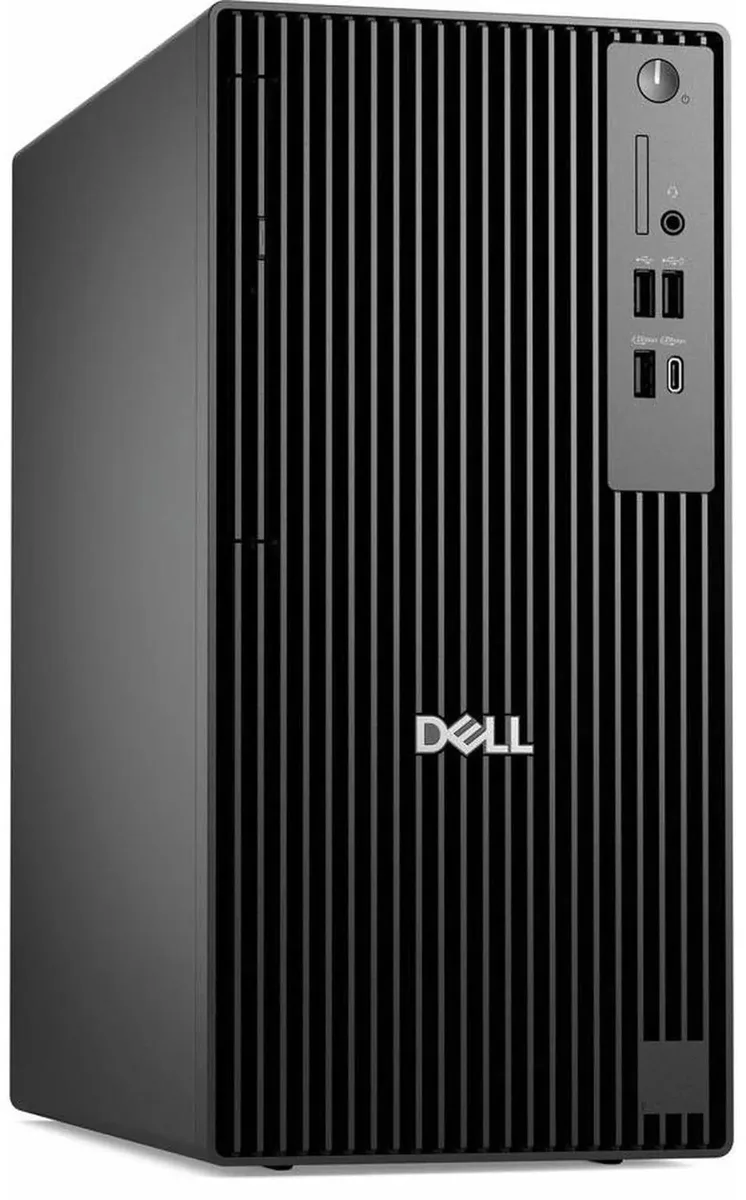
DELL Pro Tower Plus QBT1250 Intel Core Ultra 5 235 32GB DDR5 1TB SSD desktop PC
A 14-core Intel Core Ultra 5 235 desktop with 32GB DDR5, 1TB SSD and Windows 11 Pro for business multitasking
- TypeBusiness Desktops & Workstations
- Form FactorTower
- UsageBusiness
- ProcessorIntel Core Ultra 5 235 14-Core Processor at 3.40GHz up to 5.
- Processor Main Features64 bit 14-Core Processor
- Cache Per Processor24MB Intel Smart Cache
- 14-core Intel Core Ultra 5 235 handles heavy workloads at up to 5.00 GHz
- 32 GB DDR5 memory keeps multitasking smooth and responsive
- 1 TB SSD cuts boot and load times for apps and files
- Intel HD Graphics drives multiple displays for expanded workspace
- Versatile I/O with USB 2.0, USB 3.2 and USB-C plus Gigabit Ethernet connects peripherals and networks
Business desktop for office workloads
The Dell Pro Tower Plus QBT1250 ships with an Intel Core Ultra 5 235 14-core processor running at 3.40GHz up to 5.00GHz and 24MB L3 cache. It targets professionals who need a reliable Windows 11 Pro system for multitasking, productivity applications and general business computing.
Tower chassis with versatile port selection
The tower form factor provides 4 USB 2.0, 4 USB 3.2 and 2 USB 3.2 Type-C ports alongside a single RJ-45 Gigabit Ethernet jack and a headset connector. A DVD-RW drive is included and the Intel HD Graphics output supports multi-display configurations for extended desktop space.
32GB DDR5 memory and 1TB SSD capacity
The system pairs 32GB of DDR5 RAM with a 1TB solid-state drive for quick boot times and fast file access. Buyers who need more storage or additional memory slots should verify expandability before purchase. A 260W power supply limits discrete graphics upgrades.
주요 특징
- 14-core Intel Core Ultra 5 235 handles heavy workloads at up to 5.00 GHz
- 32 GB DDR5 memory keeps multitasking smooth and responsive
- 1 TB SSD cuts boot and load times for apps and files
- Intel HD Graphics drives multiple displays for expanded workspace
- Versatile I/O with USB 2.0, USB 3.2 and USB-C plus Gigabit Ethernet connects peripherals and networks
사양
| Brand | DELL |
|---|---|
| Series | Dell Pro |
| Model | QBT1250 |
| Type | Business Desktops & Workstations |
| Form Factor | Tower |
| Usage | Business |
| Processor | Intel Core Ultra 5 235 14-Core Processor at 3.40GHz up to 5.00GHz |
| Processor Main Features | 64 bit 14-Core Processor |
| Cache Per Processor | 24MB Intel Smart Cache |
| Memory | 32GB DDR5 |
| Storage | 1TB SSD |
| Optical Drive | DVD-RW |
| Graphics | Intel HD Graphics |
| Ethernet | Gigabit Ethernet |
| Power Supply | 260W |
| Monitor | Monitor not included |
| Operating System | Windows 11 Pro |
| CPU Type | Intel Core Ultra 5 (Series 2) |
| L3 Cache Per CPU | 24MB |
| CPU Main Features | 64 bit 14-Core Processor |
| GPU/VGA Type | Intel HD Graphics |
| Graphics Card | Intel HD Graphics |
| Graphics Interface | Integrated |
| Memory Capacity | 32GB DDR5 |
| Memory Speed | DDR5 |
| Memory Spec | 32GB DDR5 |
| SSD | 1 TB |
| HDD | No |
| Storage Spec | 1TB SSD |
| Optical Drive Type | DVD-RW |
| Optical Drive Spec | 8x DVD+/-RW 9.5mm Drive |
| Screen Size | No Screen |
| Display Feature | Supports Multiple Displays |
| LAN Speed | 10/100/1000Mbps |
| WLAN | No |
| Front USB | 2 x USB 2.0,1 x USB 3.2, 1 x USB Type-C 3.2 |
| Front Audio Ports | 1 x Headphone Jack |
| Card Reader | No |
| Video Ports | 3 x DisplayPort |
| Rear USB | 3 x USB 3.2, 2 x USB 2.0, 1 x USB Type-C |
| RJ45 | 1 port |
| Keyboard Type | Dell Keyboard |
| Mouse Type | Dell Mouse |
| Dimensions (H x W x D) | 18 x 16 x 10 |
| Weight | 15 |
| Package Type | Dell Brown Box |
| Package Contents | Tower Desktop, Power cord, Keyboard,Mouse |
이 상품에 대한 질문
Does the Intel Core Ultra 5 235 processor support DDR5 memory speeds beyond 3.40GHz base clock?
The 14-Core CPU runs at 3.40GHz base up to 5.00GHz turbo with 24MB Smart Cache; the installed 32GB DDR5 operates at the platform's validated speed for this configuration.
What clearance and power budget are required to add a full-height PCIe graphics card in the tower chassis?
The tower form factor accepts full-height cards, but the 260W power supply limits total system draw, so any added GPU must fit within the remaining power envelope.
After adding a second SSD, which Windows 11 Pro tool must be used to make the new drive visible in File Explorer?
Open Disk Management, initialise the new disk with GPT, create a partition and format it NTFS; the volume will then appear in File Explorer.
이 진열대의 다른 상품
고객들이 함께 비교한 상품
같은 진열대, 같은 체크아웃 — 코인 8종, 환율 잠금 30분.



Higole
Higole 11.6" Touch All-in-One PC Celeron N5095 8GB 128GB
- 11.6"
- 1366 x 768
US$307.99
0.00394905BTC
재고 있음
Toemaagic
Toemaagic All-in-One PC 24" FHD i7 4.0GHz 16GB 512GB White
- Toemaagic
- 16 GB
US$318.99
0.00409009BTC
재고 있음
Lenovo
Lenovo A100 23.8" FHD All-in-One PC Intel N100 32GB DDR4 2TB SSD 1TB Dock Windows 11 Pro White
- All-in-One PC
- All-in-One
US$930.99
0.01193715BTC
재고 있음