

SanDisk
SanDisk Cruzer Blade 8 GB USB 2.0 USB flash drive Black SDCZ50-008G-B35
US$391.99
0.00501112BTC
재고 있음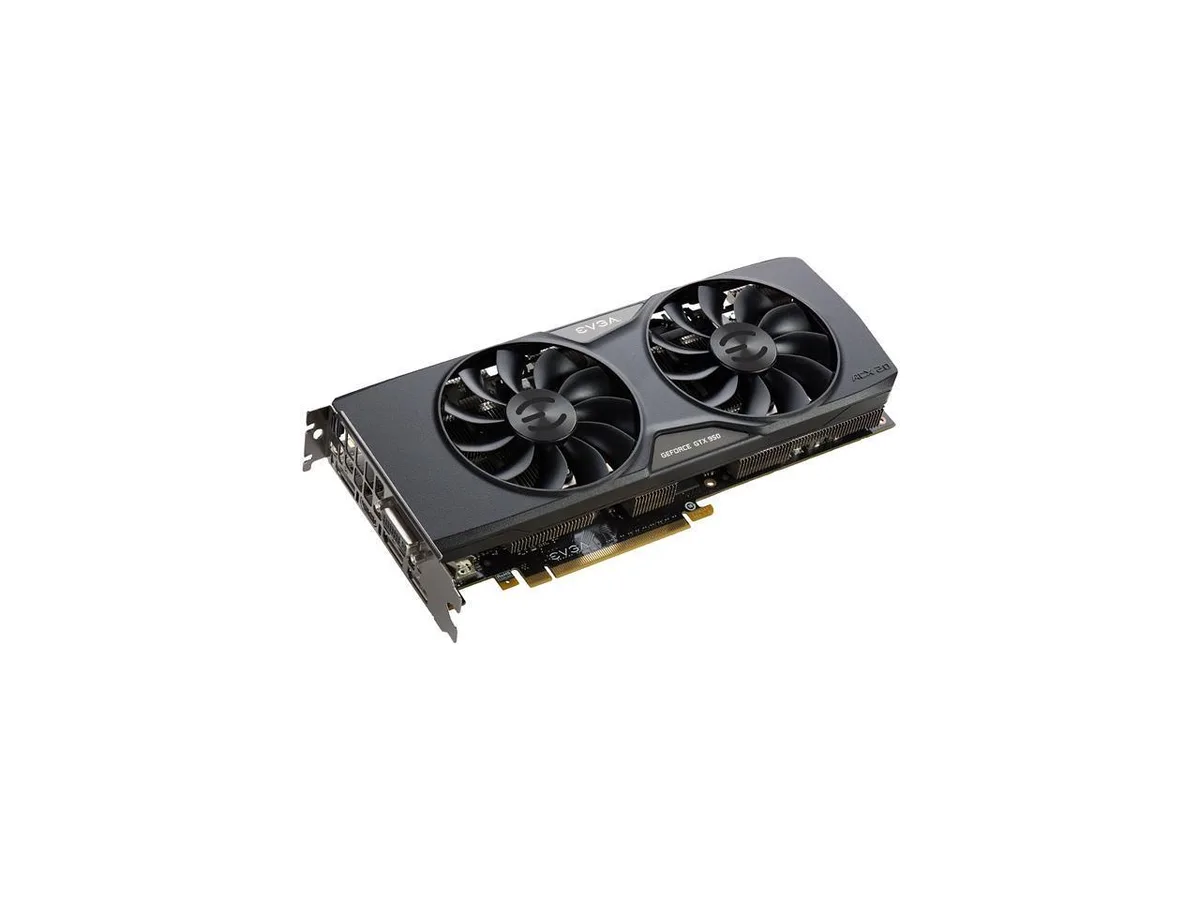

EVGA
A GeForce GTX 950 GPU with 2 GB GDDR5, 768 CUDA cores, boost clock of 1190 MHz, and HDMI 2.0 plus three DisplayPort 1.2 outputs for up to four monitors
The EVGA GeForce GTX 950 02G-P4-1953-KR is a PCI Express 3.0 x16 graphics card built on the NVIDIA GeForce GTX 900 Series architecture. It targets budget-conscious users upgrading older systems or assembling basic 1080p workstations. The GPU delivers 768 CUDA cores with a 1025 MHz core clock and a 1190 MHz boost clock. It supports DirectX 12 and OpenGL 4.4 for modern API compatibility.
A single dual-link DVI-I port drives legacy analogue monitors up to 2048 x 1536. One HDMI 2.0 and three DisplayPort 1.2 connectors handle digital outputs up to 4096 x 2160 across four simultaneous displays. The 128-bit memory bus connects 2GB of GDDR5 running at an effective 6610 MHz. This I/O mix suits mixed-monitor environments without active adapters.
The 768 CUDA cores paired with 2GB of 128-bit GDDR5 set the hard limit for compute and texture throughput. At 1025 MHz base and 1190 MHz boost, the card handles light gaming, video decode and multi-monitor productivity within that ceiling. Buyers needing higher frame buffers or wider memory buses should look elsewhere.
| Brand | EVGA |
|---|---|
| Model | 02G-P4-1953-KR |
| Interface | PCI Express 3.0 x16 |
| Chipset Manufacturer | NVIDIA |
| GPU Series | NVIDIA GeForce GTX 900 Series |
| GPU | GeForce GTX 950 |
| Core Clock | 1025 MHz |
| Boost Clock | 1190 MHz |
| CUDA Cores | 768 |
| Effective Memory Clock | 6610 MHz |
| Memory Size | 2GB |
| Memory Interface | 128-Bit |
| Memory Type | GDDR5 |
| DirectX | DirectX 12 |
| OpenGL | OpenGL 4.4 |
| Multi-Monitor Support | 4 |
| HDMI | 1 x HDMI 2.0 |
| DisplayPort | 3 x DisplayPort 1.2 |
| DVI | 1 x Dual-link DVI-I |
| Max Resolution | Analog: 2048 x 1536 Digital: 4096 x 2160 |
| SLI Support | SLI Ready |
| Cooler | Double Fans |
| Operating Systems Supported | Windows 10, Windows 8 & 8.1, Windows 7, Windows Vista, Windows XP 👉Check gaming pc with Windows 11 Pro |
| Thermal Design Power | 90W |
| System Requirements | 350W or greater power supply. PCI Express, PCI Express 2.0 or PCI Express 3.0 compliant motherboard with one graphics slot. |
| Dual-Link DVI Supported | Yes |
| Features | NVIDIA Dynamic Super Resolution Technology NVIDIA MFAA Technology NVIDIA GameWorks Technology NVIDIA GameStream Technology NVIDIA G-SYNC Ready Microsoft DirectX 12 (feature level 12_1) NVIDIA GPU Boost 2.0 NVIDIA Adaptive Vertical Sync NVIDIA Surround Technology NVIDIA SLI Ready NVIDIA CUDA Technology with OpenCL support OpenGL 4.4 Support OpenCL Support HDMI 2.0, DisplayPort 1.2 and Dual-link DVI PCI Express 3.0 x16 EVGA ACX 2.0 Cooling Quick Switch Dual BIOS dB Inverter Optimized Power Target Straight Heat Pipes |
| Card Dimensions (L x H) | 10.10" x 4.38" |
| Slot Width | 2 Slots |
The PCI Express 3.0 x16 slot provides up to 16 GT/s per lane, giving the card a theoretical maximum of around 16 GB/s of host bandwidth.
It occupies a dual-slot footprint and draws auxiliary power through a single 6-pin PCIe connector on the board.
Seat the card firmly in the top PCIe x16 slot, secure the retention bracket screw, then attach the 6-pin power cable before closing the case.
이 진열대의 다른 상품
같은 진열대, 같은 체크아웃 — 코인 8종, 환율 잠금 30분.
결제할 코인과 가격을 확인할 통화입니다.
체크아웃 시 지갑에서 전송됩니다.
표시 전용 — 카탈로그 가격은 달러 기준입니다.
일치하는 통화가 없습니다.
사이트에서 사용할 언어를 선택하십시오.
일치하는 언어가 없습니다.
처음 방문하셨나요?
이미 계정이 있으신가요?
자동 재설정 기능은 없습니다. 이 쇼핑몰은 어떠한 메일도 보내지 않으므로 요청할 일회용 링크 자체가 없습니다. 계정에 등록된 이메일 주소를 그대로 두시면 담당자가 직접 확인해 처리합니다.
요청 접수
받은편지함으로 오는 것은 아무것도 없습니다 — 이 쇼핑몰은 메일을 전혀 보내지 않습니다. 담당자가 직접 확인해 처리합니다.
기억나셨나요?



